パッケージ、リポジトリ、アプリカテゴリを検索

dragsheet のカバー
パッケージ詳細v0.0.4

dragsheet

物理的で弾性があり、ドラッグ可能なシートおよびモーダル用のFlutter。自らのアプリで直面したギャップを埋めるために作成されました。

AndroidiOSWebmacOSWindowsLinux
30日間ダウンロード
71
いいね数
4
Pub ポイント
160

パッケージをインストール

flutter pub add dragsheet

パッケージ概要

公開情報に基づく選定ガイドです。参考としてご利用ください。

Dragsheet は、物理ベースでバウンシングかつドラッグ可能なボトムシートとモーダルを提供するFlutterパッケージです。よりダイナミックで応答性の高いユーザー体験を提供するために設計されており、スプリングのようなアニメーションによる現実的なドラッグインタラクションを追加することで、標準的なFlutterボトムシート実装における欠陥を埋めています。インタラクティブでジェスチャー駆動のパネルが必要なアプリに最適で、自然で魅力的な感覚を与えます。

用途

  • インタラクティブな下部パネル
  • ジェスチャー駆動型モーダル
  • 動的UIコンポーネント
  • モバイルファーストなデザインパターン
  • カスタマイズ可能なシート遷移
  • ユーザー参加の向上

主な機能

  • 物理ベースのドラッグインタラクション
  • バウンシーアニメーション効果
  • スムーズなジェスチャー応答
  • クロスプラットフォーム対応
  • カスタマイズ可能なドラッグしきい値
  • 既存のFlutterアプリへの簡単な統合

適している対象

  • 高度なボトムシートの挙動を求める開発者
  • タッチやアニメーション付きUIを必要とするアプリ
  • デザイナーは流れるような動きに注目しています
  • インタラクティブな下部パネルを備えたFlutterプロジェクト
  • 標準のBottomSheetのドロップイン置き換えを希望するユーザー

注意事項

  • 最適な物理挙動を得るために調整が必要になる場合があります
  • アニメーションによる追加のパフォーマンスオーバーヘッド
  • 単純な静的シートには適していません
  • 明確な視覚フィードバックと併用するのが最適です
  • ドラッグメカニクス以外のカスタマイズは限定的
  • 物理学シミュレーションの原則を理解する必要がある

元の README

関連するソースリポジトリの README 原文のスナップショットです。最新の内容はリポジトリをご覧ください。

Dragsheet: Bouncy, Fun, & Draggable ✨

Simple Flutter package for creating bouncy, fun, and most importantly draggable sheets.

Developed because I wanted this for my own app, was familiar with the React Native versions of this, but couldn't find a matching one in the Flutter ecosystem.

Examples

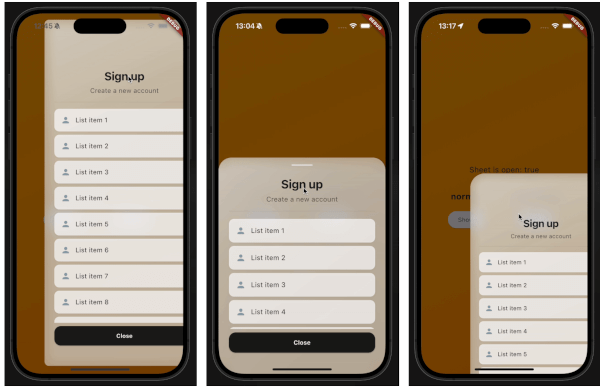
demo gif 1 demo gif 2 demo gif 3

This demo "sign up" blurry sheet is not included with the package. I created it to demonstrate what you are capable of doing with the dragsheet package.

Usage

  1. Initialize the controller.

    final controller = DragSheetController();
    
  2. Open YourWidget via the controller.

    controller.show(
        context,
        (ctx) => YourWidget(),
    ),
    
  3. If you want to close the sheet, use the controller.

    controller.close();
    
  4. If you want to listen to the state of the sheet, use the controller.

    controller.addListener(() {
        print(controller.isOpen);
    });
    
  5. Remember to dispose of the controller when you're done with it.

    @override
    void dispose() {
        super.dispose();
        controller.dispose();
    }
    
  6. If you care about customization, you won't be disapointed. However, the defaults should be solid enough. The main properties to know about are shrinkWrap, which will make the dragsheet shrink to the size of the child you provide it, and if shrinkWrap is true, closeOnShrinkWrapTap, which will close the sheet when you tap outside of the sheet.

    void show(
        BuildContext context,
        WidgetBuilder builder, {
        bool shrinkWrap = false,
        bool closeOnShrinkWrapTap = true, 
        double minScale = 0.85,
        double maxScale = 1.0,
        double minRadius = 0.0,
        double maxRadius = 30.0,
        double minOpacity = 0.0,
        double maxOpacity = 0.5,
        Duration entranceDuration = const Duration(milliseconds: 200),
        Duration exitDuration = const Duration(milliseconds: 200),
        Duration gestureFadeDuration = const Duration(milliseconds: 200),
        Duration programmaticFadeDuration = const Duration(milliseconds: 200),
        double effectDistance = 220.0,
        BgOpacity? bgOpacity,
        double swipeVelocityMultiplier = 2.5,
        double swipeAccelerationThreshold = 50.0,
        double swipeAccelerationMultiplier = 12.0,
        double swipeMinVelocity = 1000.0,
        double swipeMaxVelocity = 10000.0,
        double swipeFriction = 0.09,
        VoidCallback? onShow,
        VoidCallback? onDismiss,
        Duration opacityDuration = const Duration(milliseconds: 200),
        ApplyBorderRadius applyBorderRadius = ApplyBorderRadius.toTop,
    })
    

カテゴリー

ソースリポジトリ

このパッケージを使用しているプロジェクト

データはまだありません。