
 v1.2.6
flutter_scroll_shadow
ScrollShadow は、スクロール可能な子要素に影を追加します。ScrollController および垂直または水平方向の両方をサポートしています。
41いいね 2万30日間ダウンロード160Pub ポイント
AndroidiOSWebmacOSWindowsLinux
スクロールウィジェットに影を追加するためのFlutterウィジェット

{"sdk":"flutter"}^1.18.0^5.0.0{"sdk":"flutter"}以下は英語原文のスナップショットです。最新版は GitHub をご覧ください。
https://img.shields.io/static/v1?label=flutter&message=flutter_scroll_shadow&color=red??style=for-the-badge&logo=GitHub Pub Package Pub Points Pub Likes
Package Issue Package License
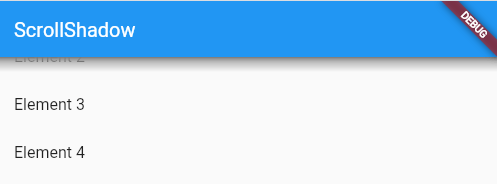
ScrollShadow is a widget for Flutter that adds shadows to a scrollable child.
Supports ScrollController and vertical or horizontal orientation.
| Image |
|---|
| ScrollShadow |
Axis
Make sure to check out the examples on GitHub.
Add the following line to pubspec.yaml:
dependencies:
  flutter_scroll_shadow: <last-release>
Complete example available here.
ScrollShadow(
  color: Colors.grey,
  child: ListView(
    children: List.generate(20, (index) => ListTile(title: Text('Element $index'),)),
  ),
);
color: for the shadows; default: Colors.greysize: The width or height of shadows, depending on Axis; default: 15.0child: Scrollable child contained by the ScrollShadowduration: Milliseconds, as an int, for animation of shadow visibility changes; default: 300fadeInCurve: The animation [Curve] to use for shadow appearance; default: Curves.easeInfadeOutCurve: The animation [Curve] to use for shadow disappearance; default: Curves.easeOutignoreInteraction: Determines if shadow is wrapped inside a [IgnorePointer] widget, so that all touch events with the shadow will be ignored; default: true
| Image | Image |
|---|---|
| Vertically-scrolling child | Horizontally-scrolling child |