パッケージ、リポジトリ、アプリカテゴリを検索

flutter_scroll_shadow のカバー
パッケージ詳細v1.2.6

flutter_scroll_shadow

ScrollShadow は、スクロール可能な子要素に影を追加します。ScrollController および垂直または水平方向の両方をサポートしています。

AndroidiOSWebmacOSWindowsLinux
30日間ダウンロード
3.3万
いいね数
41
Pub ポイント
160

パッケージをインストール

flutter pub add flutter_scroll_shadow

パッケージ概要

公開情報に基づく選定ガイドです。参考としてご利用ください。

Flutter Scroll Shadow は、スクロール可能なウィジェットにダイナミックな影を追加する軽量パッケージで、視覚的な奥行きとユーザーのフィードバックを向上させます。ScrollController と完全互換であり、垂直および水平スクロールをサポートしています。Android、iOS、Web、macOS、Windows、Linux などの主要プラットフォームでリスト、グリッド、その他のスクロール可能コンテンツの美しさを高めるのに最適です。ユーザーがスクロールするにつれて影がリアルタイムで調整され、繊細ながらも効果的な視覚効果を生み出します。

用途

  • リスト項目の可視性を向上させる
  • スクロール可能なインターフェースに奥行きを生み出す
  • 視覚フィードバックによるUXの向上
  • ダッシュボードレイアウトに仕上げを加える
  • ダークモードデザインのサポート

主な機能

  • リアルタイムシャドウ調整
  • 垂直および水平スクロールのサポート
  • ScrollController の統合
  • クロスプラットフォーム互換性
  • 最小限のパフォーマンスオーバーヘッド

適している対象

  • 視覚的な洗練を求めるUIデザイナー
  • スクロールが多く含まれるアプリを開発する開発者
  • 繊細なアニメーションを必要とするアプリ
  • 複数のプラットフォームをターゲットにするプロジェクト
  • 応答性デザインに注力するチーム

注意事項

  • 低価格端末でのパフォーマンスに影響を与える可能性があります
  • シャドウの外観は、テーマと背景に依存します
  • 影の強度を超えるカスタマイズは限られている
  • 複雑なスクロール動作には適していません
  • 異なる画面サイズでの慎重なテストが必要です

元の README

関連するソースリポジトリの README 原文のスナップショットです。最新の内容はリポジトリをご覧ください。

flutter_scroll_shadow

Scroll Shadow

Pub Package Pub Points Pub Likes

Package Issue Package License

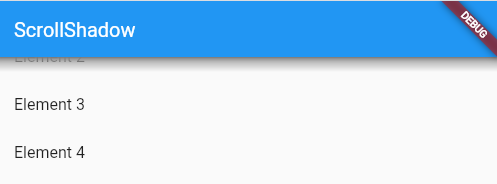
ScrollShadow is a widget for Flutter that adds shadows to a scrollable child.

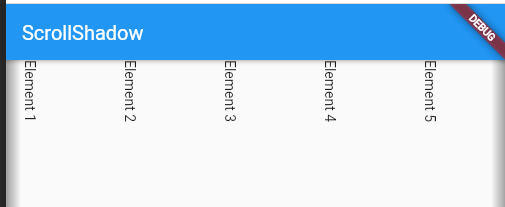
Supports ScrollController and vertical or horizontal orientation.

Image
ScrollShadow

Features

  • Adds shadows over a scrollable child while not at its max extents
  • Supports vertical and horizontal Axis
  • Customizable animation duration
  • Determine how wide or tall shadows render


Usage

Make sure to check out the examples on GitHub.

Installation

Add the following line to pubspec.yaml:

dependencies:
  flutter_scroll_shadow: <last-release>
Basic setup

Complete example available here.

ScrollShadow(
  color: Colors.grey,
  child: ListView(
    children: List.generate(20, (index) => ListTile(title: Text('Element $index'),)),
  ),
);
Properties
  • color: for the shadows; default: Colors.grey
  • size: The width or height of shadows, depending on Axis; default: 15.0
  • child: Scrollable child contained by the ScrollShadow
  • duration: Milliseconds, as an int, for animation of shadow visibility changes; default: 300
  • fadeInCurve: The animation [Curve] to use for shadow appearance; default: Curves.easeIn
  • fadeOutCurve: The animation [Curve] to use for shadow disappearance; default: Curves.easeOut
  • ignoreInteraction: Determines if shadow is wrapped inside a [IgnorePointer] widget, so that all touch events with the shadow will be ignored; default: true


Example

Image Image
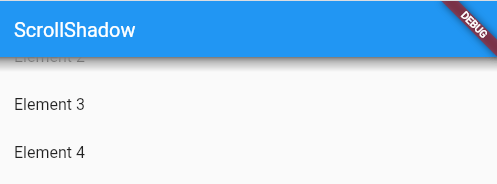
Vertically-scrolling child Horizontally-scrolling child

📚 My open source projects

Flutter
Package Verison Score Likes Test Coverage
Pub Package Pub Points Pub Likes
Dart
Package Verison Score Likes Test Coverage
Pub Package Pub Points Pub Likes Test CI codecov

カテゴリー

ソースリポジトリ

このパッケージを使用しているプロジェクト