

 v0.0.2
widget_marker_google_map
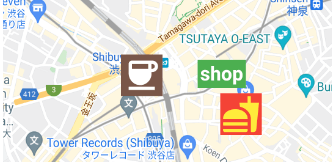
ウィジェットマーカー付きのカスタマイズされたGoogleマップ。ウィジェットコードでマーカーを表示できます。
23いいね 7530日間ダウンロード140Pub ポイント
AndroidiOSWeb
ウィジェットマーカー付きのカスタマイズされたGoogleマップ。

以下は英語原文のスナップショットです。最新版は GitHub をご覧ください。


Google map with widget markers.

Follow the steps on google_maps_flutter document.
Same as google_maps_flutter except for widgetMarkers.
 WidgetMarkerGoogleMap(
    initialCameraPosition: shibuya,
    mapType: MapType.normal,
    widgetMarkers: [
      WidgetMarker(
        position: cafePosition,
        markerId: 'cafe',
        widget: Container(
          color: Colors.brown,
          padding: const EdgeInsets.all(2),
          child: const Icon(
            Icons.coffee,
            color: Colors.white,
            size: 64,
          ),
        ),
      ),
      WidgetMarker(
        position: clothesShopPosition,
        markerId: 'clothes',
        widget: Container(
          color: Colors.green,
          padding: const EdgeInsets.all(4),
          child: const Text(
            'shop',
            style: TextStyle(
              color: Colors.white,
              fontWeight: FontWeight.bold,
              fontSize: 32,
            ),
          ),
        ),
      ),
      WidgetMarker(
        position: hamburgerShopPosition,
        markerId: 'hamburger',
        widget: Container(
          color: Colors.red,
          padding: const EdgeInsets.all(2),
          child: const Icon(
            Icons.fastfood,
            color: Colors.yellow,
            size: 64,
          ),
        ),
      ),
    ],
  ),
You need to insert the list of WidgetMarker to use widget markers.
Make sure that you still need to use onTap method when you use gestures.
class WidgetMarker {
  WidgetMarker({
    required this.position,
    required this.markerId,
    required this.widget,
    this.onTap,
  }) : assert(markerId.isNotEmpty);

  final LatLng position;

  /// Keep this unique, otherwise it will not appear.
  final String markerId;

  /// Gestures of widget is disabled.
  /// Use this callback instead.
  final VoidCallback? onTap;

  final Widget widget;
}
If you have any requests or questions, feel free to ask on github.
Thanks goes to these wonderful people (emoji key):
 Devin 💻 |
 Santa Takahashi 💻 |
This project follows the all-contributors specification. Contributions of any kind welcome!
依存関係一覧 5 件
{"sdk":"flutter"}^2.1.0^2.1.3{"sdk":"flutter"}^1.0.0用途で絞り込み、開発状況を比較し、採用前に元のリポジトリで要件を確認しましょう。
“A repository is the most basic element of GitHub.”
GitHub Docs — About repositories ↗