パッケージ、リポジトリ、アプリカテゴリを検索

widget_marker_google_map のカバー
パッケージ詳細v0.0.2

widget_marker_google_map

ウィジェットマーカー付きのカスタマイズされたGoogleマップ。ウィジェットコードでマーカーを表示できます。

AndroidiOSWeb
30日間ダウンロード
75
いいね数
23
Pub ポイント
140

パッケージをインストール

flutter pub add widget_marker_google_map

パッケージ概要

公開情報に基づく選定ガイドです。参考としてご利用ください。

Google Maps を拡張し、開発者がマップ上にカスタムウィジェットベースのマーカーを配置できるようにするFlutterパッケージです。標準のマーカーとは異なり、このパッケージではアイコン、アバター、インタラクティブな要素など、任意のFlutterウィジェットをマップマーカーとして使用できます。Google Mapsプラグインとシームレスに統合され、Android、iOS、Webプラットフォームをサポートしています。単なる画像やテキストを超えた、豊富で動的な、またはインタラクティブなマーカーコンテンツが必要なアプリに最適です。

用途

  • インタラクティブマップインターフェース
  • アニメーション付きのカスタムマーカーUI
  • リアルタイムでの位置追跡と豊富なビジュアル
  • マップ上のユーザープロファイルマーカー
  • 地図上の動的データ可視化

主な機能

  • 任意のFlutterウィジェットをマーカーとしてサポート
  • クロスプラットフォーム互換性(Android、iOS、Web)
  • Google Maps プラグインとの簡単な統合
  • カスタマイズ可能なマーカーの位置と動作
  • 動的マーカー コンテンツのライブ更新

適している対象

  • インタラクティブマップを開発する開発者
  • ブランド化またはアニメーションマーカーを必要とするアプリ
  • リアルタイム位置データを備えたプロジェクト
  • UI重視の位置情報アプリケーション
  • Flutter を使ってフルスタック地図機能を実装するチーム

注意事項

  • 多数の複雑なウィジェットによるパフォーマンスへの影響
  • 動的更新には適切な状態管理が必要です
  • 高度なマーカークラスタリングに対する制限されたサポート
  • 大規模なマップレンダリング用の最適化が必要になる可能性があります
  • Google Maps SDK の利用可能性に依存します

元の README

関連するソースリポジトリの README 原文のスナップショットです。最新の内容はリポジトリをご覧ください。

widget_marker_google_map

All Contributors

pub package License: MIT

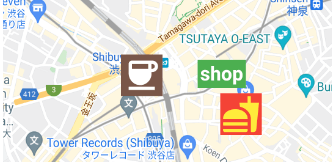
Google map with widget markers.

Set up

Follow the steps on google_maps_flutter document.

Usage

Same as google_maps_flutter except for widgetMarkers.

 WidgetMarkerGoogleMap(
    initialCameraPosition: shibuya,
    mapType: MapType.normal,
    widgetMarkers: [
      WidgetMarker(
        position: cafePosition,
        markerId: 'cafe',
        widget: Container(
          color: Colors.brown,
          padding: const EdgeInsets.all(2),
          child: const Icon(
            Icons.coffee,
            color: Colors.white,
            size: 64,
          ),
        ),
      ),
      WidgetMarker(
        position: clothesShopPosition,
        markerId: 'clothes',
        widget: Container(
          color: Colors.green,
          padding: const EdgeInsets.all(4),
          child: const Text(
            'shop',
            style: TextStyle(
              color: Colors.white,
              fontWeight: FontWeight.bold,
              fontSize: 32,
            ),
          ),
        ),
      ),
      WidgetMarker(
        position: hamburgerShopPosition,
        markerId: 'hamburger',
        widget: Container(
          color: Colors.red,
          padding: const EdgeInsets.all(2),
          child: const Icon(
            Icons.fastfood,
            color: Colors.yellow,
            size: 64,
          ),
        ),
      ),
    ],
  ),
WidgetMarker

You need to insert the list of WidgetMarker to use widget markers.

Make sure that you still need to use onTap method when you use gestures.

class WidgetMarker {
  WidgetMarker({
    required this.position,
    required this.markerId,
    required this.widget,
    this.onTap,
  }) : assert(markerId.isNotEmpty);

  final LatLng position;

  /// Keep this unique, otherwise it will not appear.
  final String markerId;

  /// Gestures of widget is disabled.
  /// Use this callback instead.
  final VoidCallback? onTap;

  final Widget widget;
}

If you have any requests or questions, feel free to ask on github.

Contributors ✨

Thanks goes to these wonderful people (emoji key):

Devin
Devin

💻
Santa Takahashi
Santa Takahashi

💻

This project follows the all-contributors specification. Contributions of any kind welcome!

カテゴリー

依存関係

依存関係一覧 2 件

ソースリポジトリ

このパッケージを使用しているプロジェクト

データはまだありません。