
flutter_maps
Google Maps SDK、Directions API を使用する Flutter アプリ
- スター
- 355
- フォーク
- 158
- 最終プッシュ(UTC)
- 2026/07/04
- プロジェクト状態
- 公開中
元の README
以下は英語原文のスナップショットです。最新版は GitHub をご覧ください。
Flutter Maps
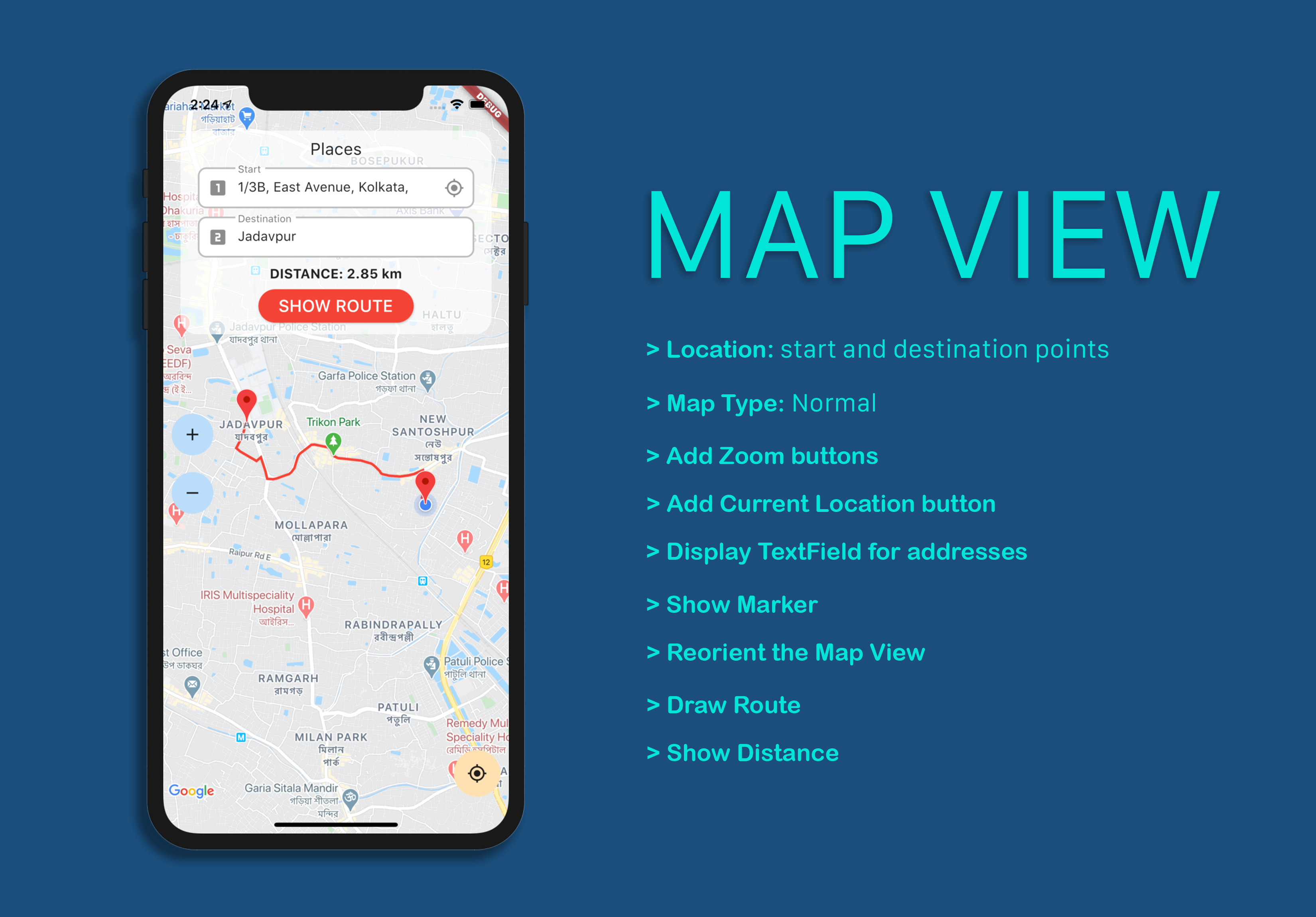
A Flutter app using Google Maps SDK & Directions API
Plugins
The plugins used in this project are:
Features
- Detect the current location of the user
- Use Geocoding for converting addresses to coordinates and vice versa
- Add Markers to the Map View
- Draw the route between two places using Polylines and Directions API
- Calculate the actual distance of the route
Usage
Before using it, you will need to make a new project in the Google Cloud Platform, and enable the Google Maps API for that project. Also, don't forget to setup the Billing for that project on GCP, otherwise you will receive the following error:

-
Clone the repository.
git clone https://github.com/sbis04/flutter_maps.git -
Open the project using your favorite IDE. For opening with VS Code:
code flutter_maps -
For the Android part, go to
android/app/src/main/AndroidManifest.xmlfile and add your API key here.<!-- Add your Google Maps API Key here --> <meta-data android:name="com.google.android.geo.API_KEY" android:value="YOUR KEY HERE"/> -
For the iOS part, go to
ios/Runner/AppDelegate.swiftfile and add your API key here.GMSServices.provideAPIKey("YOUR KEY HERE") -
Go to the
lib/secrets.dartfile and add your API key here.
Full configuration (already done in this project)
You do not require to complete these configurations if you are cloning this project, as they are already done in it. But these may be helpful if you are setting up a new Flutter project for using Google Maps and location services.
Android setup
-
Navigate to the file
android/app/src/main/AndroidManifest.xmland add the following code snippet inside theapplicationtag:<!-- Add your Google Maps API Key here --> <meta-data android:name="com.google.android.geo.API_KEY" android:value="YOUR KEY HERE"/> -
Also, you will need location access in the app. So, add the following permission in the same file inside the
manifesttag:<uses-permission android:name="android.permission.ACCESS_FINE_LOCATION"/>
iOS setup
-
Navigate to the file
ios/Runner/AppDelegate.swiftand replace the whole code with the following:import UIKit import Flutter import GoogleMaps @UIApplicationMain @objc class AppDelegate: FlutterAppDelegate { override func application( _ application: UIApplication, didFinishLaunchingWithOptions launchOptions: [UIApplication.LaunchOptionsKey: Any]? ) -> Bool { //Add your Google Maps API Key here GMSServices.provideAPIKey("YOUR KEY HERE") GeneratedPluginRegistrant.register(with: self) return super.application(application, didFinishLaunchingWithOptions: launchOptions) } } -
Also, add the following to
ios/Runner/Info.plistfile:<key>io.flutter.embedded_views_preview</key> <string>YES</string> -
For getting location permission, add the following to the same file:
<key>NSLocationWhenInUseUsageDescription</key>
<string>This app needs access to location when open.</string>
This completes the setup for both the platforms in Flutter.
License
Copyright (c) 2020 Souvik Biswas
Permission is hereby granted, free of charge, to any person obtaining a copy of this software and associated documentation files (the "Software"), to deal in the Software without restriction, including without limitation the rights to use, copy, modify, merge, publish, distribute, sublicense, and/or sell copies of the Software, and to permit persons to whom the Software is furnished to do so, subject to the following conditions:
The above copyright notice and this permission notice shall be included in all copies or substantial portions of the Software.
THE SOFTWARE IS PROVIDED "AS IS", WITHOUT WARRANTY OF ANY KIND, EXPRESS OR IMPLIED, INCLUDING BUT NOT LIMITED TO THE WARRANTIES OF MERCHANTABILITY, FITNESS FOR A PARTICULAR PURPOSE AND NONINFRINGEMENT. IN NO EVENT SHALL THE AUTHORS OR COPYRIGHT HOLDERS BE LIABLE FOR ANY CLAIM, DAMAGES OR OTHER LIABILITY, WHETHER IN AN ACTION OF CONTRACT, TORT OR OTHERWISE, ARISING FROM, OUT OF OR IN CONNECTION WITH THE SOFTWARE OR THE USE OR OTHER DEALINGS IN THE SOFTWARE.

Souvik Biswas ↗
使用している依存関係
依存関係一覧 7 件
- flutter
{"sdk":"flutter"} - cupertino_icons
^0.1.3 - google_maps_flutter
^2.0.6 - geolocator
^7.0.3 - geocoding
^2.0.0 - flutter_polyline_points
^1.0.0 - flutter_test開発用
{"sdk":"flutter"}
ランキング
プロジェクトに合うリポジトリを選ぶには?
用途で絞り込み、開発状況を比較し、採用前に元のリポジトリで要件を確認しましょう。
- 名前・作者・説明で検索し、技術トピックで絞り込みます。
- スター、フォーク、最近のプッシュを比較します。スターは関心の目安であり、品質の保証ではありません。
- 利用前に GitHub で README、ライセンス、Issues を確認します。
情報源と管理
“A repository is the most basic element of GitHub.”
GitHub Docs — About repositories ↗