
 v1.1.0
terminate_restart
データクリアオプション付きのアプリ終了および再起動用のFlutterプラグイン。
69いいね 3.1万30日間ダウンロード150Pub ポイント
AndroidiOSWeb
sleem2012/terminate_restart open-source repository details.

{"sdk":"flutter"}{"sdk":"flutter"}^2.0.2^1.1.0{"sdk":"flutter"}^3.0.0以下は英語原文のスナップショットです。最新版は GitHub をご覧ください。
pub package License: MIT likes
A robust Flutter plugin for terminating and restarting your app with extensive customization options. Perfect for implementing dynamic updates, clearing app state, or refreshing your app's UI.
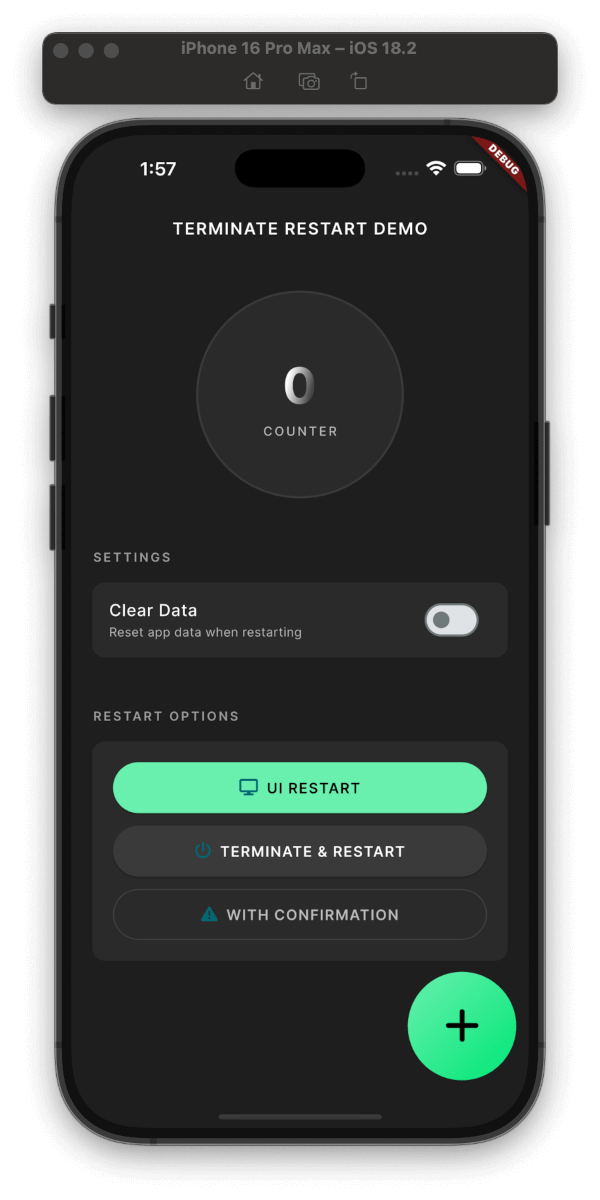
Plugin Demo
Plugin in Action
Clean Interface
Clean & Simple Interface
Three Restart Modes:
UI-only Restart: (~200ms)
Full Process Restart: (~800ms)
With Confirmation Dialog: (+50ms)
Smart Data Management:
Security Features:
Platform Support:
User Experience:
dependencies:
  terminate_restart: ^1.1.0
Get up and running with Terminate Restart in minutes:
dependencies:
  terminate_restart: ^1.1.0
import 'package:terminate_restart/terminate_restart.dart';
void main() {
  WidgetsFlutterBinding.ensureInitialized();
  TerminateRestart.instance.initialize();
  // Wrap your app with wrapWithRestart to enable UI-only restart
  runApp(TerminateRestart.wrapWithRestart(child: MyApp()));
}
// Quick UI refresh
await TerminateRestart.instance.restartApp(
  options: const TerminateRestartOptions(
    terminate: false,
  ),
);

// Full app restart
await TerminateRestart.instance.restartApp(
  options: const TerminateRestartOptions(
    terminate: true,
  ),
);

// With confirmation dialog
await TerminateRestart.instance.restartAppWithConfirmation(
  context,
  title: 'Restart App',
  message: 'Do you want to restart the app?',
  terminate: true,
);
| Feature | Description |
|---|---|
| UI Restart | Quick UI refresh without app termination |
| Full Restart | Complete app termination and restart |
| Data Clearing | Optional storage clearing with keychain preservation |
| Confirmation | Optional user confirmation before restart |
| iOS Compliance | System-approved methods for App Store compliance |
| Web Support | Page reload with browser storage clearing |
This plugin follows Apple's App Store guidelines regarding app termination:
User-Initiated Actions: The plugin only performs termination in response to explicit user actions.
Graceful Shutdown: On iOS, the plugin uses approved APIs to ensure graceful app termination:
exit(0) for clean terminationRestart Mechanism: The restart functionality complies with iOS guidelines by:
Data Handling: When clearing data:
Note: While Android allows direct app termination, iOS termination is handled through system-approved methods.
After Dynamic Updates
// After downloading new assets/code
await TerminateRestart.instance.restartAppWithConfirmation(
  context,
  title: 'Update Ready',
  message: 'Restart to apply updates?',
  terminate: true,
);
Clearing Cache
// Clear app data but preserve important settings
await TerminateRestart.instance.restartApp(
  options: const TerminateRestartOptions(
    terminate: true,
    clearData: true,
    preserveKeychain: true,
    preserveUserDefaults: true,
  ),
);
Quick UI Refresh
// Refresh UI without full restart
await TerminateRestart.instance.restartApp(
  options: const TerminateRestartOptions(
    terminate: false,
  ),
);
With Confirmation Dialog
// Show confirmation dialog before restart
await TerminateRestart.instance.restartAppWithConfirmation(
  context,
  title: 'Restart Required',
  message: 'Do you want to restart the app?',
  terminate: true,
  clearData: false,
  preserveKeychain: true,
);
| Operation | Average Time |
|---|---|
| UI-only Restart | ~300ms |
| Full Termination | ~800ms |
| Data Clearing | ~200ms |
| With Dialog | +100ms |
Sensitive Data
preserveKeychain for credentialsState Management
Platform Security
Contributions are welcome! Please read our contributing guidelines before submitting PRs.
This project is licensed under the MIT License - see the LICENSE file for details.
If you have any questions or need help, you can:
Check out our example app for a full demonstration of all features, including:
Quick Preview
The Android implementation uses a combination of techniques to ensure reliable app restart:
// Activity recreation (UI-only restart)
currentActivity.recreate()

// Full process termination
Process.killProcess(Process.myPid())
exitProcess(0)

// Smart Intent handling
intent.addFlags(Intent.FLAG_ACTIVITY_NEW_TASK or Intent.FLAG_ACTIVITY_CLEAR_TASK)
The iOS implementation provides:
Created by Ahmed Sleem GitHub • pub.dev • LinkedIn
For the restart functionality to work properly on iOS, you need to add URL scheme entries to your Info.plist file:
<key>CFBundleURLTypes</key>
<array>
    <dict>
        <key>CFBundleTypeRole</key>
        <string>Editor</string>
        <key>CFBundleURLSchemes</key>
        <array>
            <string>$(PRODUCT_BUNDLE_IDENTIFIER)</string>
        </array>
    </dict>
    <dict>
        <key>CFBundleURLSchemes</key>
        <array>
            <string>$(PRODUCT_BUNDLE_IDENTIFIER)</string>
        </array>
    </dict>
    <dict>
        <key>CFBundleURLSchemes</key>
        <array>
            <string>$(PRODUCT_BUNDLE_IDENTIFIER)</string>
        </array>
        <key>CFBundleURLName</key>
        <string>$(PRODUCT_BUNDLE_IDENTIFIER)</string>
    </dict>
</array>
This configuration allows the plugin to restart your app by opening a URL with your app's bundle identifier.
| Parameter | Type | Default | Description |
|---|---|---|---|
terminate |
bool |
true |
Whether to fully terminate the app process or just restart the UI |
clearData |
bool |
false |
Whether to clear app data during restart |
preserveKeychain |
bool |
false |
Whether to preserve keychain data when clearing app data |
preserveUserDefaults |
bool |
false |
Whether to preserve user defaults when clearing app data |
restartAppFuture<bool> restartApp({
required TerminateRestartOptions options,
})
Restarts the app immediately without user confirmation. Returns true if the restart was successful.
Parameters:
options: A TerminateRestartOptions object that configures the restart behavior.restartAppWithConfirmationFuture<bool> restartAppWithConfirmation(
BuildContext context, {
String title = 'Restart Required',
String message = 'The app needs to restart to apply changes.',
String confirmText = 'Restart Now',
String cancelText = 'Later',
bool clearData = false,
bool preserveKeychain = false,
bool preserveUserDefaults = false,
bool terminate = true,
})
Shows a confirmation dialog before restarting the app. Returns true if the user confirmed and the restart was successful, or false if the user canceled.
Parameters:
context: The BuildContext used to show the dialog.title: The title of the confirmation dialog.message: The message shown in the confirmation dialog.confirmText: The text for the confirm button.cancelText: The text for the cancel button.clearData: Whether to clear app data during restart.preserveKeychain: Whether to preserve keychain data when clearing app data.preserveUserDefaults: Whether to preserve user defaults when clearing app data.terminate: Whether to fully terminate the app process or just restart the UI.Use confirmation dialog when:
clearData: true to clear app datapreserveKeychain and preserveUserDefaults to selectively preserve dataYes! The plugin:
Future<void> changeLanguage(String newLocale) async {
  // Save new locale
  await prefs.setString('locale', newLocale);

  // Restart UI only with confirmation
  await TerminateRestart.instance.restartAppWithConfirmation(
    context,
    title: 'Language Change',
    message: 'Restart app to apply new language?',
    terminate: false,
    preserveUserDefaults: true,
  );
}
Future<void> installUpdate() async {
  try {
    // Download update
    await downloadUpdate();

    // Apply update with confirmation
    final confirmed = await TerminateRestart.instance.restartAppWithConfirmation(
      context,
      title: 'Update Ready',
      message: 'Install update and restart?',
      terminate: true,
    );

    if (!confirmed) {
      scheduleUpdateReminder();
    }
  } catch (e) {
    handleUpdateError(e);
  }
}
Future<void> secureLogout() async {
  // Clear sensitive data
  await TerminateRestart.instance.restartApp(
    options: const TerminateRestartOptions(
      terminate: true,
      clearData: true,
      preserveUserDefaults: true, // Keep app settings
      preserveKeychain: false, // Clear credentials
    ),
  );
}
graph TD
    A[Start] --> B{Restart Type}
    B -->|UI-only| C[Recreation Mode]
    B -->|Full| D[Termination Mode]

    C --> E{Show Dialog?}
    D --> E

    E -->|Yes| F[Show Confirmation]
    E -->|No| G[Process Restart]

    F -->|Confirmed| G
    F -->|Cancelled| H[Cancel Operation]

    G --> I{Clear Data?}
    I -->|Yes| J[Clear App Data]
    I -->|No| K[Preserve Data]

    J --> L[Restart App]
    K --> L

    L --> M[End]
Restart Type Selection:
Confirmation Dialog (Optional):
Data Management:
Platform-Specific Implementation: