パッケージ、リポジトリ、アプリカテゴリを検索

terminate_restart のカバー
パッケージ詳細v1.2.0

terminate_restart

データクリアオプション付きのアプリ終了および再起動用のFlutterプラグイン。

AndroidiOSWeb
30日間ダウンロード
3.2万
いいね数
70
Pub ポイント
160

パッケージをインストール

flutter pub add terminate_restart

パッケージ概要

公開情報に基づく選定ガイドです。参考としてご利用ください。

Android、iOS、Web向けにアプリの終了と再起動を可能にするFlutterプラグインで、オプションでデータをクリアできます。設定変更や認証リセット後のクリーンな状態が必要なシナリオなどで役立ちます。開発者はプログラム的にアプリを終了して再起動でき、複数プラットフォームで一貫した挙動を保証するシンプルなAPIを提供しています。pub.dev経由で既存のFlutterプロジェクトにスムーズに統合可能です。

用途

  • 設定変更後のアプリ再起動
  • ログアウト時にキャッシュされたデータをクリアする
  • アプリの状態を再初期化しています
  • 認証リセットの処理
  • 更新後に再起動を強制する

主な機能

  • クロスプラットフォーム対応(Android、iOS、Web)
  • 再起動時にアプリデータをクリアするオプション
  • 終了および再起動用の簡単な API
  • すべての主要プラットフォームで動作します
  • 軽量で簡単に統合可能

適している対象

  • アプリ再起動機能を必要とする開発者
  • ユーザー操作後に状態をリセットする必要があるアプリ
  • 複雑なセッション管理を備えたプロジェクト
  • 機密データを扱うモバイルアプリ
  • 制御された再起動を必要とするWebアプリケーション

注意事項

  • すべての Android ランチャーアプリで動作しない可能性があります
  • iOSの制限により、完全な終了が制限される可能性があります
  • Webのサポートは、ブラウザの動作によって制限されています
  • データクリアの動作は、プラットフォームによって異なります
  • 一部のデバイスでは適切な権限が必要です

元の README

関連するソースリポジトリの README 原文のスナップショットです。最新の内容はリポジトリをご覧ください。

Terminate Restart

pub package License: MIT likes

A robust Flutter plugin for terminating and restarting your app with extensive customization options. Perfect for implementing dynamic updates, clearing app state, or refreshing your app's UI.

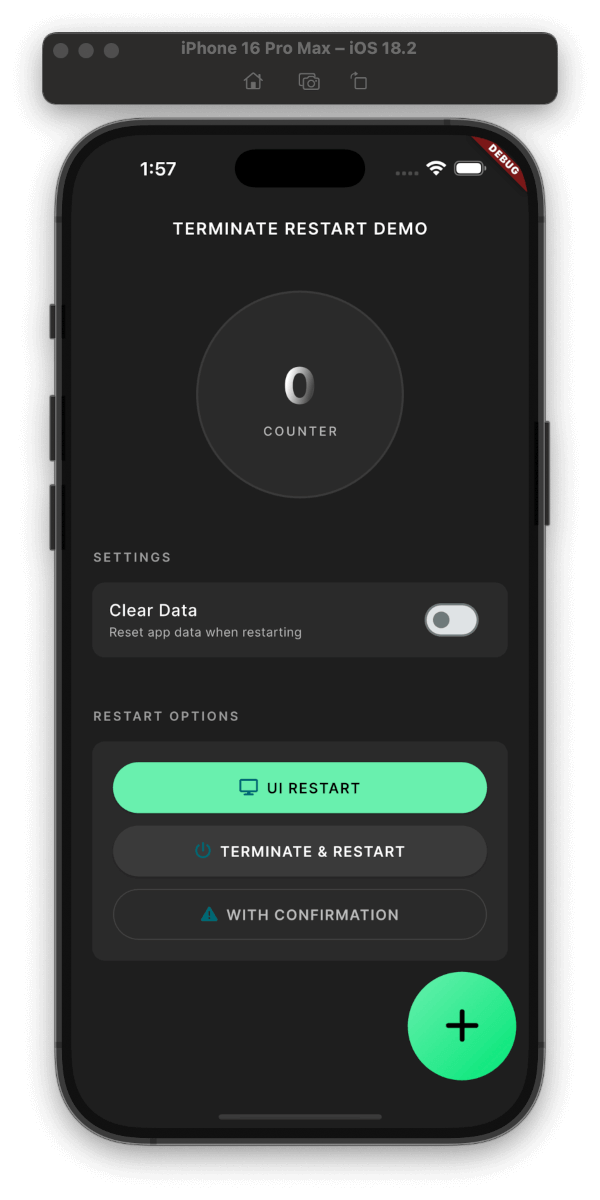
Demo

Plugin Demo
Plugin in Action

Clean Interface
Clean & Simple Interface

Features

  • Three Restart Modes:

    • UI-only Restart: (~200ms)

      • Recreates activities/views while maintaining connections
      • Perfect for theme changes, language switches
      • Preserves network connections and background tasks
      • Faster execution with minimal disruption
    • Full Process Restart: (~800ms)

      • Complete app termination and restart
      • Ideal for updates, security-related changes
      • Cleans up all resources and states
      • Ensures fresh start with no residual state
    • With Confirmation Dialog: (+50ms)

      • Shows a customizable confirmation dialog
      • User can choose to proceed or cancel
      • Supports both UI-only and full restart
      • Perfect for user-initiated actions
  • Smart Data Management:

    • Configurable data clearing during restart
    • Granular control over data preservation
    • Secure handling of sensitive information
  • Security Features:

    • Optional keychain data preservation
    • Secure user defaults handling
    • Clean process termination
  • Platform Support:

    • Android: Full support with activity recreation
    • iOS: Compliant with App Store guidelines
    • Web: Page reload with browser storage clearing
  • User Experience:

    • Built-in confirmation dialogs
    • Customizable messages and buttons
    • Smooth transitions and animations

Installation

dependencies:
  terminate_restart: ^1.1.0

Quick Start

Get up and running with Terminate Restart in minutes:

  1. Add Dependency
dependencies:
  terminate_restart: ^1.1.0
  1. Import Package
import 'package:terminate_restart/terminate_restart.dart';
  1. Initialize the Plugin
void main() {
  WidgetsFlutterBinding.ensureInitialized();
  TerminateRestart.instance.initialize();
  // Wrap your app with wrapWithRestart to enable UI-only restart
  runApp(TerminateRestart.wrapWithRestart(child: MyApp()));
}
  1. Basic Usage
// Quick UI refresh
await TerminateRestart.instance.restartApp(
  options: const TerminateRestartOptions(
    terminate: false,
  ),
);

// Full app restart
await TerminateRestart.instance.restartApp(
  options: const TerminateRestartOptions(
    terminate: true,
  ),
);

// With confirmation dialog
await TerminateRestart.instance.restartAppWithConfirmation(
  context,
  title: 'Restart App',
  message: 'Do you want to restart the app?',
  terminate: true,
);

Feature Comparison

Feature Description
UI Restart Quick UI refresh without app termination
Full Restart Complete app termination and restart
Data Clearing Optional storage clearing with keychain preservation
Confirmation Optional user confirmation before restart
iOS Compliance System-approved methods for App Store compliance
Web Support Page reload with browser storage clearing

iOS App Store Compliance

This plugin follows Apple's App Store guidelines regarding app termination:

  1. User-Initiated Actions: The plugin only performs termination in response to explicit user actions.

  2. Graceful Shutdown: On iOS, the plugin uses approved APIs to ensure graceful app termination:

    • Uses exit(0) for clean termination
    • Properly saves state and closes resources
    • Follows iOS application lifecycle
  3. Restart Mechanism: The restart functionality complies with iOS guidelines by:

    • Using approved launch mechanisms
    • Preserving user preferences when requested
    • Maintaining system integrity
  4. Data Handling: When clearing data:

    • Respects iOS data protection
    • Properly handles keychain items
    • Maintains necessary system files

Note: While Android allows direct app termination, iOS termination is handled through system-approved methods.

Common Use Cases

  1. After Dynamic Updates

    // After downloading new assets/code
    await TerminateRestart.instance.restartAppWithConfirmation(
      context,
      title: 'Update Ready',
      message: 'Restart to apply updates?',
      terminate: true,
    );
    
  2. Clearing Cache

    // Clear app data but preserve important settings
    await TerminateRestart.instance.restartApp(
      options: const TerminateRestartOptions(
        terminate: true,
        clearData: true,
        preserveKeychain: true,
        preserveUserDefaults: true,
      ),
    );
    
  3. Quick UI Refresh

    // Refresh UI without full restart
    await TerminateRestart.instance.restartApp(
      options: const TerminateRestartOptions(
        terminate: false,
      ),
    );
    
  4. With Confirmation Dialog

    // Show confirmation dialog before restart
    await TerminateRestart.instance.restartAppWithConfirmation(
      context,
      title: 'Restart Required',
      message: 'Do you want to restart the app?',
      terminate: true,
      clearData: false,
      preserveKeychain: true,
    );
    

Performance Metrics

Operation Average Time
UI-only Restart ~300ms
Full Termination ~800ms
Data Clearing ~200ms
With Dialog +100ms

Security Considerations

  1. Sensitive Data

    • Use preserveKeychain for credentials
    • Clear data on logout
    • Handle biometric authentication state
  2. State Management

    • Clear sensitive data before restart
    • Implement proper authentication state handling
    • Use secure storage for critical information
  3. Platform Security

    • Proper permission handling
    • Secure data clearing
    • Protected file access

Contributing

Contributions are welcome! Please read our contributing guidelines before submitting PRs.

License

This project is licensed under the MIT License - see the LICENSE file for details.

Support

If you have any questions or need help, you can:

Complete Example

Check out our example app for a full demonstration of all features, including:

  • Basic UI/Process restart
  • Data clearing with preservation options
  • Custom confirmation dialogs
  • Error handling
  • State management
  • Platform-specific features

Demo

Quick Preview

Quick Preview

Platform-Specific Details

Android Implementation

The Android implementation uses a combination of techniques to ensure reliable app restart:

// Activity recreation (UI-only restart)
currentActivity.recreate()

// Full process termination
Process.killProcess(Process.myPid())
exitProcess(0)

// Smart Intent handling
intent.addFlags(Intent.FLAG_ACTIVITY_NEW_TASK or Intent.FLAG_ACTIVITY_CLEAR_TASK)
iOS Implementation

The iOS implementation provides:

  • Clean process termination
  • State preservation options
  • Keychain data handling
  • User defaults management

Author

Created by Ahmed Sleem GitHub • pub.dev • LinkedIn


pub.dev • GitHub • Issues

iOS Configuration

For the restart functionality to work properly on iOS, you need to add URL scheme entries to your Info.plist file:

<key>CFBundleURLTypes</key>
<array>
    <dict>
        <key>CFBundleTypeRole</key>
        <string>Editor</string>
        <key>CFBundleURLSchemes</key>
        <array>
            <string>$(PRODUCT_BUNDLE_IDENTIFIER)</string>
        </array>
    </dict>
    <dict>
        <key>CFBundleURLSchemes</key>
        <array>
            <string>$(PRODUCT_BUNDLE_IDENTIFIER)</string>
        </array>
    </dict>
    <dict>
        <key>CFBundleURLSchemes</key>
        <array>
            <string>$(PRODUCT_BUNDLE_IDENTIFIER)</string>
        </array>
        <key>CFBundleURLName</key>
        <string>$(PRODUCT_BUNDLE_IDENTIFIER)</string>
    </dict>
</array>

This configuration allows the plugin to restart your app by opening a URL with your app's bundle identifier.

Configuration Options

Core Parameters
Parameter Type Default Description
terminate bool true Whether to fully terminate the app process or just restart the UI
clearData bool false Whether to clear app data during restart
preserveKeychain bool false Whether to preserve keychain data when clearing app data
preserveUserDefaults bool false Whether to preserve user defaults when clearing app data
API Methods
restartApp
Future<bool> restartApp({
  required TerminateRestartOptions options,
})

Restarts the app immediately without user confirmation. Returns true if the restart was successful.

Parameters:

  • options: A TerminateRestartOptions object that configures the restart behavior.
restartAppWithConfirmation
Future<bool> restartAppWithConfirmation(
  BuildContext context, {
  String title = 'Restart Required',
  String message = 'The app needs to restart to apply changes.',
  String confirmText = 'Restart Now',
  String cancelText = 'Later',
  bool clearData = false,
  bool preserveKeychain = false,
  bool preserveUserDefaults = false,
  bool terminate = true,
})

Shows a confirmation dialog before restarting the app. Returns true if the user confirmed and the restart was successful, or false if the user canceled.

Parameters:

  • context: The BuildContext used to show the dialog.
  • title: The title of the confirmation dialog.
  • message: The message shown in the confirmation dialog.
  • confirmText: The text for the confirm button.
  • cancelText: The text for the cancel button.
  • clearData: Whether to clear app data during restart.
  • preserveKeychain: Whether to preserve keychain data when clearing app data.
  • preserveUserDefaults: Whether to preserve user defaults when clearing app data.
  • terminate: Whether to fully terminate the app process or just restart the UI.

Frequently Asked Questions

1. What's the difference between UI-only and Full restart?
  • UI-only Restart: Only recreates the UI components while keeping the app process alive. Perfect for theme changes or language switches.
  • Full Restart: Completely terminates the app process and starts fresh. Ideal for updates or when you need a clean state.
2. When should I use confirmation dialog?

Use confirmation dialog when:

  • User needs to be aware of the restart
  • Data might be lost during restart
  • Action is user-initiated
  • Critical operations are in progress
3. Will my app data be preserved?
  • By default, all app data is preserved
  • Use clearData: true to clear app data
  • Use preserveKeychain and preserveUserDefaults to selectively preserve data
4. Is it safe to use in production?

Yes! The plugin:

  • Uses official platform APIs
  • Follows platform guidelines
  • Handles errors gracefully
  • Has no special permission requirements

Advanced Use Cases

1. Language Change with Data Preservation
Future<void> changeLanguage(String newLocale) async {
  // Save new locale
  await prefs.setString('locale', newLocale);
  
  // Restart UI only with confirmation
  await TerminateRestart.instance.restartAppWithConfirmation(
    context,
    title: 'Language Change',
    message: 'Restart app to apply new language?',
    terminate: false,
    preserveUserDefaults: true,
  );
}
2. Update Installation with Progress
Future<void> installUpdate() async {
  try {
    // Download update
    await downloadUpdate();
    
    // Apply update with confirmation
    final confirmed = await TerminateRestart.instance.restartAppWithConfirmation(
      context,
      title: 'Update Ready',
      message: 'Install update and restart?',
      terminate: true,
    );
    
    if (!confirmed) {
      scheduleUpdateReminder();
    }
  } catch (e) {
    handleUpdateError(e);
  }
}
3. Secure Logout with Data Clearing
Future<void> secureLogout() async {
  // Clear sensitive data
  await TerminateRestart.instance.restartApp(
    options: const TerminateRestartOptions(
      terminate: true,
      clearData: true,
      preserveUserDefaults: true, // Keep app settings
      preserveKeychain: false, // Clear credentials
    ),
  );
}

How It Works

graph TD
    A[Start] --> B{Restart Type}
    B -->|UI-only| C[Recreation Mode]
    B -->|Full| D[Termination Mode]
    
    C --> E{Show Dialog?}
    D --> E
    
    E -->|Yes| F[Show Confirmation]
    E -->|No| G[Process Restart]
    
    F -->|Confirmed| G
    F -->|Cancelled| H[Cancel Operation]
    
    G --> I{Clear Data?}
    I -->|Yes| J[Clear App Data]
    I -->|No| K[Preserve Data]
    
    J --> L[Restart App]
    K --> L
    
    L --> M[End]
Flow Explanation:
  1. Restart Type Selection:

    • Choose between UI-only or Full restart
    • Each type optimized for specific use cases
  2. Confirmation Dialog (Optional):

    • Can be added to any restart type
    • Fully customizable UI
    • User can cancel operation
  3. Data Management:

    • Optional data clearing
    • Selective data preservation
    • Secure handling of sensitive data
  4. Platform-Specific Implementation:

    • Android: Activity/Process management
    • iOS: UIApplication handling
    • Error handling and recovery

カテゴリー

依存関係

依存関係一覧 2 件

  • plugin_platform_interface^2.0.2
  • web^1.1.0

ソースリポジトリ

このパッケージを使用しているプロジェクト