

 v0.0.1
animated_radial_menu
ボイラープレートコードなしで、非常にカスタマイズ可能な複雑なラジアルアニメーション。
34いいね 8130日間ダウンロード130Pub ポイント
AndroidiOSWebmacOSWindowsLinux
ボイラープレートコードなしで、非常にカスタマイズ可能な複雑なラジアルアニメーション。

以下は英語原文のスナップショットです。最新版は GitHub をご覧ください。
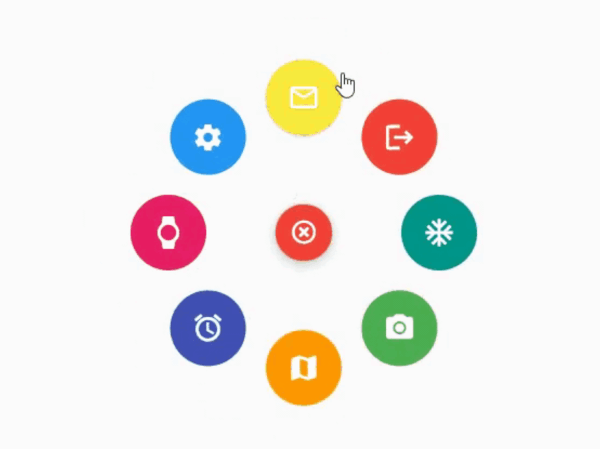
The package provides an easy way to work with radial menu along with animations.

You can check out the example here
To use this package : add the dependency to your pubspec.yaml file
   dependencies:
     flutter:
       sdk: flutter
     animated_radial_menu:
Import it to your project file
import 'package:animated_radial_menu/animated_radial_menu.dart';
Similar to column or row widget, simply pass in buttons as children and you are done
  RadialMenu(
     children: [
         RadialButton(
           icon: Icon(Icons.ac_unit),
           onPress: () => print("ac unit"),
         )
     ]
 ),
Eventhough you can use this widget anywhere, it's recommended to use RadialMenu with Stack Widget if your page contains tons of UI elements
     body: Stack(
          children: [
            RadialMenu(
              children: [
                RadialButton(
                  icon: Icon(Icons.ac_unit),
                  buttonColor: Colors.teal,
                  onPress: () => Get.to(TargetScreen())),
                RadialButton(
                    icon: Icon(Icons.camera_alt),
                    buttonColor: Colors.green,
                    onPress: () => Get.to(TargetScreen())),
                RadialButton(
                    icon: Icon(Icons.map),
                    buttonColor: Colors.orange,
                    onPress: () => Get.to(TargetScreen())),

                /* you can add any number of buttons, although it's
                  not recommended to insert beyond 8-9 buttons. */
              ],
            ),

            // rest of the widgets....

          ],
        ),
You can manually position the widget wherever you wish
   RadialMenu(
    centerButtonAlignment: Alignment(0.3,0.5) // by default alignment is set to Alignment.center
   )
You can also customize the main centered button(more customizations will be made available soon)
   RadialMenu(
        centerButtonSize: 0.5, // size ranging from 0.0 to 1.0
   )
依存関係一覧 4 件
{"sdk":"flutter"}^9.1.0^2.1.0{"sdk":"flutter"}用途で絞り込み、開発状況を比較し、採用前に元のリポジトリで要件を確認しましょう。
“A repository is the most basic element of GitHub.”
GitHub Docs — About repositories ↗