
パッケージ、リポジトリ、アプリカテゴリを検索

animated_radial_menu のカバー
パッケージ詳細v0.0.1

animated_radial_menu

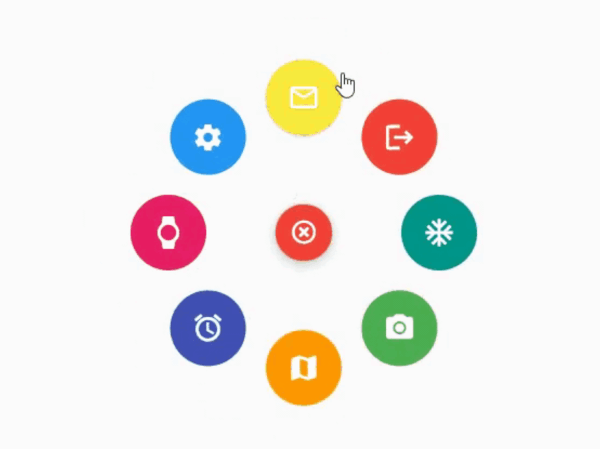
ボイラープレートコードなしで、非常にカスタマイズ可能な複雑なラジアルアニメーション。

AndroidiOSWebmacOSWindowsLinux
30日間ダウンロード
81
いいね数
34
Pub ポイント
130

パッケージをインストール

flutter pub add animated_radial_menu

パッケージ概要

公開情報に基づく選定ガイドです。参考としてご利用ください。

Flutter用の高度にカスタマイズ可能なラジアルメニュー パッケージで、ボイラープレートコードなしで複雑でスムーズなアニメーションを提供します。開発者が複数のプラットフォームで洗練されたラジアルレイアウトを持つインタラクティブなフローティングアクションメニューを作成できるようにします。最小限のセットアップで動的でジェスチャー対応のメニューを実装しやすくし、直感的なナビゲーションやユーザーインターフェースの向上を必要とするアプリに最適です。パフォーマンスと柔軟性を意識して設計されており、アニメーション速度、アイテム配置、ビジュアルスタイルなど幅広いカスタマイズが可能です。

用途

  • インタラクティブなアプリナビゲーション
  • ジェスチャーに基づくメニューのトリガー
  • フローティングアクションインターフェースデザイン
  • ユーザー参加の向上
  • カスタムUIコンポーネント
  • モバイルおよびデスクトップアプリケーションインターフェース

主な機能

  • ボイラープレートは不要です
  • 非常にカスタマイズ可能
  • スムーズなラジアルアニメーション
  • クロスプラットフォーム対応
  • ジェスチャー対応デザイン
  • 簡単な統合

適している対象

  • クリーンなUIパターンを探している開発者
  • 複雑なナビゲーション要件を持つアプリ
  • デザインに注力したFlutterプロジェクト
  • マルチプラットフォームアプリケーション
  • UI/UXの向上努力

注意事項

  • 低スペックデバイスではパフォーマンスチューニングが必要になる場合があります
  • 基本的な使用法を超えるドキュメントは限られている
  • カスタマイズは初心者にとって複雑さを増す可能性があります
  • 非常に大きなメニュー項目には最適化されていません
  • Flutterのアニメーションフレームワークの安定性に依存しています

元の README

関連するソースリポジトリの README 原文のスナップショットです。最新の内容はリポジトリをご覧ください。

animated_radial_menu

The package provides an easy way to work with radial menu along with animations.

example

You can check out the example here

Installation

To use this package : add the dependency to your pubspec.yaml file

   dependencies:
     flutter:
       sdk: flutter
     animated_radial_menu:

Basic Usage

Import it to your project file

  import 'package:animated_radial_menu/animated_radial_menu.dart';

Similar to column or row widget, simply pass in buttons as children and you are done

  RadialMenu(
     children: [
         RadialButton(
           icon: Icon(Icons.ac_unit),
           onPress: () => print("ac unit"),
         )
     ]
 ),

Eventhough you can use this widget anywhere, it's recommended to use RadialMenu with Stack Widget if your page contains tons of UI elements

     body: Stack(
          children: [
            RadialMenu(
              children: [
                RadialButton(
                  icon: Icon(Icons.ac_unit),
                  buttonColor: Colors.teal,
                  onPress: () => Get.to(TargetScreen())),
                RadialButton(
                    icon: Icon(Icons.camera_alt),
                    buttonColor: Colors.green,
                    onPress: () => Get.to(TargetScreen())),
                RadialButton(
                    icon: Icon(Icons.map),
                    buttonColor: Colors.orange,
                    onPress: () => Get.to(TargetScreen())),
                                 
                /* you can add any number of buttons, although it's 
                  not recommended to insert beyond 8-9 buttons. */
              ],
            ),
            
            // rest of the widgets....

          ],
        ),

You can manually position the widget wherever you wish

   RadialMenu(
    centerButtonAlignment: Alignment(0.3,0.5) // by default alignment is set to Alignment.center
   )

You can also customize the main centered button(more customizations will be made available soon)

   RadialMenu(
        centerButtonSize: 0.5, // size ranging from 0.0 to 1.0
   )

カテゴリー

依存関係

依存関係一覧 2 件

ソースリポジトリ

このパッケージを使用しているプロジェクト

データはまだありません。