
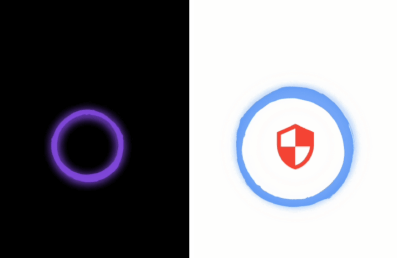
 v1.0.0
super_circle
놀라운 애니메이션 컬러 원형 위젯이며, 프로필, 로딩 화면 또는 원하는 위젯에 사용할 수 있습니다.
26좋아요 1130일 다운로드130Pub 점수
AndroidiOSWebmacOSWindowsLinux
flutter 프레임워크에 의해 만들어진 놀라운 애니메이션 컬러링 서클 위젯입니다.

의존성 목록 3 개
{"sdk":"flutter"}^0.1.1{"sdk":"flutter"}아래는 영문 원문 스냅샷입니다. 최신 내용은 GitHub에서 확인하세요.
Amazing animated colored circular widget, you can use it in your profile , loading screen or with any widget you want.
Add Super Circle => Better UI/UX
Animation
This widget animate any widget with pro UI, you can use it to profile screen , loading screen or any widget you want.
Configurable Widget
You can control any part of this widget speed , rotation direction , background color
Add this to your package's pubspec.yaml file:
dependencies:
  super_circle: latest_version
Then import the package in dart code:
import 'package:super_circle/super_circle.dart';
More details see pub.dev.
The super_circle package it is so easy to use:
:warning:: The
sizevalue must besize <= MediaQuery.of(context).size.widthto give you good experience.
Without any child widget
Center(child: SuperCircle());
Add Image widget
      SuperCircle(
          size: 400,
          rotateBegin: 1.0,
          rotateEnd: 0.0,
          backgroundCircleColor: Colors.black,
          speedRotateCircle: 6000,
          speedChangeShadowColorInner: 2000,
          speedChangeShadowColorOuter: 2000,
          child: Container(
            width: 400,
            height: 400,
            color: Colors.red,
            child: Image.network(
              'http://placekitten.com/g/200/300',
              width: 400,
              height: 400,
              fit: BoxFit.cover,
            ),
          ),
        )
Add Icon widget
      SuperCircle(
        size: 250,
        rotateBegin: 0.0,
        rotateEnd: 1.0,
        backgroundCircleColor: Colors.white,
        speedRotateCircle: 4000,
        speedChangeShadowColorInner: 3000,
        speedChangeShadowColorOuter: 3000,
        child: Container(
          width: 300,
          height: 300,
          child: Icon(Icons.security , color: Colors.red, size: 100,),
        ),
      )
child
Widget
A widget which it is inside the circle.
size
double
size of the circle (width and height are equal).
backgroundCircleColor
Color
background color of the circle.
rotateBegin
double
The initial value of the rotation , the value between 0.0 and 1.0 .
rotateEnd
double
The final value of the rotation , the value between 0.0 and 1.0 .
spreadShadowBegin
double
The initial value of spread shadow.
spreadShadowEnd
double
The final value of spread shadow.
speedChangeColor
int
The speed value of changing color of the circle.
speedRotateCircle
int
The speed value of rotation of the circle.
speedChangeShadowColorInner
int
The speed value of changing color of the inner shadow.
speedChangeShadowColorOuter
int
The speed value of changing color of the outer shadow.