

 v0.0.2
flutter_animated_reaction
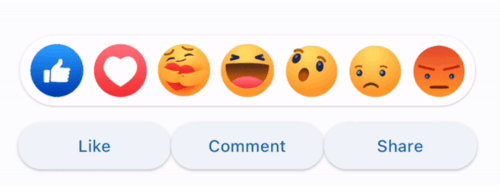
Flutter Animated Reaction은 애니메이션된 반응 오버레이(예: 페이스북, 링크드인)이며, 사용자 고유의 반응 아이콘(이미지/GIF)을 사용하여 맞춤 설정할 수 있습니다.
34좋아요 3630일 다운로드130Pub 점수
AndroidiOSWebmacOSWindowsLinux
Ajoy-1704001/flutter_animated_reaction open-source repository details.

아래는 영문 원문 스냅샷입니다. 최신 내용은 GitHub에서 확인하세요.
Flutter Animated Reaction is an animated reaction overlay(Example: Facebook, LinkedIn) which can be customized using your own reaction icons(images/gifs). Wherever your reaction button is on the screen, this package helps you to pop up an animated reaction overlay at the right location on the screen with your preferred reactions icon.
import 'package:flutter_animated_reaction/flutter_animated_reaction.dart';
For better understanding, you can see example application.
AnimatedFlutterReaction().showOverlay(context: context,
                                      key: key,
                                      onReaction: (val){
                                         print(val);
                                      });
| Parameter | Description |
|---|---|
| Key | Global Key used in the reaction button . It is used to find the renderBox and measure it's position. |
| reactions | List of all reaction icons which you want to show in the overlay.(Image/Gifs path) |
| onReaction(int) | It is triggered when any of the reaction is tapped |
| backgroundColor | It describes overlay background color |
| overlaySize | It specifies overlay width |
| iconSize | It can set the size of reaction icons. Default size is (45,45) |
의존성 목록 4 개
{"sdk":"flutter"}^4.1.0{"sdk":"flutter"}^2.0.0사용 목적에 따라 검색하고 개발 활동을 비교한 뒤 원본 저장소에서 요구 사항을 확인하세요.
“A repository is the most basic element of GitHub.”
GitHub Docs — About repositories ↗