
 v0.1.2
appflowy_board
AppFlowyBoard는 여러 그룹으로 구성된 보드 스타일 위젯입니다. 서로 다른 그룹 간의 드래그 앤 드롭을 지원합니다.
225좋아요 2.2천30일 다운로드140Pub 점수
AndroidiOSmacOSWindowsLinux
AppFlowy Board는 여러 그룹으로 구성된 보드 스타일 위젯이며, 서로 다른 그룹 간에 드래그 앤 드롭을 지원합니다. AppFlowy 및 그 이상을 위한 AppFlowy Kanban Board 프로젝트입니다.

{"sdk":"flutter"}^2.0.7^6.1.2^5.0.0{"sdk":"flutter"}아래는 영문 원문 스냅샷입니다. 최신 내용은 GitHub에서 확인하세요.
A customizable and draggable Kanban Board widget for Flutter
AppFlowyBoard
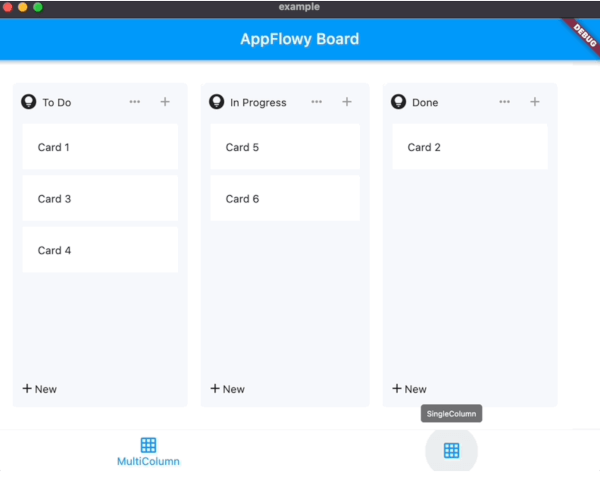
appflowy_board is a customizable and draggable Kanban Board widget for Flutter. You can use it to create a Kanban Board tool like those in Trello.
Check out appflowy_board to see to build a BoardView database.
AppFlowyBoard
Add the AppFlowy Board Flutter package to your environment.
With Flutter:
flutter pub add appflowy_board
flutter pub get
This will add a line like this to your package's pubspec.yaml:
dependencies:
  appflowy_board: ^0.1.0
Initialize an AppFlowyBoardController for the board. It contains the data used by the board. You can
register callbacks to receive the changes of the board.
final AppFlowyBoardController controller = AppFlowyBoardController(
  onMoveGroup: (fromGroupId, fromIndex, toGroupId, toIndex) {
    debugPrint('Move item from $fromIndex to $toIndex');
  },
  onMoveGroupItem: (groupId, fromIndex, toIndex) {
    debugPrint('Move $groupId:$fromIndex to $groupId:$toIndex');
  },
  onMoveGroupItemToGroup: (fromGroupId, fromIndex, toGroupId, toIndex) {
    debugPrint('Move $fromGroupId:$fromIndex to $toGroupId:$toIndex');
  },
);
Provide an initial value of the board by initializing the AppFlowyGroupData. It represents a group data and contains list of items. Each item displayed in the group requires to implement the AppFlowyGroupItem class.
void initState() {
  final group1 = AppFlowyGroupData(id: "To Do", items: [
    TextItem("Card 1"),
    TextItem("Card 2"),
  ]);
  final group2 = AppFlowyGroupData(id: "In Progress", items: [
    TextItem("Card 3"),
    TextItem("Card 4"),
  ]);

  final group3 = AppFlowyGroupData(id: "Done", items: []);

  controller.addGroup(group1);
  controller.addGroup(group2);
  controller.addGroup(group3);
  super.initState();
}

class TextItem extends AppFlowyGroupItem {
  final String s;
  TextItem(this.s);

  @override
  String get id => s;
}
Finally, return a AppFlowyBoard widget in the build method.
@override
Widget build(BuildContext context) {
  return AppFlowyBoard(
    controller: controller,
    cardBuilder: (context, group, groupItem) {
      final textItem = groupItem as TextItem;
      return AppFlowyGroupCard(
        key: ObjectKey(textItem),
        child: Text(textItem.s),
      );
    },
    groupConstraints: const BoxConstraints.tightFor(width: 240),
  );
}
To quickly grasp how it can be used, look at the /example/lib folder. First, run main.dart to play with the demo.
Second, let's delve into multi_board_list_example.dart to understand a few key components:
AppFlowyBoard object.AppFlowyBoard object, you can find the AppFlowyBoardController, which is defined in board_data.dart, is fed with pre-populated mock data. It also contains callback functions to materialize future user data.AppFlowyBoard
Please refer to the API documentation.
Contributions are what make the open source community such an amazing place to learn, inspire, and create. Any contributions you make are greatly appreciated.
Please look at CONTRIBUTING.md for details.