
생기 감지
카메라에 보이는 얼굴이 살아있는 얼굴인지 여부를 감지하는 단일 함수 패키지입니다.
- 스타
- 10
- 포크
- 24
- 최근 푸시(UTC)
- 2026. 7. 16.
- 프로젝트 상태
- 활성
원본 README
아래는 영문 원문 스냅샷입니다. 최신 내용은 GitHub에서 확인하세요.
livelyness_detection










Index
What is the Livelyness Detection?
Liveness detection for face recognition in biometrics is a technique where an algorithm detects if the person in front of the camera is alive and real. The algorithm is able to recognize a live person from presentation attacks - where a bad actor, or fraud perpetrator, uses someone else's physical characteristics or biometric data (known as "spoofs") for impersonation.
Spoofing attempts using printed photos, recordings, deep fake pictures, and 3D masks poses a serious threat. Facial Liveness Detection incorporates specialized features to identify biometric spoofing attacks, which could be an imitation emulating a person’s unique biometrics scanned through the biometric detector to deceive or bypass the identification and authentication steps provided by the system. Even though face recognition can reliably answer the question, “Is this the right person?” but not the question, “Is this a live person?” This is where liveness detection technology plays a significant role in fraud detection and mitigation. Face biometric matching must be able to detect spoofs in order to be trusted, and to maintain the integrity of biometric data.
Platform Support
| iOS | Android | MacOS | Web | Linux | Windows |
|---|---|---|---|---|---|
| ✔️ | ✔️ |
Installation
First, we have to install the package on flutter.
Flutter Setup
Add livelyness_detection to your pubspec.yaml dependencies.
Using command-line
flutter pub add livelyness_detection
Native Setup
Next comes the native setup on both android and iOS
iOS
iOS Setup
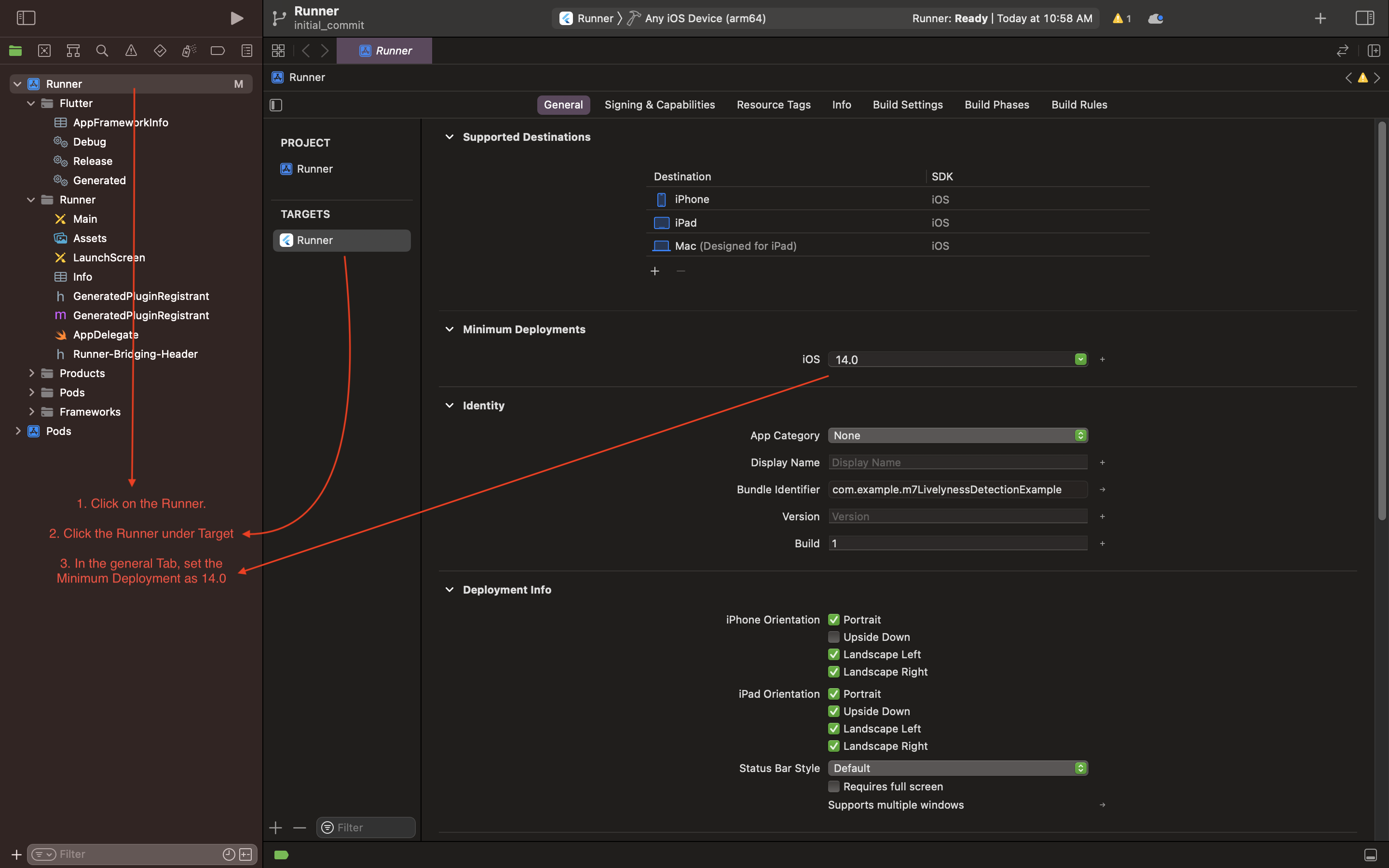
- Open the project in Xcode and set the deployment
- Open the
ios/Runner/Info.plistfile asSource Code. - Add the below-mentioned code inside the
<dict>tag.
  <key>NSCameraUsageDescription</key>
  <string>Camera Access for Scanning</string>
  <key>NSMicrophoneUsageDescription</key>
  <string>Microphone for playing instructions audio.</string>
- Open the
ios/Runner/Podfileand uncomment the second line.
platform :ios, '14.0' # <---------- Uncomment this line
- Set the deployment target in the Xcode project
Android
Android Setup
- Open the
example/android/app/build.gradlefile and set theminSdkVersionas21.
Example
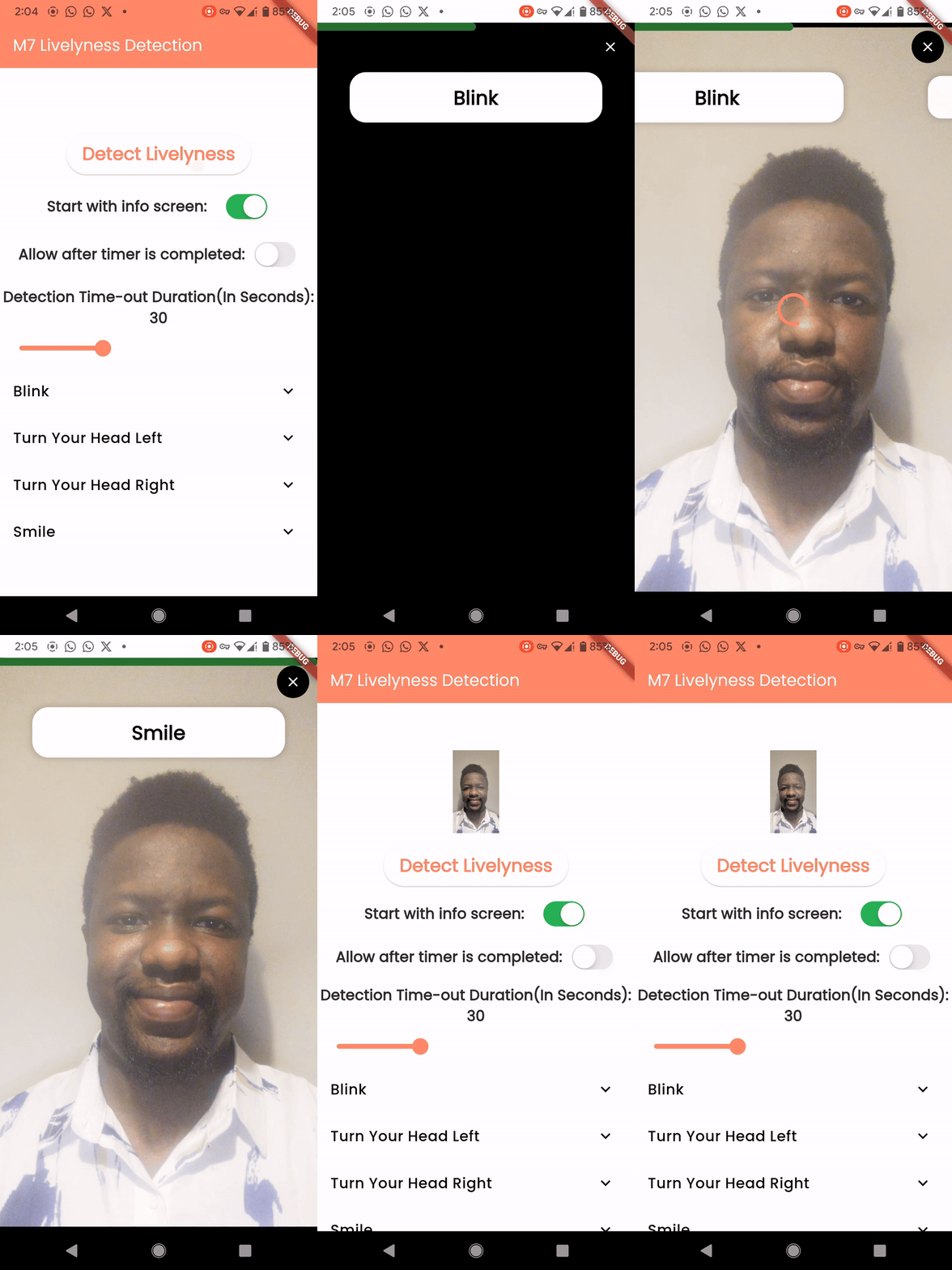
A call to a single line function will return a temporary path to the captured image.
Code
    final String? response =
        await LivelynessDetection.instance.detectLivelyness(
      context,
      config: DetectionConfig(
        steps: [
          LivelynessStepItem(
            step: LivelynessStep.blink,
            title: "Blink",
            isCompleted: false,
          ),
          LivelynessStepItem(
            step: LivelynessStep.smile,
            title: "Smile",
            isCompleted: false,
          ),
        ],
        startWithInfoScreen: true,
      ),
    );
Example Video-Andriod , iOS
Contributors

Kryonex Labs ↗
사용 중인 의존성
의존성 목록 15 개
- animate_do
^3.3.4 - camera
^0.11.0+1 - camerawesome
^2.1.0 - collection
^1.17.0 - equatable
^2.0.5 - flutter
{"sdk":"flutter"} - google_mlkit_face_detection
^0.11.0 - image
^4.0.15 - lottie
^3.1.2 - path_provider
^2.0.14 - plugin_platform_interface
^2.1.3 - rxdart
^0.28.0 - uuid
^4.4.2 - flutter_lints개발 의존성
^4.0.0 - flutter_test개발 의존성
{"sdk":"flutter"}
프로젝트에 맞는 저장소를 선택하려면?
사용 목적에 따라 검색하고 개발 활동을 비교한 뒤 원본 저장소에서 요구 사항을 확인하세요.
- 이름, 작성자 또는 설명으로 검색하고 기술 주제로 범위를 좁힙니다.
- 스타, 포크, 최근 푸시를 함께 비교하세요. 스타는 관심의 지표이며 품질을 보장하지 않습니다.
- 사용하기 전에 GitHub에서 README, 라이선스, Issues를 확인하세요.
출처 및 관리
“A repository is the most basic element of GitHub.”
GitHub Docs — About repositories ↗