
 v1.1.2
colored_json
JSON 문자열을 사용자 지정 가능한 Flutter 위젯으로 변환하는 패키지입니다.
27좋아요 2.6천30일 다운로드160Pub 점수
AndroidiOSWebmacOSWindowsLinux
이것은 JSON 문자열을 받아 사용자 정의 가능한 Flutter 위젯으로 변환하는 Flutter 플러그인입니다.

의존성 목록 3 개
{"sdk":"flutter"}{"sdk":"flutter"}^1.0.0아래는 영문 원문 스냅샷입니다. 최신 내용은 GitHub에서 확인하세요.
Convert JSON string into customizable widget.
ColoredJson is a stateless widget that produces a structured view of JSON string provided. It can be used like any other flutter widget.
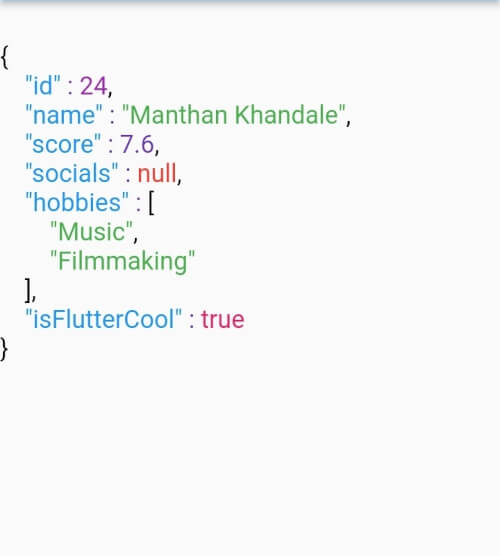
It's fully customizable where you can set different colors to different datatypes including colon, comma and brackets. Set indent length. Use text style of your choice. You can also change the background color.
| Defaut View | Customised View 1 | Customised View 2 |
|---|---|---|
| Default View | Customized View 1 | Customized View 2 |
data parameter of ColoredJson Widgetconst String responseBody = '''
{
'id' : 1,
'name' : 'Colored Json',
'isFlutterAwesome' : true,
}
''';
ColoredJson(
data: responseBody,
)
final dartMap = {
  "id": 24,
  "name": "Manthan Khandale",
  "score": 7.6,
  "socials": null,
  "hobbies": [
    "Music",
    "Filmmaking",
  ],
  "isFlutterCool": true,
};

ColoredJson(
 data: jsonEncode(dartMap),
 indentLength: 5,
 keyColor: Colors.green,
 backgroundColor: Colors.black,
 boolColor: Colors.white,
 nullColor: Colors.redAccent,
 stringColor: Colors.cyan,
 curlyBracketColor: Colors.yellow,
 doubleColor: Colors.deepOrange,
 squareBracketColor: Colors.amber,
 commaColor: Colors.yellow,
 colonColor: Colors.purple,
 intColor: Colors.lime,
 textStyle: const TextStyle(
  fontSize: 20,
  letterSpacing: 2,
  ),
 )
| Parameter | Info |
|---|---|
| data (required) | A JSON string to be formatted |
| keyColor | Color of Json Key |
| intColor | Color of integer type value |
| doubleColor | Color of decimal type value |
| stringColor | Color of string type value |
| boolColor | Color of boolean type value |
| nullColor | Color of null type value |
| curlyBracketColor | Color of curly brackets {} |
| squareBracketColor | Color of square brackets [] |
| commaColor | Color of comma ( , ) |
| colonColor | Color of colon ( : ) |
| backgroundColor | Background color of widget |
| textStyle | Textstyle of texts in the widget |
| indentLength | Indent length |