패키지, 저장소 및 앱 카테고리 검색

colored_json 표지
패키지 상세v1.1.2

colored_json

JSON 문자열을 사용자 지정 가능한 Flutter 위젯으로 변환하는 패키지입니다.

AndroidiOSWebmacOSWindowsLinux
30일 다운로드
3.5천
좋아요
27
Pub 점수
160

패키지 설치

flutter pub add colored_json

패키지 개요

공개 정보를 바탕으로 생성한 선택 가이드입니다.

JSON 문자열을 시각적으로 강화되고 사용자 정의 가능한 위젯으로 변환하는 플러터 패키지입니다. 개발자가 앱 내에서 구조화된 JSON 데이터를 읽기 쉽게 아름답게 표시할 수 있게 해줍니다. 키, 값, 괄호 등 다양한 JSON 요소에 대해 색상 커스터마이징을 지원하여 디버깅 또는 데이터 표시 시 가독성을 높입니다. 개발 도구, 대시보드 또는 포맷된 JSON 출력이 필요한 모든 UI에 적합합니다.

사용 사례

  • JSON 응답 디버깅
  • 앱에서 API 데이터 표시하기
  • 개발자 도구 인터페이스 향상
  • 구성 파일 시각화
  • 실시간 데이터 검사
  • 교육용 앱 콘텐츠 표시

주요 기능

  • JSON 구문 강조
  • 사용자 지정 가능한 색상 및 스타일
  • Flutter 위젯과의 간편한 통합
  • 모든 주요 플랫폼을 지원합니다
  • 경량이고 빠른 렌더링
  • 사용자 정의 가능한 들여쓰기 및 간격

적합한 대상

  • Flutter 개발자
  • 디버깅 도구
  • API 테스트 인터페이스
  • 학습 애플리케이션
  • 구조화된 데이터와 함께 작업하는 UI 디자이너

고려 사항

  • 매우 큰 JSON과 함께 성능에 영향을 미칠 수 있습니다
  • 정적 JSON 표시에 제한됨
  • 수동 문자열 입력 또는 구문 분석이 필요합니다
  • 동적 JSON 편집을 위한 것이 아님
  • 색 테마는 명시적인 설정이 필요합니다
  • 비생산 디버그 뷰에서 가장 잘 사용됨

원본 README

연결된 소스 저장소의 README 원문 스냅샷입니다. 최신 내용은 저장소에서 확인하세요.

Colored JSON

Convert JSON string into customizable widget.

Getting Started

ColoredJson is a stateless widget that produces a structured view of JSON string provided. It can be used like any other flutter widget. It's fully customizable where you can set different colors to different datatypes including colon, comma and brackets. Set indent length. Use text style of your choice. You can also change the background color.

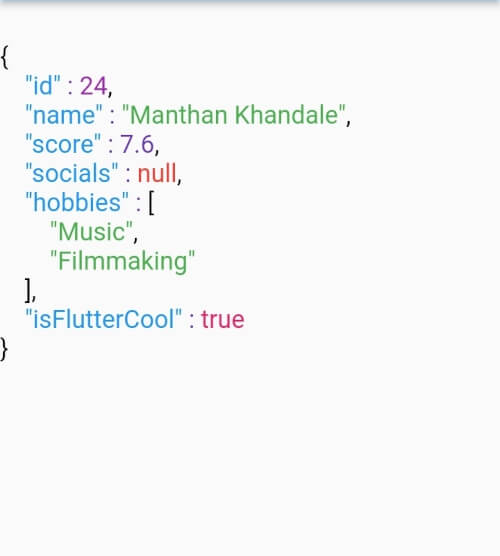
Defaut View Customised View 1 Customised View 2
Default View Customized View 1 Customized View 2

Usage

  • Pass a JSON string to the data parameter of ColoredJson Widget
Simple Usage
const String responseBody = '''
{
  'id' : 1,
  'name' : 'Colored Json',
  'isFlutterAwesome' : true,
}
''';

ColoredJson(
 data: responseBody,
)

Full Usage
final dartMap = {
  "id": 24,
  "name": "Manthan Khandale",
  "score": 7.6,
  "socials": null,
  "hobbies": [
    "Music",
    "Filmmaking",
  ],
  "isFlutterCool": true,
};

ColoredJson(
 data: jsonEncode(dartMap),
 indentLength: 5,
 keyColor: Colors.green,
 backgroundColor: Colors.black,
 boolColor: Colors.white,
 nullColor: Colors.redAccent,
 stringColor: Colors.cyan,
 curlyBracketColor: Colors.yellow,
 doubleColor: Colors.deepOrange,
 squareBracketColor: Colors.amber,
 commaColor: Colors.yellow,
 colonColor: Colors.purple,
 intColor: Colors.lime,
 textStyle: const TextStyle(
  fontSize: 20,
  letterSpacing: 2,
  ),
 )
Parameter Info
data (required) A JSON string to be formatted
keyColor Color of Json Key
intColor Color of integer type value
doubleColor Color of decimal type value
stringColor Color of string type value
boolColor Color of boolean type value
nullColor Color of null type value
curlyBracketColor Color of curly brackets {}
squareBracketColor Color of square brackets []
commaColor Color of comma ( , )
colonColor Color of colon ( : )
backgroundColor Background color of widget
textStyle Textstyle of texts in the widget
indentLength Indent length

Upcoming Tasks

  • Code shrink feature
  • Add Inner Spacing parameter
  • Add tests

카테고리

소스 저장소

이 패키지를 사용하는 프로젝트

아직 데이터가 없습니다.