

 v1.1.0
zo_animated_border
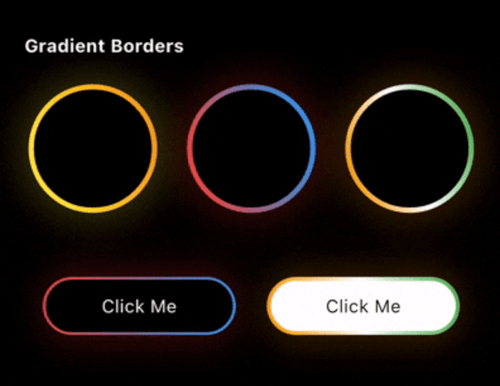
zo_animated_border를 사용하여 어떤 Flutter 위젯에도 애니메이션, 빛나는 효과, 그라데이션 테두리를 추가하세요. 현대적인 UI를 위한 강력하고 유연한 패키지입니다.
137좋아요 6.5천30일 다운로드160Pub 점수
AndroidiOSWebmacOSWindowsLinux
Oauth-Celestial/zo_animated_border open-source repository details.

아래는 영문 원문 스냅샷입니다. 최신 내용은 GitHub에서 확인하세요.


Zo Animated Border is a powerful Flutter package that brings modern UI to life with beautifully animated borders. Whether you're building a login screen, a button, or a decorative container, this package lets you wrap any widget with stylish, animated border effects.
First, add zo_animated_border as a dependency in your pubspec.yaml file
dependencies:
  flutter:
    sdk: flutter
  zo_animated_border : ^[version]
import 'package:zo_animated_border/zo_animated_border.dart';
ZoAnimatedGradientBorder(
  borderRadius: 100,
  animationCurve: Curves.linear,
  borderThickness: 4,
  gradientColor: [
    Colors.yellow,
    Colors.orange,
  ],
  animationDuration: const Duration(seconds: 4),
  child: Container(
    width: 100,
    height: 100,
    alignment: Alignment.center,
    decoration: BoxDecoration(
      shape: BoxShape.circle,
    ),
    child: Text(
      "Circle",
      style: TextStyle(color: Colors.white),
    ),
  ),
);
ZoFireBorder(
  duration: const Duration(seconds: 3),
  borderWidth: 4,
  snakeLength: 0.8,
  borderRadius: BorderRadius.circular(24),
  gradient: const LinearGradient(
    colors: [
      Colors.orange,
      Colors.red,
      Colors.green,
    ],
  ),
  particleColors: const [
    Colors.orange,
    Colors.orangeAccent,
    Colors.white,
  ],
  child: Container(
    width: 200,
    height: 200,
    alignment: Alignment.center,
    decoration: BoxDecoration(
      color: Colors.black,
      borderRadius: BorderRadius.circular(24),
    ),
    child: const Icon(
      Icons.local_fire_department,
      color: Colors.white,
      size: 60,
    ),
  ),
),
ZoPsychoBorder(
  ringCount: 4,
  maxSpread: 10.0,
  borderRadius: BorderRadius.circular(75),
  colors: const [
    Color(0xFFFF2A85),
    Color(0xFFFF992A),
    Color(0xFF00E5FF),
    Color(0xFF6B2AFF),
  ],
  duration: const Duration(seconds: 3),
  child: Container(
    width: 150,
    height: 150,
    alignment: Alignment.center,
    decoration: BoxDecoration(
      color: Colors.transparent,
      borderRadius: BorderRadius.circular(20),
    ),
    child: const Text(
      'Z',
      style: TextStyle(
        color: Colors.white,
        fontSize: 50,
        fontWeight: FontWeight.bold,
      ),
    ),
  ),
),
ZoSequentialGlowBorder(
  borderRadius: BorderRadius.circular(20),
  borderWidth: 4.0,
  glowRadius: 10.0,
  duration: const Duration(seconds: 4),
  gradientPalettes: const [
    [Color(0xFF6B2AFF), Color(0xFF00E5FF)], // Purple to Cyan
    [Color(0xFFFF2A85), Color(0xFFFF992A)], // Pink to Orange
    [Color(0xFF00FF87), Color(0xFF60EFFF)], // Green to Blue
  ],
  child: Container(
    width: 250,
    height: 120,
    alignment: Alignment.center,
    child: const Text(
      "Sequential Glow Border",
      style: TextStyle(
        color: Colors.white,
        fontSize: 18,
      ),
    ),
  ),
)
ZoMultiColorBorder(
  colors: [
    Colors.orange,
    Colors.white,
    Colors.green,
    Colors.indigo,
    Colors.pink,
  ],
  strokeWidth: 3,
  borderRadius: 75,
  child: Padding(
    padding: const EdgeInsets.all(3.0),
    child: Container(
      width: 150,
      height: 150,
      alignment: Alignment.center,
      decoration: BoxDecoration(
        color: Colors.blue,
        shape: BoxShape.circle,
      ),
      child: Text(
        "MultiColor Border",
        style: TextStyle(color: Colors.white),
        textAlign: TextAlign.center,
      ),
    ),
  ),
)
ZoTextBorder(
  text: "The Zerone",
  borderRadius: BorderRadius.circular(100),
  padding: 12,
  duration: const Duration(seconds: 12),
  textStyle: const TextStyle(
    color: Colors.greenAccent,
    fontSize: 12,
  ),
  child: Container(
    width: 150,
    height: 150,
    decoration: BoxDecoration(
      borderRadius: BorderRadius.circular(8),
    ),
    child: const Icon(
      Icons.shield,
      color: Colors.greenAccent,
      size: 50,
    ),
  ),
)
ZoSegmentBorder(
  borderRadius: 20,
  segmentLength: 0.2,
  glowOpacity: 1.0,
  glowRadius: 10,
  colors: const [
    Colors.cyanAccent,
    Colors.cyanAccent,
  ],
  child: Container(
    width: 250,
    height: 120,
    alignment: Alignment.center,
    child: const Text(
      "Zo Segment Border",
      style: TextStyle(
        color: Colors.white,
        fontSize: 18,
      ),
    ),
  ),
)
ZoScribbleBorder(
  borderColor: Colors.white,
  padding: const EdgeInsets.all(50),
  borderRadius: 100,
  child: ClipOval(
    child: Image.asset(
      'assets/pnglogo.png', // Replace with your asset
      width: 110,
      height: 110,
      fit: BoxFit.cover,
      errorBuilder: (context, error, stackTrace) =>
          const Icon(
            Icons.face,
            size: 80,
            color: Colors.orange,
          ),
    ),
  ),
),
ZoRippleEffect(
  rippleColor: Colors.cyanAccent,
  minCircleSize: 120,
  numberOfCircles: 4,
  animationDuration: const Duration(seconds: 4),
  child: const CircleAvatar(
    radius: 40,
    backgroundColor: Colors.cyanAccent,
    child: Icon(
      Icons.home,
      color: Colors.white,
      size: 30,
    ),
  ),
);
ZoColorChangingBorder(
  borderRadius: 0,
  segmentLength: 0.2,
  colors: [
    Colors.orange,
    Colors.white,
    Colors.green,
  ],
  child: Padding(
    padding: const EdgeInsets.all(3.0),
    child: Container(
      width: 150,
      height: 150,
      alignment: Alignment.center,
      decoration: const BoxDecoration(
        color: Colors.blue,
      ),
      child: const Text(
        "Color Changing Border",
        textAlign: TextAlign.center,
        style: TextStyle(color: Colors.white),
      ),
    ),
  ),
);
ZoSignalBorder(
  maxRadius: 120,
  ringColors: [
    Colors.yellow,
    Colors.orange,
    Colors.red,
    Colors.purple,
    Colors.blue,
  ],
  child: Container(
    alignment: Alignment.center,
    width: 130,
    height: 130,
    decoration: BoxDecoration(
      color: Colors.white,
      shape: BoxShape.circle,
    ),
    child: const Text("Signal Border"),
  ),
);
ZoDualBorder(
  glowOpacity: 0.4,
  firstBorderColor: Colors.yellow,
  secondBorderColor: Colors.orange,
  trackBorderColor: Colors.transparent,
  borderWidth: 8,
  borderRadius: BorderRadius.circular(10),
  child: Container(
    width: 150,
    height: 150,
    alignment: Alignment.center,
    decoration: BoxDecoration(
      color: Colors.white,
      borderRadius: BorderRadius.circular(10),
    ),
    child: Text(
      "Dual Border",
      style: TextStyle(
        color: Colors.black,
      ),
    ),
  ),
);
ZoDottedBorder(
  child: Container(
    height: 100,
    width: 100,
    color: Colors.red,
    alignment: Alignment.center,
    child: Text(
      "MonoChrome",
      style: TextStyle(fontSize: 14, color: Colors.white),
    ),
  ),
  animate: true,
  borderRadius: 10,
  dashLength: 10,
  gapLength: 5,
  strokeWidth: 3,
  color: Colors.blue,
  borderStyle: BorderStyleType.monochrome,
);
ZoBreathingBorder(
  borderWidth: 3.0,
  borderRadius: BorderRadius.circular(75),
  colors: [
    Colors.blue,
    Colors.purple,
    Colors.red,
    Colors.orange,
  ],
  animationDuration: const Duration(seconds: 4),
  child: Container(
    width: 150,
    height: 150,
    decoration: BoxDecoration(
      color: Colors.white,
      borderRadius: BorderRadius.circular(75),
    ),
    alignment: Alignment.center,
    child: const Text(
      'Breathing Border',
      textAlign: TextAlign.center,
      style: TextStyle(
        fontSize: 16,
        fontWeight: FontWeight.bold,
      ),
    ),
  ),
);
ZoSnakeBorder(
  glowOpacity: 0,
  snakeHeadColor: Colors.red,
  snakeTailColor: Colors.blue,
  snakeTrackColor: Colors.blueGrey,
  borderWidth: 5,
  borderRadius: BorderRadius.circular(10),
  child: Container(
    width: 150,
    height: 45,
    alignment: Alignment.center,
    decoration: BoxDecoration(
      color: Colors.white,
      borderRadius: BorderRadius.circular(10),
    ),
    child: Text(
      "Snake Border",
      style: TextStyle(color: Colors.black),
    ),
  ),
);
ZoGlowingEdgeBorder(
  gradientColors: [
    Colors.orange,
    Colors.white,
    Colors.green,
  ],
  child: Padding(
    padding: const EdgeInsets.all(3.0),
    child: Container(
      width: 150,
      height: 150,
      alignment: Alignment.center,
      decoration: const BoxDecoration(
        color: Colors.blue,
      ),
      child: const Text(
        "Glow Edge Border",
        textAlign: TextAlign.center,
        style: TextStyle(color: Colors.white),
      ),
    ),
  ),
);
ZoPulsatingBorder(
  type: ZoPulsatingBorderType.pulse,
  borderRadius: BorderRadius.circular(100),
  pulseColor: Colors.blue,
  child: Container(
    alignment: Alignment.center,
    width: 100,
    height: 100,
    decoration: BoxDecoration(
      color: Colors.red,
      borderRadius: BorderRadius.circular(50),
    ),
    child: Text(
      "Radar Pulse",
      style: TextStyle(color: Colors.white),
    ),
  ),
);
ZoMonoCromeBorder(
  trackBorderColor: Colors.white,
  cornerRadius: 50.0,
  borderStyle: ZoMonoCromeBorderStyle.mirror,
  borderWidth: 5.5,
  child: Container(
    width: 100,
    height: 100,
    alignment: Alignment.center,
    decoration: BoxDecoration(
      color: Colors.red,
      shape: BoxShape.circle,
    ),
    child: Text(
      "Mirror",
      style: TextStyle(color: Colors.white),
    ),
  ),
);
Feel free to post a feature requests or report a bug issues.
의존성 목록 3 개
{"sdk":"flutter"}{"sdk":"flutter"}^3.0.0사용 목적에 따라 검색하고 개발 활동을 비교한 뒤 원본 저장소에서 요구 사항을 확인하세요.
“A repository is the most basic element of GitHub.”
GitHub Docs — About repositories ↗