패키지, 저장소 및 앱 카테고리 검색

zo_animated_border 표지
패키지 상세v1.1.0

zo_animated_border

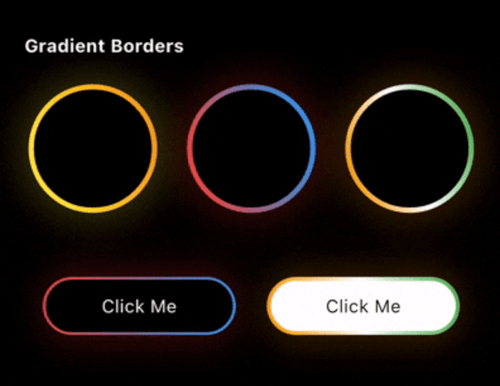
zo_animated_border를 사용하여 어떤 Flutter 위젯에도 애니메이션, 빛나는 효과, 그라데이션 테두리를 추가하세요. 현대적인 UI를 위한 강력하고 유연한 패키지입니다.

AndroidiOSWebmacOSWindowsLinux
30일 다운로드
6.5천
좋아요
137
Pub 점수
160

패키지 설치

flutter pub add zo_animated_border

패키지 개요

공개 정보를 바탕으로 생성한 선택 가이드입니다.

zo_animated_border는 어떤 위젯에도 동적이고 애니메이션 효과가 있는 빛나는 그라데이션 테두리를 추가할 수 있도록 해주는 Flutter 패키지입니다. 부드러운 전환과 사용자 정의 가능한 효과를 통해 현대적인 시각적 매력을 가진 UI를 강화합니다. 여러 플랫폼을 지원하며 기존의 Flutter 프로젝트에 쉽게 통합할 수 있습니다. 버튼, 카드, 주목을 끌 필요가 있는 인터랙티브 요소에 이상적입니다. 유연한 설정을 통해 색상, 애니메이션 속도, 테두리 스타일을 제어할 수 있습니다. 간편함과 성능을 고려해 설계되어, 매력적인 사용자 인터페이스를 만들기에 완벽합니다.

사용 사례

  • 애니메이션 버튼 만들기
  • 카드 컴포넌트 향상
  • 웹에 호버 효과 추가하기
  • 인터랙티브 UI 요소 설계
  • 빛나는 포커스 상태 구현
  • 현대적인 대시보드 위젯 만들기

주요 기능

  • 애니메이션된 테두리 전환
  • 빛나는 테두리 효과
  • 그라디언트 테두리 지원
  • 사용자 지정 가능한 애니메이션 속도
  • 크로스 플랫폼 호환성
  • 기존 위젯과의 간편한 통합

적합한 대상

  • 현대적인 미학을 추구하는 UI 디자이너
  • 인터랙티브 앱을 개발하는 개발자
  • 프론트엔드 중심의 플러터 프로젝트
  • 시각적 참여도가 높은 앱
  • 동적 인터페이스 프로토타이핑
  • 다중 플랫폼을 대상으로 하는 프로젝트

고려 사항

  • 저사양 기기에서 성능에 영향을 미칠 수 있습니다
  • 복잡한 애니메이션을 위해 신중한 튜닝이 필요합니다
  • 테두리 장식에만 제한됨
  • 정적 UI에 적합하지 않습니다
  • 최소한의 겹치는 요소와 함께 사용하는 것이 가장 좋습니다
  • 애니메이션은 다른 변환과 충돌할 수 있습니다

원본 README

연결된 소스 저장소의 README 원문 스냅샷입니다. 최신 내용은 저장소에서 확인하세요.

pub package pub points License: MIT

Zo Animated Border is a powerful Flutter package that brings modern UI to life with beautifully animated borders. Whether you're building a login screen, a button, or a decorative container, this package lets you wrap any widget with stylish, animated border effects.

Getting started

First, add zo_animated_border as a dependency in your pubspec.yaml file

dependencies:
  flutter:
    sdk: flutter
  zo_animated_border : ^[version]

Import the package

import 'package:zo_animated_border/zo_animated_border.dart';

Usage

For Gradient border

gradient_border (online-video-cutter com)

ZoAnimatedGradientBorder(
  borderRadius: 100,
  animationCurve: Curves.linear,
  borderThickness: 4,
  gradientColor: [
    Colors.yellow,
    Colors.orange,
  ],
  animationDuration: const Duration(seconds: 4),
  child: Container(
    width: 100,
    height: 100,
    alignment: Alignment.center,
    decoration: BoxDecoration(
      shape: BoxShape.circle,
    ),
    child: Text(
      "Circle",
      style: TextStyle(color: Colors.white),
    ),
  ),
);

For Fire Border

Screen Recording 2026-07-25 at 11 22 57 PM
ZoFireBorder(
  duration: const Duration(seconds: 3),
  borderWidth: 4,
  snakeLength: 0.8,
  borderRadius: BorderRadius.circular(24),
  gradient: const LinearGradient(
    colors: [
      Colors.orange,
      Colors.red,
      Colors.green,
    ],
  ),
  particleColors: const [
    Colors.orange,
    Colors.orangeAccent,
    Colors.white,
  ],
  child: Container(
    width: 200,
    height: 200,
    alignment: Alignment.center,
    decoration: BoxDecoration(
      color: Colors.black,
      borderRadius: BorderRadius.circular(24),
    ),
    child: const Icon(
      Icons.local_fire_department,
      color: Colors.white,
      size: 60,
    ),
  ),
),

For Psycho Border

Screen Recording 2026-07-25 at 11 19 24 PM
ZoPsychoBorder(
  ringCount: 4,
  maxSpread: 10.0,
  borderRadius: BorderRadius.circular(75),
  colors: const [
    Color(0xFFFF2A85),
    Color(0xFFFF992A),
    Color(0xFF00E5FF),
    Color(0xFF6B2AFF),
  ],
  duration: const Duration(seconds: 3),
  child: Container(
    width: 150,
    height: 150,
    alignment: Alignment.center,
    decoration: BoxDecoration(
      color: Colors.transparent,
      borderRadius: BorderRadius.circular(20),
    ),
    child: const Text(
      'Z',
      style: TextStyle(
        color: Colors.white,
        fontSize: 50,
        fontWeight: FontWeight.bold,
      ),
    ),
  ),
),

For Sequential Glow Border

Screen Recording 2026-09-08 at 12 28 33 PM
ZoSequentialGlowBorder(
  borderRadius: BorderRadius.circular(20),
  borderWidth: 4.0,
  glowRadius: 10.0,
  duration: const Duration(seconds: 4),
  gradientPalettes: const [
    [Color(0xFF6B2AFF), Color(0xFF00E5FF)], // Purple to Cyan
    [Color(0xFFFF2A85), Color(0xFFFF992A)], // Pink to Orange
    [Color(0xFF00FF87), Color(0xFF60EFFF)], // Green to Blue
  ],
  child: Container(
    width: 250,
    height: 120,
    alignment: Alignment.center,
    child: const Text(
      "Sequential Glow Border",
      style: TextStyle(
        color: Colors.white,
        fontSize: 18,
      ),
    ),
  ),
)

For MultiColor Border

multicolor

ZoMultiColorBorder(
  colors: [
    Colors.orange,
    Colors.white,
    Colors.green,
    Colors.indigo,
    Colors.pink,
  ],
  strokeWidth: 3,
  borderRadius: 75,
  child: Padding(
    padding: const EdgeInsets.all(3.0),
    child: Container(
      width: 150,
      height: 150,
      alignment: Alignment.center,
      decoration: BoxDecoration(
        color: Colors.blue,
        shape: BoxShape.circle,
      ),
      child: Text(
        "MultiColor Border",
        style: TextStyle(color: Colors.white),
        textAlign: TextAlign.center,
      ),
    ),
  ),
)

For Text Border

circular_text

ZoTextBorder(
  text: "The Zerone",
  borderRadius: BorderRadius.circular(100),
  padding: 12,
  duration: const Duration(seconds: 12),
  textStyle: const TextStyle(
    color: Colors.greenAccent,
    fontSize: 12,
  ),
  child: Container(
    width: 150,
    height: 150,
    decoration: BoxDecoration(
      borderRadius: BorderRadius.circular(8),
    ),
    child: const Icon(
      Icons.shield,
      color: Colors.greenAccent,
      size: 50,
    ),
  ),
)

For Segmented Border

segment_border (online-video-cutter com) (1)
ZoSegmentBorder(
  borderRadius: 20,
  segmentLength: 0.2,
  glowOpacity: 1.0,
  glowRadius: 10,
  colors: const [
    Colors.cyanAccent,
    Colors.cyanAccent,
  ],
  child: Container(
    width: 250,
    height: 120,
    alignment: Alignment.center,
    child: const Text(
      "Zo Segment Border",
      style: TextStyle(
        color: Colors.white,
        fontSize: 18,
      ),
    ),
  ),
)

For Scribble Border

scribble_border

ZoScribbleBorder(
  borderColor: Colors.white,
  padding: const EdgeInsets.all(50),
  borderRadius: 100,
  child: ClipOval(
    child: Image.asset(
      'assets/pnglogo.png', // Replace with your asset
      width: 110,
      height: 110,
      fit: BoxFit.cover,
      errorBuilder: (context, error, stackTrace) =>
          const Icon(
            Icons.face,
            size: 80,
            color: Colors.orange,
          ),
    ),
  ),
),

For Ripple Border

ripple

ZoRippleEffect(
  rippleColor: Colors.cyanAccent,
  minCircleSize: 120,
  numberOfCircles: 4,
  animationDuration: const Duration(seconds: 4),
  child: const CircleAvatar(
    radius: 40,
    backgroundColor: Colors.cyanAccent,
    child: Icon(
      Icons.home,
      color: Colors.white,
      size: 30,
    ),
  ),
);

For Color Changing Border

new_border

ZoColorChangingBorder(
  borderRadius: 0,
  segmentLength: 0.2,
  colors: [
    Colors.orange,
    Colors.white,
    Colors.green,
  ],
  child: Padding(
    padding: const EdgeInsets.all(3.0),
    child: Container(
      width: 150,
      height: 150,
      alignment: Alignment.center,
      decoration: const BoxDecoration(
        color: Colors.blue,
      ),
      child: const Text(
        "Color Changing Border",
        textAlign: TextAlign.center,
        style: TextStyle(color: Colors.white),
      ),
    ),
  ),
);

For Signal Border

Simulator Screen Recording - iPhone 15 Pro - 2025-08-19 at 11 56 35 (online-video-cutter com)

ZoSignalBorder(
  maxRadius: 120,
  ringColors: [
    Colors.yellow,
    Colors.orange,
    Colors.red,
    Colors.purple,
    Colors.blue,
  ],
  child: Container(
    alignment: Alignment.center,
    width: 130,
    height: 130,
    decoration: BoxDecoration(
      color: Colors.white,
      shape: BoxShape.circle,
    ),
    child: const Text("Signal Border"),
  ),
);

For Dual border

dual

ZoDualBorder(
  glowOpacity: 0.4,
  firstBorderColor: Colors.yellow,
  secondBorderColor: Colors.orange,
  trackBorderColor: Colors.transparent,
  borderWidth: 8,
  borderRadius: BorderRadius.circular(10),
  child: Container(
    width: 150,
    height: 150,
    alignment: Alignment.center,
    decoration: BoxDecoration(
      color: Colors.white,
      borderRadius: BorderRadius.circular(10),
    ),
    child: Text(
      "Dual Border",
      style: TextStyle(
        color: Colors.black,
      ),
    ),
  ),
);

For Dotted border

dotted

ZoDottedBorder(
  child: Container(
    height: 100,
    width: 100,
    color: Colors.red,
    alignment: Alignment.center,
    child: Text(
      "MonoChrome",
      style: TextStyle(fontSize: 14, color: Colors.white),
    ),
  ),
  animate: true,
  borderRadius: 10,
  dashLength: 10,
  gapLength: 5,
  strokeWidth: 3,
  color: Colors.blue,
  borderStyle: BorderStyleType.monochrome,
);

For Breathing border

breathing

ZoBreathingBorder(
  borderWidth: 3.0,
  borderRadius: BorderRadius.circular(75),
  colors: [
    Colors.blue,
    Colors.purple,
    Colors.red,
    Colors.orange,
  ],
  animationDuration: const Duration(seconds: 4),
  child: Container(
    width: 150,
    height: 150,
    decoration: BoxDecoration(
      color: Colors.white,
      borderRadius: BorderRadius.circular(75),
    ),
    alignment: Alignment.center,
    child: const Text(
      'Breathing Border',
      textAlign: TextAlign.center,
      style: TextStyle(
        fontSize: 16,
        fontWeight: FontWeight.bold,
      ),
    ),
  ),
);

For Snake Border

snake_border

ZoSnakeBorder(
  glowOpacity: 0,
  snakeHeadColor: Colors.red,
  snakeTailColor: Colors.blue,
  snakeTrackColor: Colors.blueGrey,
  borderWidth: 5,
  borderRadius: BorderRadius.circular(10),
  child: Container(
    width: 150,
    height: 45,
    alignment: Alignment.center,
    decoration: BoxDecoration(
      color: Colors.white,
      borderRadius: BorderRadius.circular(10),
    ),
    child: Text(
      "Snake Border",
      style: TextStyle(color: Colors.black),
    ),
  ),
);

For GlowEdge Border

glowEdge

ZoGlowingEdgeBorder(
  gradientColors: [
    Colors.orange,
    Colors.white,
    Colors.green,
  ],
  child: Padding(
    padding: const EdgeInsets.all(3.0),
    child: Container(
      width: 150,
      height: 150,
      alignment: Alignment.center,
      decoration: const BoxDecoration(
        color: Colors.blue,
      ),
      child: const Text(
        "Glow Edge Border",
        textAlign: TextAlign.center,
        style: TextStyle(color: Colors.white),
      ),
    ),
  ),
);


For Pulsating border

pulse (online-video-cutter com)

ZoPulsatingBorder(
  type: ZoPulsatingBorderType.pulse,
  borderRadius: BorderRadius.circular(100),
  pulseColor: Colors.blue,
  child: Container(
    alignment: Alignment.center,
    width: 100,
    height: 100,
    decoration: BoxDecoration(
      color: Colors.red,
      borderRadius: BorderRadius.circular(50),
    ),
    child: Text(
      "Radar Pulse",
      style: TextStyle(color: Colors.white),
    ),
  ),
);

For MonoChrome border

mono_chrome (online-video-cutter com)

ZoMonoCromeBorder(
  trackBorderColor: Colors.white,
  cornerRadius: 50.0,
  borderStyle: ZoMonoCromeBorderStyle.mirror,
  borderWidth: 5.5,
  child: Container(
    width: 100,
    height: 100,
    alignment: Alignment.center,
    decoration: BoxDecoration(
      color: Colors.red,
      shape: BoxShape.circle,
    ),
    child: Text(
      "Mirror",
      style: TextStyle(color: Colors.white),
    ),
  ),
);

Feel free to post a feature requests or report a bug issues.

My Other packages

  • zo_micro_interactions: A curated set of high-quality Flutter micro-interactions designed for modern, polished apps.
  • zo_screenshot: The zo_screenshot plugin helps restrict screenshots and screen recording in Flutter apps, enhancing security and privacy by preventing unauthorized screen captures.
  • zo_collection_animation: A lightweight Flutter package to create smooth collect animations for coins carts
  • connectivity_watcher: A Flutter package to monitor internet connectivity with subsecond response times, even on mobile networks.
  • zo_app_blocker: A Flutter plugin to block specific applications on Android.
  • ultimate_extension: Enhances Dart collections and objects with utilities for advanced data manipulation and simpler coding.
  • theme_manager_plus: Allows customization of your app's theme with your own theme class, eliminating the need for traditional
  • date_util_plus: A powerful Dart API designed to augment and simplify date and time handling in your Dart projects.
  • pick_color: A Flutter package that allows you to extract colors and hex codes from images with a simple touch.

카테고리

소스 저장소

이 패키지를 사용하는 프로젝트

아직 데이터가 없습니다.