
 v1.0.1
book_my_seat
버스, 극장, 항공기 등에 대한 좌석 예약 레이아웃을 생성하기 위한 플러터 패키지입니다.
69좋아요 4230일 다운로드140Pub 점수
AndroidiOSWebmacOSWindowsLinux
Flutter에서 좌석 예약 레이아웃을 만들기 위한 Flutter 패키지입니다.

{"sdk":"flutter"}^2.0.5^1.0.2아래는 영문 원문 스냅샷입니다. 최신 내용은 GitHub에서 확인하세요.
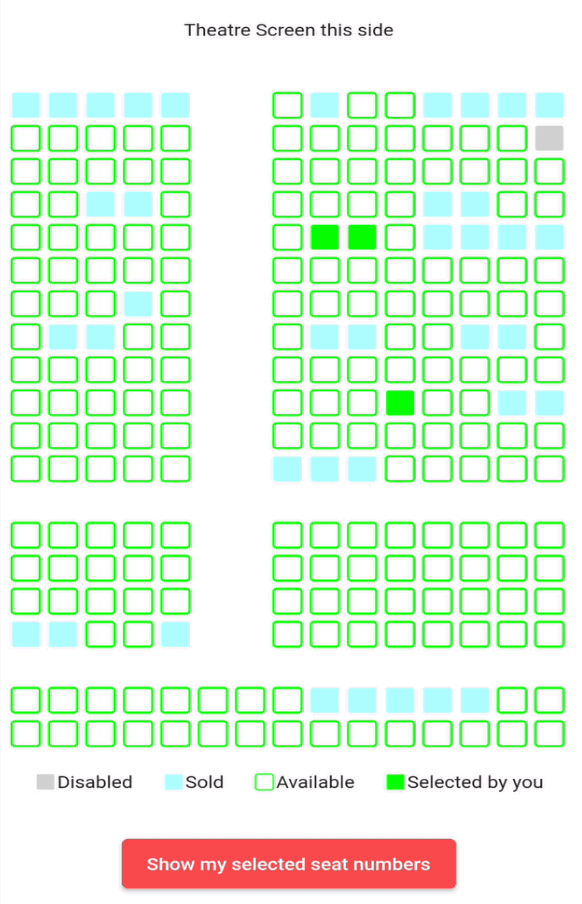
This is a flutter package to create seat booking layout for bus, theatre, aeroplane etc. This gives you facility to select a seat by gestures like zoom-in, zoom-out, pan etc.
https://user-images.githubusercontent.com/47804278/194926012-7e04955d-ca78-44d4-a52b-0e8fc8fbd128.jpg " " gif
Add this dependency in your pubspec.yaml file
dependencies:
  book_my_seat: <version number>
import 'package:book_my_seat/book_my_seat.dart';
SeatLayoutWidget widget and add the required parameters.Example:
SeatLayoutWidget(
  onSeatStateChanged: (rowIndex, colIndex, updatedSeatState) {
    print("tapped $rowIndex $colIndex $updatedSeatState");
  },
  stateModel: SeatLayoutStateModel(
    rows: 12,
    cols: 15,
    seatSvgSize: 30,
    pathUnSelectedSeat: 'assets/svg_unselected_bus_seat.svg',
    pathSelectedSeat: 'assets/svg_selected_bus_seat.svg',
    pathSoldSeat: 'assets/svg_sold_bus_seat.svg',
    pathDisabledSeat: 'assets/svg_disabled_bus_seat.svg',
    currentSeatsState: <explained below>,
  ),
)
onSeatStateChanged: - This is a callback method which gets called when user clicks on a seat which has current state equals to either SeatState.selected or SeatState.unselected.
The params in this method are:
rowIndex - the index of the row where this seat is situated
colIndex - the index of the column where this seat is situated
updatedSeatState - this is the updated state of the seat after user clicks on the seat. It is an enum of type SeatState
stateModel: - It is an object of class SeatLayoutStateModel which describes the initial state of the whole layout(maybe bus or aeroplane or theatre). The params in this method are:
rows - number of rows in the area(I will refer bus/aeroplane/theatre etc as area from now onwards)
cols - number of columns in the area.
seatSvgSize - size of individual seat
pathUnSelectedSeat, pathSelectedSeat, pathSoldSeat, pathDisabledSeat - path of the svg assets you want to show for unselected(available), selected(by you right now), already sold and disabled(non-choosable) seats respectively
currentSeatsState - this is the main parameter. It is a 2D list i.e. of type List<List<SeatState>> (SeatState enum is explained below). This describes the initial state of the area i.e. state of each seat whether it is already sold or unselected(available) or selected by you or disabled(non-selectable).
It is a dart enum. This describes the current state of individual seat. This currently holds 5 states unselected, selected, sold, disabled and empty.
Brief description of each:
unselected - state when a seat is available and user can select itselected - state when user has selected an unselected(available) seat (i.e. a seat which had its state == unselected)sold - state when it is already sold to some other userdisabled - state when a seat is disabled and nobody can select itempty - state of the cell in 2D area which is an empty place(consider vacant ground) in the bus/theatre/aeroplane etc. This can mimic staircase or aisle or some other place in the area where there are no seatsNOTE: User can only click on seats which have state equals to SeatState.selected or SeatState.unselected.
Prateek Sharma - Linkedin | Github