버스, 극장, 항공기와 같은 교통 수단 및 이벤트 장소를 위한 상호작용식 좌석 예약 레이아웃을 생성하도록 설계된 플러터 패키지입니다. 사용자가 좌석을 선택하고 강조 표시하며 예약을 쉽게 관리할 수 있도록 사용자 정의 가능한 UI 컴포넌트를 제공합니다. 안드로이드, iOS, 웹, macOS, 윈도우, 리눅스 등 다양한 플랫폼을 지원하여 직관적인 좌석 선택 인터페이스가 필요한 크로스플랫폼 애플리케이션에 이상적입니다.
사용 사례
버스 티켓 예약
극장 좌석 예약
비행기 좌석 배치
이벤트 티켓팅 시스템
다중 장소 예약 앱
인터랙티브 좌석도
주요 기능
사용자 정의 가능한 좌석 스타일
실시간 좌석 선택
다수의 좌석 배치 지원
크로스 플랫폼 호환성
내장된 시트 상태 관리
모든 기기용 반응형 디자인
적합한 대상
여행 및 교통 앱
이벤트 및 장소 관리 소프트웨어
티켓팅 플랫폼
모바일 및 웹 예약 인터페이스
재사용 가능한 좌석 UI 컴포넌트가 필요한 개발자
고려 사항
예약 로직의 수동 통합이 필요합니다
좌석 충돌에 대한 내장 검증이 제한적
정적 또는 반동적 좌석 레이아웃에 가장 적합
복잡한 워크플로우를 위해 추가적인 상태 관리가 필요할 수 있습니다
좌석 이용 가능 여부에 외부 데이터에 의존
원본 README
연결된 소스 저장소의 README 원문 스냅샷입니다. 최신 내용은 저장소에서 확인하세요.
book_my_seat
This is a flutter package to create seat booking layout for bus, theatre, aeroplane etc. This gives you facility to select a seat by gestures like zoom-in, zoom-out, pan etc.
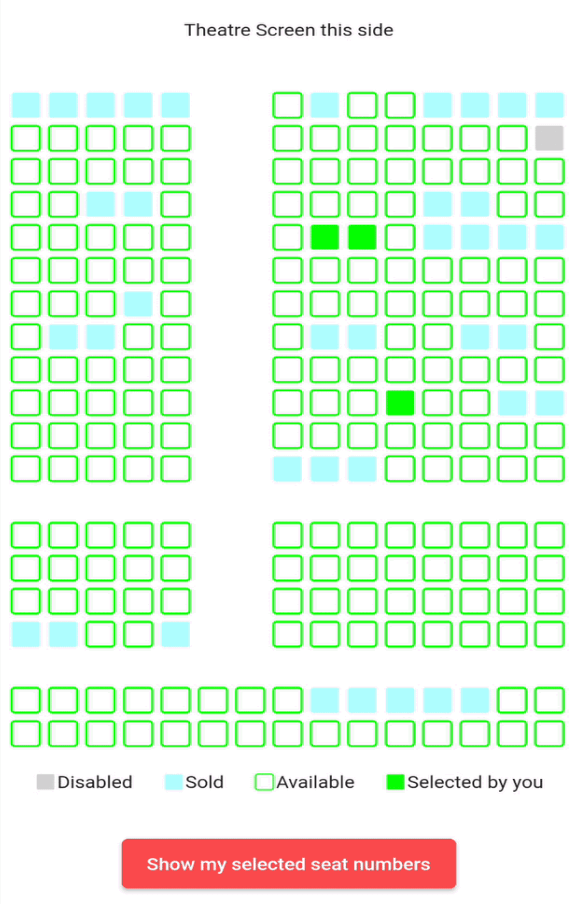
Some examples(below is for theatre but you can implement the package for bus etc also)
" "
Example project and blog for better understanding 🚀
onSeatStateChanged: - This is a callback method which gets called when user clicks on a seat which has current state equals to either SeatState.selected or SeatState.unselected.
The params in this method are: rowIndex - the index of the row where this seat is situated colIndex - the index of the column where this seat is situated updatedSeatState - this is the updated state of the seat after user clicks on the seat. It is an enum of type SeatState
stateModel: - It is an object of class SeatLayoutStateModel which describes the initial state of the whole layout(maybe bus or aeroplane or theatre). The params in this method are: rows - number of rows in the area(I will refer bus/aeroplane/theatre etc as area from now onwards) cols - number of columns in the area. seatSvgSize - size of individual seat pathUnSelectedSeat, pathSelectedSeat, pathSoldSeat, pathDisabledSeat - path of the svg assets you want to show for unselected(available), selected(by you right now), already sold and disabled(non-choosable) seats respectively currentSeatsState - this is the main parameter. It is a 2D list i.e. of type List<List<SeatState>> (SeatState enum is explained below). This describes the initial state of the area i.e. state of each seat whether it is already sold or unselected(available) or selected by you or disabled(non-selectable).
SeatState enum:
It is a dart enum. This describes the current state of individual seat. This currently holds 5 states unselected, selected, sold, disabled and empty.
Brief description of each:
unselected - state when a seat is available and user can select it
selected - state when user has selected an unselected(available) seat (i.e. a seat which had its state == unselected)
sold - state when it is already sold to some other user
disabled - state when a seat is disabled and nobody can select it
empty - state of the cell in 2D area which is an empty place(consider vacant ground) in the bus/theatre/aeroplane etc. This can mimic staircase or aisle or some other place in the area where there are no seats
NOTE: User can only click on seats which have state equals to SeatState.selected or SeatState.unselected.
Example project and blog for better understanding 🚀

 " "