

 v2.0.1
kpostal
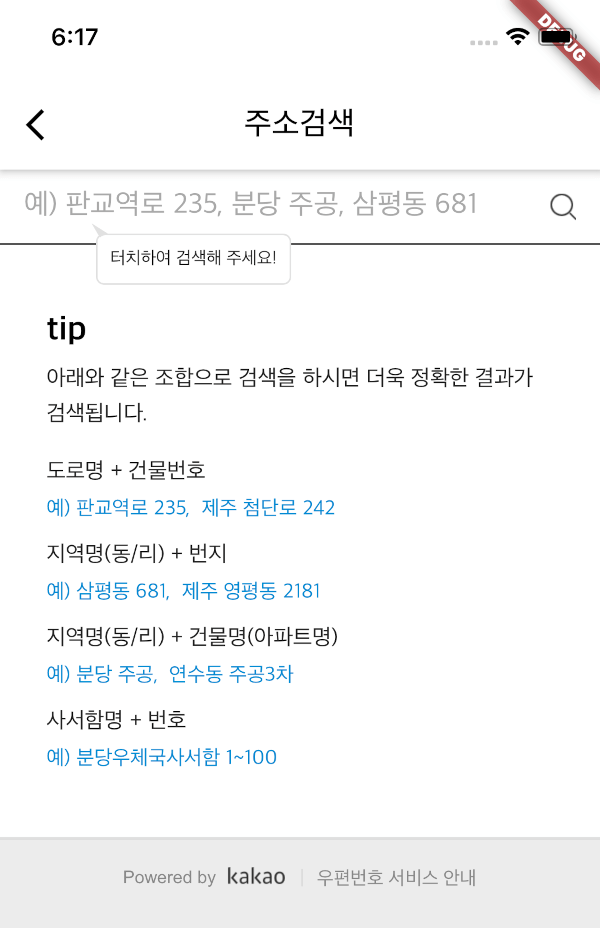
Kpostal 패키지는 카카오 우편번호 서비스를 사용하여 한국 주소를 검색할 수 있습니다.
74좋아요 2.7천30일 다운로드160Pub 점수
AndroidiOS
Kpostal 패키지는 카카오 우편번호 서비스를 사용하여 한국 주소를 검색할 수 있습니다.

아래는 영문 원문 스냅샷입니다. 최신 내용은 GitHub에서 확인하세요.




kpostal is a Korean postal address search widget for Flutter, powered by the Kakao (Daum) postcode service. Push a single widget, get a structured address (postcode, road/jibun address, building info, …) back — with optional latitude/longitude geocoding.
Inspired by the discontinued Kopo package.
KpostalView widget — zero configuration to get started.useLocalServer) in case of hosting issues.AppBar, loading indicator, and result callback.| Android | iOS | macOS | Web | Windows | Linux |
|---|---|---|---|---|---|
| ✅ | ✅ | ✅ | ✅ | ❌ | ❌ |
useLocalServer is ignored and platform geocoding is unavailable (latitude/longitude are null) — use kakaoKey geocoding instead.
dependencies:
  kpostal:
import 'package:kpostal/kpostal.dart';

// Use callback.
await Navigator.push(context, MaterialPageRoute(
  builder: (_) => KpostalView(
    callback: (Kpostal result) {
      print(result.address);
      print(result.latitude);
    },
  ),
));

// Or receive the result as a return value.
Kpostal result = await Navigator.push(
  context, MaterialPageRoute(builder: (_) => KpostalView()));
Key fields on the Kpostal result: postCode, address, roadAddress, jibunAddress, buildingName, sido, sigungu, latitude/longitude, kakaoLatitude/kakaoLongitude, userSelectedAddress — see the API reference for the full list.
🧑🏻💻 With the default hosted page, Android and iOS need no extra setup.
<!-- AndroidManifest.xml -->
<uses-permission android:name="android.permission.INTERNET"/>
<!-- macos/Runner/DebugProfile.entitlements & Release.entitlements -->
<key>com.apple.security.network.client</key>
<true/>
<!-- only if you use [useLocalServer] -->
<key>com.apple.security.network.server</key>
<true/>
useLocalServer: true) — allow http trafficThe local server serves the search page over http://localhost, so cleartext traffic must be allowed.
Android — add android:usesCleartextTraffic="true" to <application> in AndroidManifest.xml:
<application
    android:label="[your_app]"
    android:usesCleartextTraffic="true"
    ...>
iOS — add NSAppTransportSecurity to Info.plist:
<key>NSAppTransportSecurity</key>
<dict>
    <key>NSAllowsArbitraryLoads</key>
    <true/>
</dict>
kakaoKey) — get kakaoLatitude/kakaoLongitudehttps://tykann.github.iohttp://localhost:{your port, default 8080}kakaoKey.KpostalView(
kakaoKey: '{your kakao app JS key}',
callback: (Kpostal result) {
print(result.kakaoLatitude);
},
)
KpostalView(
  useLocalServer: true,        // host the page on localhost (default: false)
  localPort: 8080,             // local server port (default: 8080)
  kakaoKey: '{JS key}',        // enable Kakao geocoding (optional)
  appBar: ...,                 // custom AppBar (optional)
  onLoading: ...,              // custom loading widget (optional)
  callback: (Kpostal result) { ... },
)
Most apps need no code changes — v2 swaps the webview engine from flutter_inappwebview to the official webview_flutter and adds Web/macOS support.
latitude/longitude are null — use kakaoKey geocoding if you need coordinates.See the CHANGELOG for details.
webview_flutter, Web & macOS supportScaffold)webview_flutter desktop supportHave an idea or issue? Open an issue — contributions are welcome!
의존성 목록 8 개
{"sdk":"flutter"}^5.0.0^5.0.0^1.1.0^4.14.1{"sdk":"flutter"}—^2.15.1사용 목적에 따라 검색하고 개발 활동을 비교한 뒤 원본 저장소에서 요구 사항을 확인하세요.
“A repository is the most basic element of GitHub.”
GitHub Docs — About repositories ↗