
 v4.0.1
settings_ui
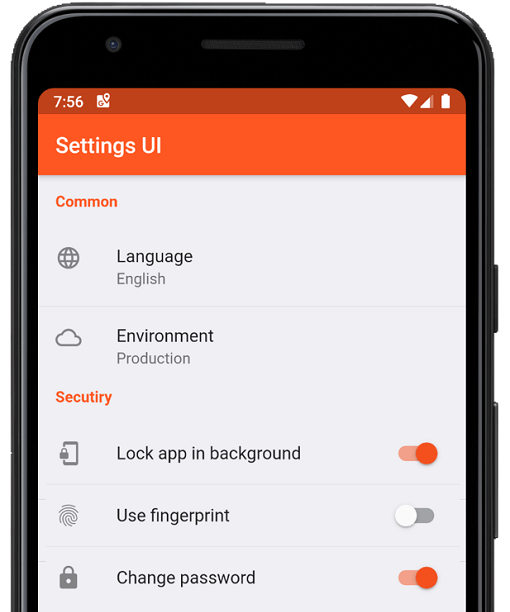
몇 분 만에 Flutter 앱용 네이티브 설정을 생성하세요. 단일 인터페이스를 사용하여 빌드합니다
1천좋아요 33.2만30일 다운로드160Pub 점수
AndroidiOSWebmacOSWindowsLinux
:weight_lifting: :medal_sports: 오픈소스이며 크로스 플랫폼의 하이 인터벌 트레이닝(HIIT) 및 타바타 인터벌 타이머입니다. 풀 리퀘스트를 환영합니다!
 v4.0.1
몇 분 만에 Flutter 앱용 네이티브 설정을 생성하세요. 단일 인터페이스를 사용하여 빌드합니다
 v0.8.0
화려한 커페티를 화면 전체에 흩뿌리세요. 앱 내 성취를 스타일 있게 축하하세요. 커페티의 속도, 각도, 중력 및 양을 제어할 수 있습니다.
 v1.2.0
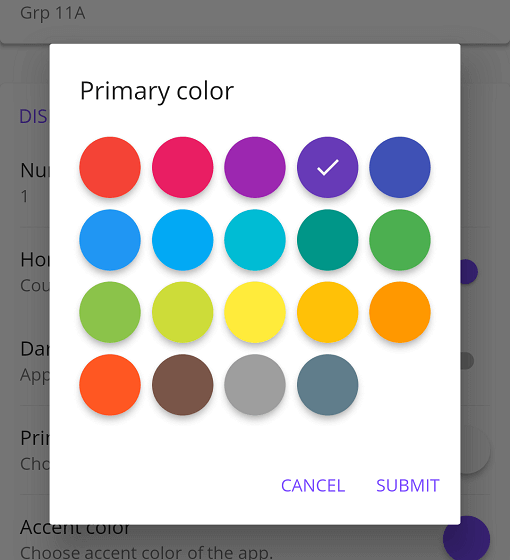
Flutter 앱용 가능한 커스터마이제이션을 갖춘 Material 색상 선택기
{"sdk":"flutter"}^1.9.0^4.5.3^0.8.0^2.4.0+2^1.5.2^1.2.0^1.2.3^3.0.0^8.1.0^3.0.0^2.7.0^10.3.10^2.1.3^12.0.2^12.0.0+1^2.5.5^6.3.0^6.1.2^1.0.0^0.1.1^3.0.1^9.0.1^0.14.1{"sdk":"flutter"}^6.0.0{"sdk":"flutter"}아래는 영문 원문 스냅샷입니다. 최신 내용은 GitHub에서 확인하세요.
Integration Tests Nightly Build Pre-Release Release
https://raw.githubusercontent.com/a-mabe/OpenHIIT/HEAD/assets/icon/openhiit-ios.png
https://www.buymeacoffee.com/assets/img/custom_images/orange_img.png https://raw.githubusercontent.com/a-mabe/OpenHIIT/HEAD/docs/images/Google_Play_Badge.svg Get it at IzzyOnDroid https://raw.githubusercontent.com/a-mabe/OpenHIIT/HEAD/docs/images/Download_on_the_App_Store_Badge_US-UK_RGB_blk_092917.svg
OpenHIIT is a free, open-source interval timer app built with Flutter. Create unlimited workout timers with custom audio/visual cues. No ads, no paywalls, no subscriptions.
▶️ The background timer package is developed separately here.
| ⏲️ Customizable Timers | Build interval timers. |
| 🔊 Visual & Audio Cues | Stay on track with cues for every interval transition. |
| 💾 Save & Load | Store unlimited timer configurations. |
| 📱 Export & Import | Export and share timer configs or import configs. |
| 🖌️ Color Coding | Color-code your timers to keep your routines organized. |
| 🏋️ Exercise Labels | Add exercise names that display on-screen while the timer runs. |
https://github.com/user-attachments/assets/2d64f356-526b-419e-8b71-cc43bf8da65b https://github.com/user-attachments/assets/8ada8439-deae-47ea-b76c-96c49cfdf914 https://github.com/user-attachments/assets/4b470c2f-96db-4e01-95c9-228cccb65316 https://github.com/user-attachments/assets/a74e76e5-4608-4303-a751-e156f1645335
Check out the OpenHIIT Roadmap to see planned features, work in progress, and ideas under consideration. Have a suggestion? Open an issue or start a discussion.
https://raw.githubusercontent.com/a-mabe/OpenHIIT/HEAD/docs/images/Google_Play_Badge.svg https://raw.githubusercontent.com/a-mabe/OpenHIIT/HEAD/docs/images/Download_on_the_App_Store_Badge_US-UK_RGB_blk_092917.svg
Install Flutter — follow the official Flutter installation guide to set up Flutter and the Dart SDK.
Clone the repository:
git clone https://github.com/a-mabe/openhiit.git
cd openhiit
Install dependencies:
flutter pub get
Run the app — connect a device or start an emulator, then:
flutter run
Encountering an issue? Visit the support page for troubleshooting guidance and known issues.
Contributions are welcome! Please open an issue before creating a PR. To begin working on an issue:
feature/rest-round-alerts).Please check the Roadmap and open issues before starting work to avoid duplication.
OpenHIIT is released under the MIT License. You're free to use, modify, and distribute this app under those terms. See the LICENSE file for full details.