
pdf_viewer
PDF 파일을 처리하기 위한 플러터 플러그인입니다. Android 및 iOS에서 모두 작동합니다

- 스타
- 2
- 포크
- 20
- 최근 푸시(UTC)
- 2024. 4. 13.
- 프로젝트 상태
- 활성
원본 README
아래는 영문 원문 스냅샷입니다. 최신 내용은 GitHub에서 확인하세요.
advance_pdf_viewer_fork
A flutter plugin for handling PDF files. Works on both Android & iOS. Originally forked from https://github.com/lohanidamodar/pdf_viewer that originally forked from https://github.com/CrossPT/flutter_plugin_pdf_viewer.

Installation
Add advance_pdf_viewer_fork as a dependency in your pubspec.yaml file.
advance_pdf_viewer_fork: any
Android
No permissions required. Uses application cache directory.
iOS
No permissions required.
How-to:
Load PDF
// Load from assets
PDFDocument doc = await PDFDocument.fromAsset('assets/test.pdf');

// Load from URL
PDFDocument doc = await PDFDocument.fromURL('http://www.africau.edu/images/default/sample.pdf');

// Load from file
File file  = File('...');
PDFDocument doc = await PDFDocument.fromFile(file);
Load pages
// Load specific page
PDFPage pageOne = await doc.get(page: _number);
Pre-built viewer
Use the pre-built PDF Viewer
@override
  Widget build(BuildContext context) {
    Scaffold(
        appBar: AppBar(
          title: Text('Example'),
        ),
        body: Center(
        child: _isLoading
            ? Center(child: CircularProgressIndicator())
            : PDFViewer(document: document)),
    );
  }
This code produces the following view:
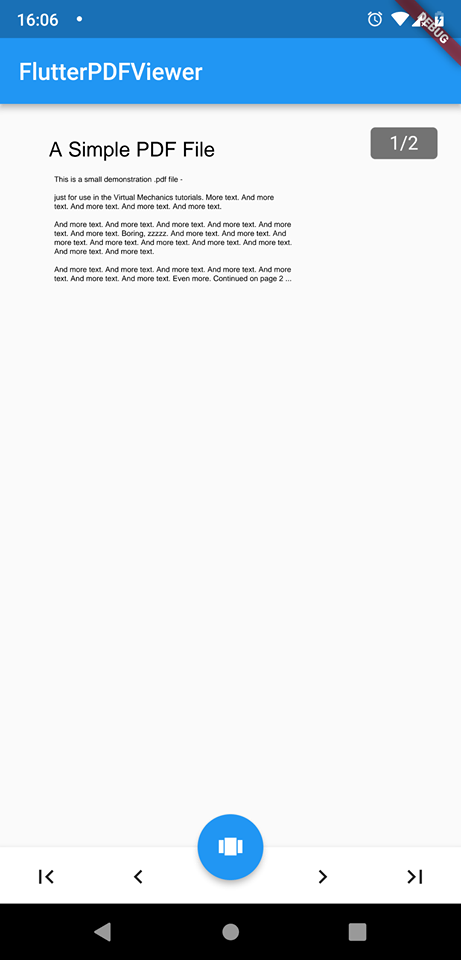
TODO
- Allow password-protected files
Third-party packages used
| Name | Description |
|---|---|
| path_provider | A Flutter plugin for finding commonly used locations on the filesystem. Supports iOS and Android. |
| flutter_cache_manager | A CacheManager to download and cache files in the cache directory of the app. Various settings on how long to keep a file can be changed. |
| numberpicker | NumberPicker is a custom widget designed for choosing an integer or decimal number by scrolling spinners. |

GitHub 작성자
Yechan Choi ↗
언어DartJavaObjective-CRuby
사용 중인 의존성
의존성 목록 4 개
- flutter
{"sdk":"flutter"} - flutter_cache_manager
^3.1.1 - numberpicker
^2.1.1 - path_provider
^2.0.2
프로젝트에 맞는 저장소를 선택하려면?
사용 목적에 따라 검색하고 개발 활동을 비교한 뒤 원본 저장소에서 요구 사항을 확인하세요.
- 이름, 작성자 또는 설명으로 검색하고 기술 주제로 범위를 좁힙니다.
- 스타, 포크, 최근 푸시를 함께 비교하세요. 스타는 관심의 지표이며 품질을 보장하지 않습니다.
- 사용하기 전에 GitHub에서 README, 라이선스, Issues를 확인하세요.
출처 및 관리
“A repository is the most basic element of GitHub.”
GitHub Docs — About repositories ↗