
 v1.3.1
ocr_scan_text
OCR 스캔 텍스트는 "Google ML Kit 텍스트 인식" 라이브러리의 래퍼입니다.
38좋아요 2130일 다운로드125Pub 점수
AndroidiOS
OCR Flutter

{"sdk":"flutter"}^2.0.2^0.8.1^0.10.2+1^4.0.17^1.4.0^1.8.2^2.0.15^5.0.0^1.0.4{"sdk":"flutter"}^2.0.0아래는 영문 원문 스냅샷입니다. 최신 내용은 GitHub에서 확인하세요.
OCR Flutter
v1.3.1
Flutter OCR Scan Text is a wrapper around the "Google ML kit Text Recognition" library. It helps to facilitate accurate text search and display of results from the camera. It also allows to manage text searches from an image or a pdf.
Allows you to easily scan text from the camera, extract accurate results and display them to the user.
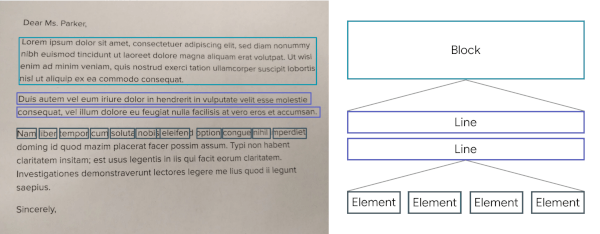
The results are returned by list of Block.
https://developers.google.com/static/ml-kit/vision/text-recognition/images/text-structure.png
Note: The library uses the Camera package, be sure to ask for permission.
dependencies:
ocr_scan_text: 1.3.1
import 'package:ocr_scan_text/ocr_scan_text.dart';
LiveScanWidget(ocrTextResult: (ocrTextResult) {}, scanModules: [ScanAllModule()],)
A LiveScanWidget needs a module list to start detection. Validated results will be returned to the "matchedResult" method.
In this example (see the /example folder), we consider all Elements to be results.
Create a scan module :
class ScanAllModule extends ScanModule
The constructor of a module:
ScanAllModule() : super(label: 'All',color: Colors.redAccent.withOpacity(0.3), validateCountCorrelation: 1);
The purpose of a module is to search among the Blocks for a list of results (ScanResult) and to return it using the "matchedResult" method.
@override
Future<List<ScanResult>> matchedResult(List<TextBlock> textBlock, String text) async {
 List<ScanResult> list = [];
 for (var block in textBlock) {
  for (var line in block.lines) {
   for (var element in line.elements) {
    list.add(ScanResult(cleanedText: element.text, scannedElementList: [element]));
   }
  }
 }
 return list;
}
module.start();
module.stop();
StaticScanWidget(ocrTextResult: (ocrTextResult) {}, scanModules: [ScanAllModule()], file: File("path/image.png"));
This method open gallery for pick a pics and start text analyze. ( /!\ verify permissions before )
OcrScanService([module]).startScanWithPhoto();
This method open file folder for pick a file and start text analyze. ( /!\ verify permissions before )
OcrScanService([module]).startScanWithOpenFile();
This method start text analyze
OcrScanService([module]).startScanProcess(File('path/image.png'));
You can use TextBlockHelper methods to help find results.
TextBlockHelper.extractTextElementsWithRegex : Find the list of elements that match with the regex
TextBlockHelper.nextTextElement : Find the next TextElement a right or left of TextElement
TextBlockHelper.combineRecreateTextLine : When texts are on the same line but distant, MLKit can create two different TextBlock. The "combineRecreateTextLine" method will create a TextLine, from a starting TextElement, taking into account the Elements of each TextBlock
TextBlockHelper.combineLeftTextElement : Return a List of TextElement with all TextElement to the left of startElement including startElement.
TextBlockHelper.combineRightTextElement : Return a List of TextElement with all TextElement to the right of startElement including startElement.
TextBlockHelper.combineBetweenTextElement : Return a List of TextElement between startElement and endElement