OCR Scan Text는 Google ML Kit 텍스트 인식 라이브러리를 래핑한 Flutter 패키지로, 카메라로 촬영하거나 디바이스 갤러리에서 선택한 이미지에서 텍스트를 추출할 수 있게 해줍니다. 다국어 및 손글씨 인식을 지원하며 정확하고 빠른 텍스트 감지 기능을 제공합니다. 개발자가 기계 학습 프레임워크에 대한 깊은 지식 없이도 고급 OCR 기능을 모바일 앱에 쉽게 통합할 수 있도록 합니다. Android와 iOS용으로 제작되어 텍스트 스캔 기능의 크로스 플랫폼 일관성을 보장합니다.
사용 사례
문서에서 텍스트 추출
명함 스캔
손글씨 노트 읽기
스크린샷에서 텍스트 캡처하기
데이터 입력 자동화
주요 기능
실시간 텍스트 인식
다중 언어 지원
손글씨 감지
카메라 통합
오프라인 운영
적합한 대상
문서 스캔 앱
노트 작성 도구
데이터 입력 자동화
접근성 기능
모바일 재고 시스템
고려 사항
카메라 권한이 필요합니다
성능은 기기마다 다릅니다
명확한 이미지로 최상의 결과
텍스트 인식에만 제한됨
저품질 입력에 대해 이미지 전처리가 필요할 수 있습니다
원본 README
연결된 소스 저장소의 README 원문 스냅샷입니다. 최신 내용은 저장소에서 확인하세요.
Flutter OCR Scan Text
OCR Flutter
v1.3.1
Flutter OCR Scan Text is a wrapper around the "Google ML kit Text Recognition" library.
It helps to facilitate accurate text search and display of results from the camera. It also allows to manage text searches from an image or a pdf.
Features
Allows you to easily scan text from the camera, extract accurate results and display them to the user.
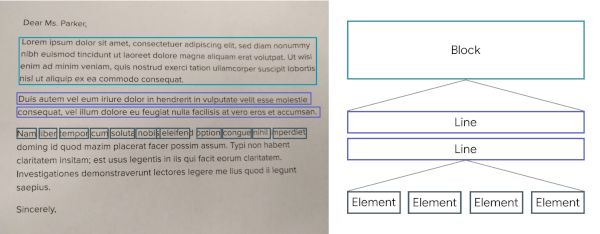
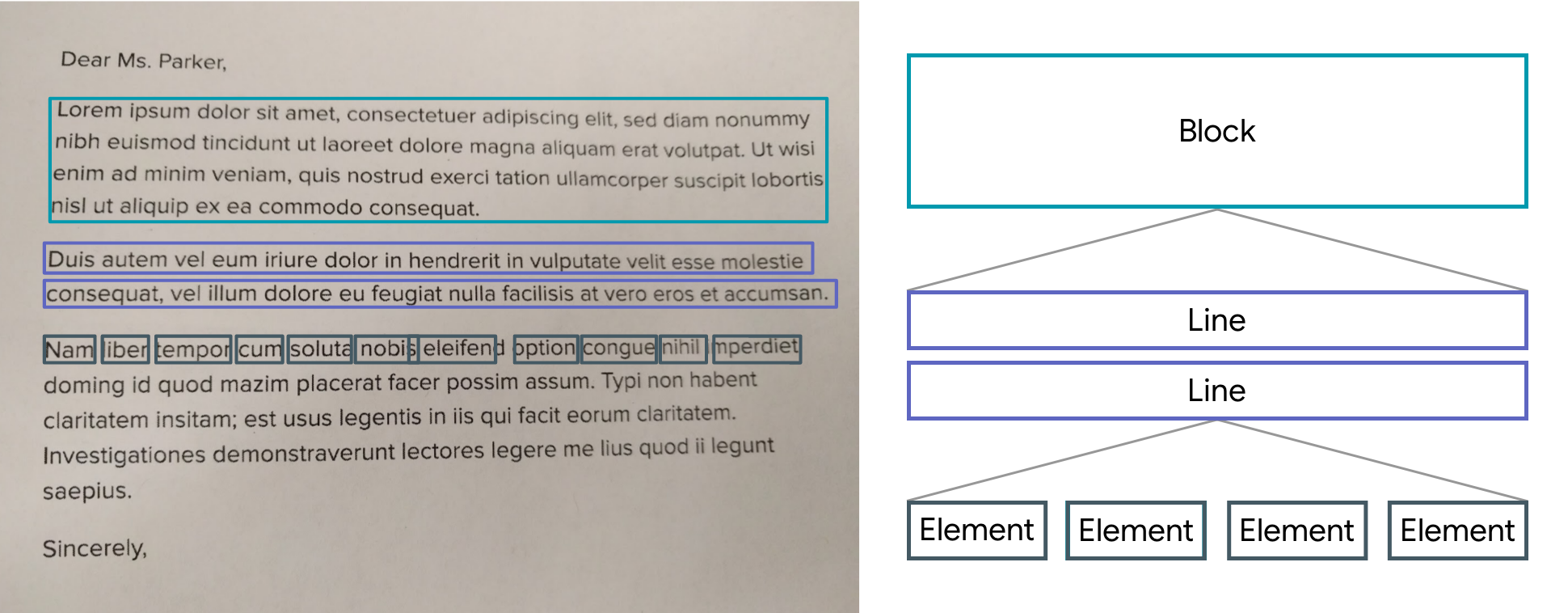
The results are returned by list of Block.
A Block contains: the global text of the block, a list of Lines and the position.
A Line contains: the global text of the line, a list of Elements and the position.
An Element contains: a word and the position.
Note: The library uses the Camera package, be sure to ask for permission.
A LiveScanWidget needs a module list to start detection.
Validated results will be returned to the "matchedResult" method.
Create a scan module :
In this example (see the /example folder), we consider all Elements to be results.
Create a scan module :
classScanAllModuleextendsScanModule
The constructor of a module:
label: A label (optional) that will be displayed to the user during rendering
color: A color (optional) that will be used for rendering
validateCountCorrelation: The number of times the same result must be found in the same place for it to be valid. (As the camera moves certain numbers / letters may be misinterpreted over several frames).
The purpose of a module is to search among the Blocks for a list of results (ScanResult) and to return it using the "matchedResult" method.
@overrideFuture<List<ScanResult>> matchedResult(List<TextBlock> textBlock, String text) async {
List<ScanResult> list = [];
for (var block in textBlock) {
for (var line in block.lines) {
for (var element in line.elements) {
list.add(ScanResult(cleanedText: element.text, scannedElementList: [element]));
}
}
}
return list;
}
Start a module :
module.start();
Stop a module :
module.stop();
Scan file with Widget (Supported extension : png, jpg and pdf )
You can use TextBlockHelper methods to help find results.
TextBlockHelper.extractTextElementsWithRegex :
Find the list of elements that match with the regex
TextBlockHelper.nextTextElement :
Find the next TextElement a right or left of TextElement
TextBlockHelper.combineRecreateTextLine :
When texts are on the same line but distant, MLKit can create two different TextBlock. The "combineRecreateTextLine" method will create a TextLine, from a starting TextElement, taking into account the Elements of each TextBlock
TextBlockHelper.combineLeftTextElement :
Return a List of TextElement with all TextElement to the left of startElement including startElement.
TextBlockHelper.combineRightTextElement :
Return a List of TextElement with all TextElement to the right of startElement including startElement.
TextBlockHelper.combineBetweenTextElement :
Return a List of TextElement between startElement and endElement