Google의 ML Kit를 활용하여 중국어, 데바나가리, 일본어, 한국어 및 라틴 문자 등 다양한 언어에서 정확한 텍스트 인식을 제공하는 Flutter 플러그인입니다. 개발자들은 안드로이드와 iOS 플랫폼에서 이미지에서 인쇄체 및 손글씨 텍스트를 높은 정밀도로 추출할 수 있습니다. 이 플러그인은 Flutter 앱에 원활하게 통합되며, 문서 스캔, 데이터 입력 자동화, 접근성 도구 등의 사용 사례에 실시간 또는 배치 처리 기능을 제공합니다. 성능과 사용 편의성을 고려해 제작되었으며, 개인정보 보호와 낮은 지연 시간을 위해 디바이스 내 처리를 지원합니다.
⚠️ Important: GenAI APIs are built on top of AICore and will not support all Android devices. These APIs require devices with AICore support. Please check device compatibility before using these features in production.
⚠️ Production Disclaimer: Using GenAI plugins in production is the responsibility of the developers consuming the plugins, not the authors. The authors provide these plugins as-is and are not responsible for any issues, failures, or compatibility problems that may arise from using these plugins in production environments.
PLEASE READ THIS before continuing or posting a new issue:
Google's ML Kit was build only for mobile platforms: iOS and Android apps. Web or any other platform is not supported, you can request support for those platform to Google in their repo.
This plugin is not sponsored or maintained by Google. The authors are developers excited about Machine Learning that wanted to expose Google's native APIs to Flutter.
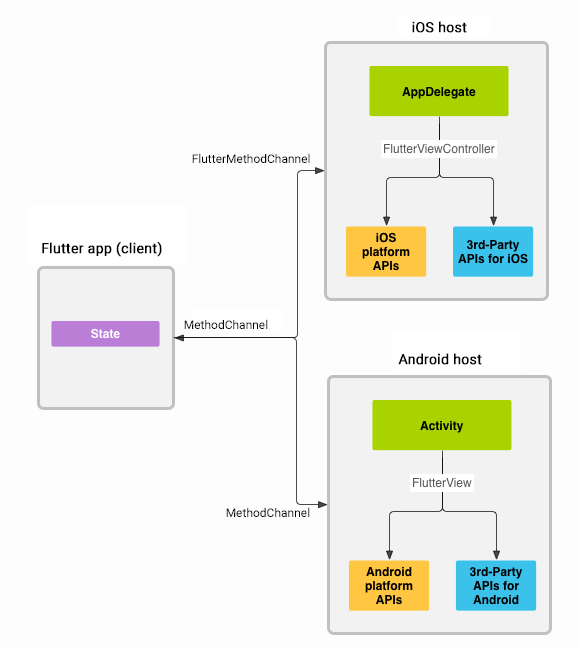
Google's ML Kit APIs are only developed natively for iOS and Android. This plugin uses Flutter Platform Channels as explained here.
Messages are passed between the client (the app/plugin) and host (platform) using platform channels as illustrated in this diagram:
Messages and responses are passed asynchronously, to ensure the user interface remains responsive. To read more about platform channels go here.
Because this plugin uses platform channels, no Machine Learning processing is done in Flutter/Dart, all the calls are passed to the native platform using MethodChannel in Android and FlutterMethodChannel in iOS, and executed using Google's native APIs. Think of this plugin as a bridge between your app and Google's native ML Kit APIs. This plugin only passes the call to the native API and the processing is done by Google's API. It is important that you understand this concept when it comes to debugging errors for your ML model and/or app.
Since the plugin uses platform channels, you may encounter issues with the native API. Before submitting a new issue, identify the source of the issue. You can run both iOS and/or Android native example apps by Google and make sure that the issue is not reproducible with their native examples. If you can reproduce the issue in their apps then report the issue to Google. The authors do not have access to the source code of their native APIs, so you need to report the issue to them. If you find that their example apps are okay and still you have an issue using this plugin, then look at our closed and open issues. If you cannot find anything that can help you then report the issue and provide enough details. Be patient, someone from the community will eventually help you.
Migrating from ML Kit for Firebase to the new standalone ML Kit SDK
When Migrating from ML Kit for Firebase to the new standalone ML Kit SDK read this guide.
Until https://github.com/flutter/flutter/issues/145961 is resolved, the most recent version of the camera package doesn't support the required image formats. To make things work, manually add the legacy plugin via the instructions from https://pub.dev/packages/camera_android.
Contributing
Contributions are welcome.
In case of any problems look at existing issues, if you cannot find anything related to your problem then open an issue.
Create an issue before opening a pull request for non trivial fixes.
In case of trivial fixes open a pull request directly.