
 v0.0.10
canopas_country_picker
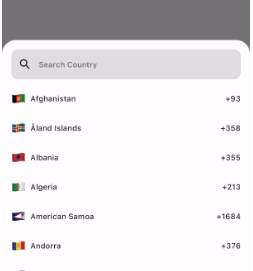
검색 기능을 갖춘 간단하고 사용자 정의 가능한 플러터 국가 선택기입니다. 국가 또는 통화 코드를 선택할 수 있습니다.
18좋아요 71030일 다운로드150Pub 점수
AndroidiOSWebmacOSWindowsLinux
검색 기능을 갖춘 간단하고 사용자 정의 가능한 플러터 국가 선택기입니다. 국가 또는 통화 코드를 선택할 수 있습니다.

{"sdk":"flutter"}{"sdk":"flutter"}^2.0.0아래는 영문 원문 스냅샷입니다. 최신 내용은 GitHub에서 확인하세요.
A Simple, Customizable Flutter Country picker for picking a Country or Dialing code with Search functionality.
If you want to show the country picker bottom sheet, use:
CountryCode? code = await showCountryCodePickerSheet(context: context);
If you want to show the country picker dialog, use:
CountryCode? code = await showCountryCodePickerDialog(context: context);
If you want to show the country list as a UI component, use the CountryCodeSelector widget:
CountryCodeSelector(
   onCountryCodeTap: (CountryCode code) {
      /// Specify country code tap event
   },
    //Note: Cannot provide both onCountryCodeTap and codeBuilder, as onCountryCodeTap will not work if you have provided codeBuilder.
)
How to get a country code from the country alpha-2:,
CountryCode code = CountryCode.getCountryCodeByAlpha2(
    countryAlpha2Code:"IN", // its case-insensitive you can use both IN or in
);
You can use await Alpha2CountryCode,getCurrentCountryCode() to obtain the current alpha-2 code:
String countryAlpha2Code = await Alpha2CountryCode.getCurrentCountryCode();

CountryCode code = CountryCode.getCountryCodeByAlpha2(
  countryAlpha2Code: countryAlpha2Code,
);
Note: Using await Alpha2CountryCode.getCurrentCountryCode() will return the current country alpha-2 code based on the IP location from the 'http://ip-api.com/json/' API.
You can also get the current country alpha-2 code based on the user's device region, using PlatformDispatcher locale.
CountryCode code = CountryCode.getCountryCodeByAlpha2(
    countryAlpha2Code: WidgetsBinding.instance.platformDispatcher.locale.countryCode,
    /// if you have context, use View.of(context).platformDispatcher.locale.countryCode
);
Note: WidgetsBinding and View.of(context) are provided by the Flutter SDK.
How to get a country code from the country dial code,
CountryCode code = CountryCode.getCountryCodeByDialCode(
    dialCode: "+91",
);
Note: Instead of using a dial code, which can be shared by multiple countries, we recommend using the alpha-2 code.
How to get a country codes from the country dial code,
List<CountryCode> code = CountryCode.getCountryCodesByDialCode(
    dialCode: "+47",
);
If you want to show the localized country name, use:
String? l10nCountryName = countryCode.localizedName("en");
For customizations, we are providing the CustomizationBuilders class to customize each section.
customizationBuilders: CustomizationBuilders(
  codeBuilder: (CountryCode code) {
    // Return something to change the country list item UI.
    // Note: onCountryCodeTap will be overridden by codeBuilder in customizationBuilders.

   // If want to do some customization in default country code view, you can use
    return DefaultCountryCodeListItemView(
      onCountryCodeTap: () {},
      code: code,
      locale: 'US', // To show a localized country name,
    );
  },

  codeSeparatorBuilder: (BuildContext context, int index) {
    // Return something to add a separator between country codes.
    return const SizedBox(); // Default
  },

  countryListBuilder: (List<CountryCode> codes, ScrollController? controller) {
    // Return something to customize the country list
  },

  textFieldBuilder: (void Function(String)? filter) {
    // Return the search text field widget
    //
    // If you want to do some customization in the default text field, you can use
    return DefaultCountryCodeFilterTextField(
      filter: filter,
    );

    // Use filter(searchText); to update the country code list.
  },
),
For bugs, feedback, questions and discussions please use the Github Issues.
Canopas Country Picker is owned and maintained by the Canopas team. You can follow us on Twitter at @canopassoftware for project updates and releases.
We regularly upload blogs on new topics, which you can read here.