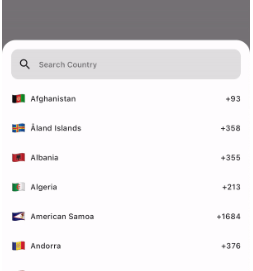
국가 또는 국가 코드를 선택할 수 있는 간단하고 사용자 정의 가능한 Flutter 패키지로 내장된 검색 기능을 제공합니다. 국가 선택이 필요한 양식에서 사용자 경험을 향상시키기 위해 설계되었으며, Android, iOS, Web, macOS, Windows, Linux 등 다양한 플랫폼을 지원합니다. 피커는 가볍고 쉽게 통합할 수 있으며, 개발자가 앱의 필요에 따라 외관과 동작을 맞춤 설정할 수 있습니다.
사용 사례
국가 선택과 함께 사용자 등록
국가 코드가 포함된 전화번호 입력
국제 양식 필드
여행 또는 배송 주소 수집
국가 이름의 다국어 지원
주요 기능
검색 가능한 국가 목록
사용자 지정 가능한 UI
다이얼 코드를 지원합니다
크로스 플랫폼 호환성
경량이고 빠름
Flutter 폼과의 간편한 통합
적합한 대상
국가 선택이 필요한 모바일 및 웹 앱
국제 사용자를 대상으로 하는 앱
전화번호 입력이 필요한 폼
간단한 국가 선택기 찾는 개발자
최소 종속성의 프로젝트
고려 사항
사전 정의된 국가 데이터로 제한됨
실시간 국가 업데이트 없음
사용자 지정에는 추가적인 스타일링 지식이 필요할 수 있습니다
지오로케이션 기능을 포함하지 않습니다
새로운 국가 추가를 위해 수동 업데이트가 필요할 수 있습니다
원본 README
연결된 소스 저장소의 README 원문 스냅샷입니다. 최신 내용은 저장소에서 확인하세요.
A Simple, Customizable Flutter Country picker for picking a Country or Dialing code with Search functionality.
Preview
How to use
If you want to show the country picker bottom sheet, use:
If you want to show the country list as a UI component, use the CountryCodeSelector widget:
CountryCodeSelector(
   onCountryCodeTap: (CountryCode code) {
      /// Specify country code tap event
   },
    //Note: Cannot provide both onCountryCodeTap and codeBuilder, as onCountryCodeTap will not work if you have provided codeBuilder.
)
How to get a country code from the country alpha-2:,
CountryCode code = CountryCode.getCountryCodeByAlpha2(
    countryAlpha2Code:"IN", // its case-insensitive you can use both IN or in
);
You can use await Alpha2CountryCode,getCurrentCountryCode() to obtain the current alpha-2 code:
Note: Using await Alpha2CountryCode.getCurrentCountryCode() will return the current country alpha-2 code based on the IP location from the 'http://ip-api.com/json/' API.
You can also get the current country alpha-2 code based on the user's device region, using PlatformDispatcher locale.
CountryCode code = CountryCode.getCountryCodeByAlpha2(
    countryAlpha2Code: WidgetsBinding.instance.platformDispatcher.locale.countryCode,
    /// if you have context, use View.of(context).platformDispatcher.locale.countryCode
);
Note: WidgetsBinding and View.of(context) are provided by the Flutter SDK.
How to get a country code from the country dial code,
For customizations, we are providing the CustomizationBuilders class to customize each section.
customizationBuilders: CustomizationBuilders(
codeBuilder: (CountryCode code) {
// Return something to change the country list item UI.// Note: onCountryCodeTap will be overridden by codeBuilder in customizationBuilders.// If want to do some customization in default country code view, you can usereturnDefaultCountryCodeListItemView(
onCountryCodeTap: () {},
code: code,
locale: 'US', // To show a localized country name,
);
},
codeSeparatorBuilder: (BuildContext context, int index) {
// Return something to add a separator between country codes.returnconstSizedBox(); // Default
},
countryListBuilder: (List<CountryCode> codes, ScrollController? controller) {
// Return something to customize the country list
},
textFieldBuilder: (voidFunction(String)? filter) {
// Return the search text field widget//// If you want to do some customization in the default text field, you can usereturnDefaultCountryCodeFilterTextField(
filter: filter,
);
// Use filter(searchText); to update the country code list.
},
),
Bugs and Feedback
For bugs, feedback, questions and discussions please use the Github Issues.
Credits
Canopas Country Picker is owned and maintained by the Canopas team.
You can follow us on Twitter at @canopassoftware for project updates and releases.
We regularly upload blogs on new topics, which you can read here.