

v0.1.9
receive_whatsapp_chat
Flutter 앱이 WhatsApp에서 내보낸 채팅을 수신할 수 있도록 해주는 플러터 플러그인입니다.
35좋아요 11730일 다운로드160Pub 점수
AndroidiOS
Flutter 앱이 WhatsApp에서 채팅을 수신할 수 있도록 해주는 플러터 플러그인입니다.

아래는 영문 원문 스냅샷입니다. 최신 내용은 GitHub에서 확인하세요.
A flutter plugin that enables flutter apps to receive chats from Whatsapp.
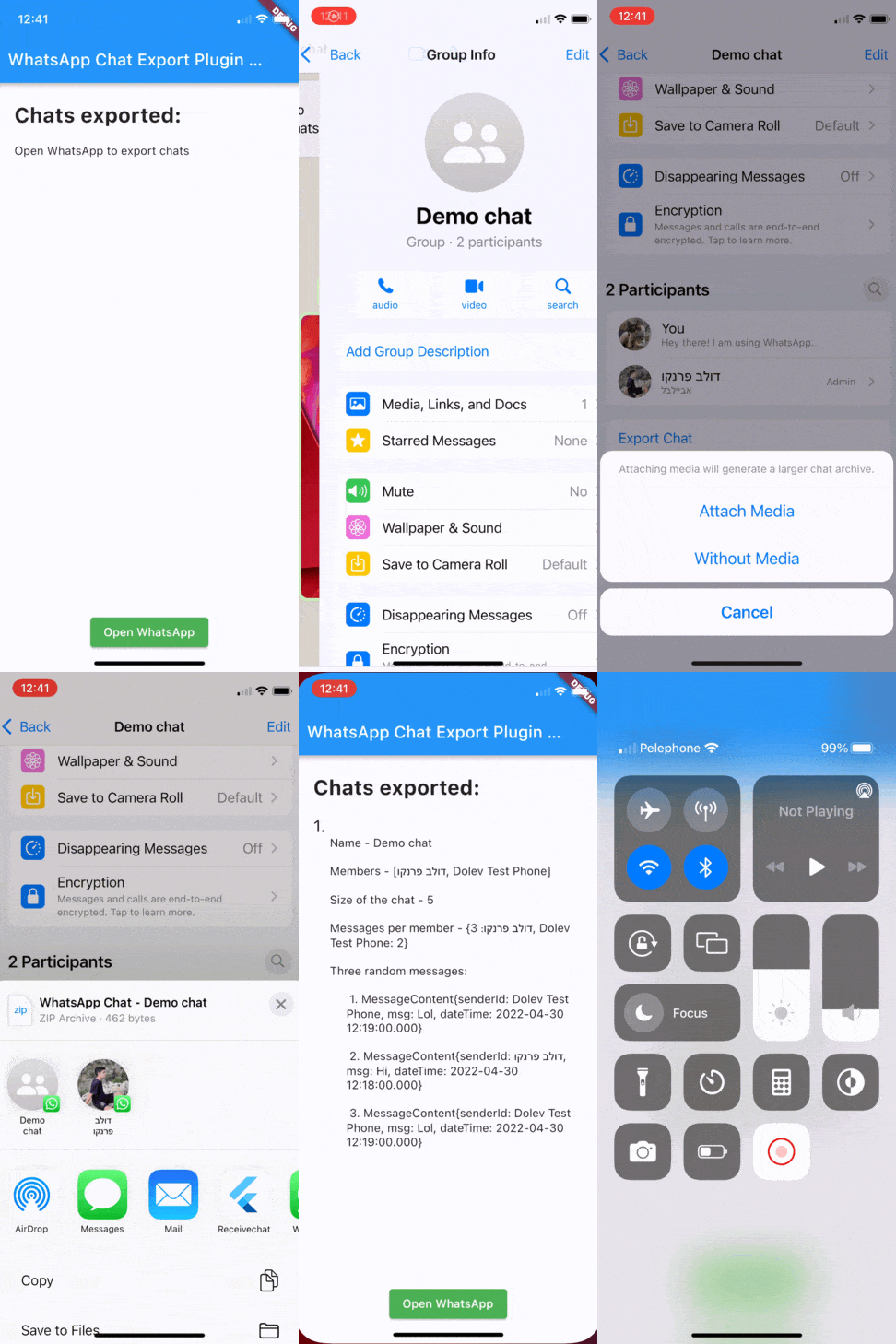

For Java projects: please add the following to android/app/main/java/.../MainActivity.java.
import android.os.Bundle;

import io.flutter.plugins.GeneratedPluginRegistrant;

import com.whatsapp.receive_whatsapp_chat.FlutterShareReceiverActivity;

public class MainActivity extends FlutterShareReceiverActivity {
    @Override
    protected void onCreate(Bundle savedInstanceState) {
        super.onCreate(savedInstanceState);
        GeneratedPluginRegistrant.registerWith(this.getFlutterEngine());
    }
}
For Kotlin projects: please add the following to android/app/main/kotlin/.../MainActivity.kt.
//TODO: Replace <package_name> with package from AndroidManifest.xml
package <package_name>

import android.os.Bundle
import com.whatsapp.receive_whatsapp_chat.FlutterShareReceiverActivity
import io.flutter.embedding.engine.FlutterEngine
import io.flutter.plugins.GeneratedPluginRegistrant

class MainActivity : FlutterShareReceiverActivity() {
    override fun onCreate(savedInstanceState: Bundle?) {
        super.onCreate(savedInstanceState)
    }

    override fun configureFlutterEngine(flutterEngine: FlutterEngine) {
        // Register plugins with FlutterEngine
        GeneratedPluginRegistrant.registerWith(flutterEngine)
        super.configureFlutterEngine(flutterEngine)
    }
}
Note: If you have a problem with the compilation (kotlin version error), please go to the package pubspec.ymal and uncomment this:
  receive_sharing_intent:
    git:
      url: https://github.com/AyushmanG26/receive_sharing_intent.git
Refer to: https://github.com/KasemJaffer/receive_sharing_intent/issues/254
For iOS, the plugin receive_sharing_intent has been used. receive_sharing_intent iOS setup:
ios/Runner/info.plist
...
<key>AppGroupId</key>
<string>$(CUSTOM_GROUP_ID)</string>
<key>CFBundleURLTypes</key>
	<array>
		<dict>
			<key>CFBundleTypeRole</key>
			<string>Editor</string>
			<key>CFBundleURLSchemes</key>
			<array>
				<string>ShareMedia</string>
			</array>
		</dict>
	</array>

<key>NSPhotoLibraryUsageDescription</key>
<string>To upload photos, please allow permission to access your photo library.</string>
...
ios/Share Extension/info.plist
....
    <key>AppGroupId</key>
    <string>$(CUSTOM_GROUP_ID)</string>
	<key>CFBundleVersion</key>
	<string>$(FLUTTER_BUILD_NUMBER)</string>
	<key>NSExtension</key>
	<dict>
		<key>NSExtensionAttributes</key>
        <dict>
            <key>PHSupportedMediaTypes</key>
               <array>
                    <!--TODO: Add this flag, if you want to support sharing video into your app-->
                   <string>Video</string>
                   <!--TODO: Add this flag, if you want to support sharing images into your app-->
                   <string>Image</string>
               </array>
            <key>NSExtensionActivationRule</key>
            <dict>
                <!--TODO: Add this tag, if you want to support sharing urls into your app-->
            	<key>NSExtensionActivationSupportsWebURLWithMaxCount</key>
            	<integer>1</integer>
                <!--TODO: Add this flag, if you want to support sharing other files into your app-->
                <!--Change the integer to however many files you want to be able to share at a time-->
				<key>NSExtensionActivationSupportsFileWithMaxCount</key>
				<integer>1</integer>
            </dict>
        </dict>
		<key>NSExtensionMainStoryboard</key>
		<string>MainInterface</string>
		<key>NSExtensionPointIdentifier</key>
		<string>com.apple.share-services</string>
	</dict>
....
ios/Share Extension/ShareViewController.swift
loadIds() for configure and detailsimport UIKit
import Social
import MobileCoreServices
import Photos
class ShareViewController: SLComposeServiceViewController {
// TODO: IMPORTANT: This should be your host app bundle identifier
var hostAppBundleIdentifier = "com.whatsapp.receiveWhatsappChatExample"
var appGroupId = ""
let sharedKey = "ShareKey"
var sharedMedia: [SharedMediaFile] = []
var sharedText: [String] = []
let imageContentType = kUTTypeImage as String
let videoContentType = kUTTypeMovie as String
let textContentType = kUTTypeText as String
let urlContentType = kUTTypeURL as String
let fileURLType = kUTTypeFileURL as String;
override func isContentValid() -> Bool {
return true
}
private func loadIds() {
// loading Share extension App Id
let shareExtensionAppBundleIdentifier = Bundle.main.bundleIdentifier!;
// convert ShareExtension id to host app id
// By default it is remove last part of id after last point
// For example: com.test.ShareExtension -> com.test
let lastIndexOfPoint = shareExtensionAppBundleIdentifier.lastIndex(of: ".");
hostAppBundleIdentifier = String(shareExtensionAppBundleIdentifier[..<lastIndexOfPoint!]);
// loading custom AppGroupId from Build Settings or use group.<hostAppBundleIdentifier>
appGroupId = (Bundle.main.object(forInfoDictionaryKey: "AppGroupId") as? String) ?? "group.\(hostAppBundleIdentifier)";
}
override func viewDidLoad() {
super.viewDidLoad();
// load group and app id from build info
loadIds();
}
override func viewDidAppear(_ animated: Bool) {
super.viewDidAppear(animated)
// This is called after the user selects Post. Do the upload of contentText and/or NSExtensionContext attachments.
if let content = extensionContext!.inputItems[0] as? NSExtensionItem {
if let contents = content.attachments {
for (index, attachment) in (contents).enumerated() {
if attachment.hasItemConformingToTypeIdentifier(imageContentType) {
handleImages(content: content, attachment: attachment, index: index)
} else if attachment.hasItemConformingToTypeIdentifier(textContentType) {
handleText(content: content, attachment: attachment, index: index)
} else if attachment.hasItemConformingToTypeIdentifier(fileURLType) {
handleFiles(content: content, attachment: attachment, index: index)
} else if attachment.hasItemConformingToTypeIdentifier(urlContentType) {
handleUrl(content: content, attachment: attachment, index: index)
} else if attachment.hasItemConformingToTypeIdentifier(videoContentType) {
handleVideos(content: content, attachment: attachment, index: index)
}
}
}
}
}
override func didSelectPost() {
print("didSelectPost");
}
override func configurationItems() -> [Any]! {
// To add configuration options via table cells at the bottom of the sheet, return an array of SLComposeSheetConfigurationItem here.
return []
}
private func handleText (content: NSExtensionItem, attachment: NSItemProvider, index: Int) {
attachment.loadItem(forTypeIdentifier: textContentType, options: nil) { [weak self] data, error in
if error == nil, let item = data as? String, let this = self {
this.sharedText.append(item)
// If this is the last item, save imagesData in userDefaults and redirect to host app
if index == (content.attachments?.count)! - 1 {
let userDefaults = UserDefaults(suiteName: this.appGroupId)
userDefaults?.set(this.sharedText, forKey: this.sharedKey)
userDefaults?.synchronize()
this.redirectToHostApp(type: .text)
}
} else {
self?.dismissWithError()
}
}
}
private func handleUrl (content: NSExtensionItem, attachment: NSItemProvider, index: Int) {
attachment.loadItem(forTypeIdentifier: urlContentType, options: nil) { [weak self] data, error in
if error == nil, let item = data as? URL, let this = self {
this.sharedText.append(item.absoluteString)
// If this is the last item, save imagesData in userDefaults and redirect to host app
if index == (content.attachments?.count)! - 1 {
let userDefaults = UserDefaults(suiteName: this.appGroupId)
userDefaults?.set(this.sharedText, forKey: this.sharedKey)
userDefaults?.synchronize()
this.redirectToHostApp(type: .text)
}
} else {
self?.dismissWithError()
}
}
}
private func handleImages (content: NSExtensionItem, attachment: NSItemProvider, index: Int) {
attachment.loadItem(forTypeIdentifier: imageContentType, options: nil) { [weak self] data, error in
if error == nil, let url = data as? URL, let this = self {
// Always copy
let fileName = this.getFileName(from: url, type: .image)
let newPath = FileManager.default
.containerURL(forSecurityApplicationGroupIdentifier: this.appGroupId)!
.appendingPathComponent(fileName)
let copied = this.copyFile(at: url, to: newPath)
if(copied) {
this.sharedMedia.append(SharedMediaFile(path: newPath.absoluteString, thumbnail: nil, duration: nil, type: .image))
}
// If this is the last item, save imagesData in userDefaults and redirect to host app
if index == (content.attachments?.count)! - 1 {
let userDefaults = UserDefaults(suiteName: this.appGroupId)
userDefaults?.set(this.toData(data: this.sharedMedia), forKey: this.sharedKey)
userDefaults?.synchronize()
this.redirectToHostApp(type: .media)
}
} else {
self?.dismissWithError()
}
}
}
private func handleVideos (content: NSExtensionItem, attachment: NSItemProvider, index: Int) {
attachment.loadItem(forTypeIdentifier: videoContentType, options: nil) { [weak self] data, error in
if error == nil, let url = data as? URL, let this = self {
// Always copy
let fileName = this.getFileName(from: url, type: .video)
let newPath = FileManager.default
.containerURL(forSecurityApplicationGroupIdentifier: this.appGroupId)!
.appendingPathComponent(fileName)
let copied = this.copyFile(at: url, to: newPath)
if(copied) {
guard let sharedFile = this.getSharedMediaFile(forVideo: newPath) else {
return
}
this.sharedMedia.append(sharedFile)
}
// If this is the last item, save imagesData in userDefaults and redirect to host app
if index == (content.attachments?.count)! - 1 {
let userDefaults = UserDefaults(suiteName: this.appGroupId)
userDefaults?.set(this.toData(data: this.sharedMedia), forKey: this.sharedKey)
userDefaults?.synchronize()
this.redirectToHostApp(type: .media)
}
} else {
self?.dismissWithError()
}
}
}
private func handleFiles (content: NSExtensionItem, attachment: NSItemProvider, index: Int) {
attachment.loadItem(forTypeIdentifier: fileURLType, options: nil) { [weak self] data, error in
if error == nil, let url = data as? URL, let this = self {
// Always copy
let fileName = this.getFileName(from :url, type: .file)
let newPath = FileManager.default
.containerURL(forSecurityApplicationGroupIdentifier: this.appGroupId)!
.appendingPathComponent(fileName)
let copied = this.copyFile(at: url, to: newPath)
if (copied) {
this.sharedMedia.append(SharedMediaFile(path: newPath.absoluteString, thumbnail: nil, duration: nil, type: .file))
}
if index == (content.attachments?.count)! - 1 {
let userDefaults = UserDefaults(suiteName: this.appGroupId)
userDefaults?.set(this.toData(data: this.sharedMedia), forKey: this.sharedKey)
userDefaults?.synchronize()
this.redirectToHostApp(type: .file)
}
} else {
self?.dismissWithError()
}
}
}
private func dismissWithError() {
print("[ERROR] Error loading data!")
let alert = UIAlertController(title: "Error", message: "Error loading data", preferredStyle: .alert)
let action = UIAlertAction(title: "Error", style: .cancel) { _ in
self.dismiss(animated: true, completion: nil)
}
alert.addAction(action)
present(alert, animated: true, completion: nil)
extensionContext!.completeRequest(returningItems: [], completionHandler: nil)
}
private func redirectToHostApp(type: RedirectType) {
// ids may not loaded yet so we need loadIds here too
loadIds();
let url = URL(string: "ShareMedia-\(hostAppBundleIdentifier)://dataUrl=\(sharedKey)#\(type)")
var responder = self as UIResponder?
let selectorOpenURL = sel_registerName("openURL:")
while (responder != nil) {
if (responder?.responds(to: selectorOpenURL))! {
let _ = responder?.perform(selectorOpenURL, with: url)
}
responder = responder!.next
}
extensionContext!.completeRequest(returningItems: [], completionHandler: nil)
}
enum RedirectType {
case media
case text
case file
}
func getExtension(from url: URL, type: SharedMediaType) -> String {
let parts = url.lastPathComponent.components(separatedBy: ".")
var ex: String? = nil
if (parts.count > 1) {
ex = parts.last
}
if (ex == nil) {
switch type {
case .image:
ex = "PNG"
case .video:
ex = "MP4"
case .file:
ex = "TXT"
}
}
return ex ?? "Unknown"
}
func getFileName(from url: URL, type: SharedMediaType) -> String {
var name = url.lastPathComponent
if (name.isEmpty) {
name = UUID().uuidString + "." + getExtension(from: url, type: type)
}
return name
}
func copyFile(at srcURL: URL, to dstURL: URL) -> Bool {
do {
if FileManager.default.fileExists(atPath: dstURL.path) {
try FileManager.default.removeItem(at: dstURL)
}
try FileManager.default.copyItem(at: srcURL, to: dstURL)
} catch (let error) {
print("Cannot copy item at \(srcURL) to \(dstURL): \(error)")
return false
}
return true
}
private func getSharedMediaFile(forVideo: URL) -> SharedMediaFile? {
let asset = AVAsset(url: forVideo)
let duration = (CMTimeGetSeconds(asset.duration) * 1000).rounded()
let thumbnailPath = getThumbnailPath(for: forVideo)
if FileManager.default.fileExists(atPath: thumbnailPath.path) {
return SharedMediaFile(path: forVideo.absoluteString, thumbnail: thumbnailPath.absoluteString, duration: duration, type: .video)
}
var saved = false
let assetImgGenerate = AVAssetImageGenerator(asset: asset)
assetImgGenerate.appliesPreferredTrackTransform = true
// let scale = UIScreen.main.scale
assetImgGenerate.maximumSize = CGSize(width: 360, height: 360)
do {
let img = try assetImgGenerate.copyCGImage(at: CMTimeMakeWithSeconds(600, preferredTimescale: Int32(1.0)), actualTime: nil)
try UIImage.pngData(UIImage(cgImage: img))()?.write(to: thumbnailPath)
saved = true
} catch {
saved = false
}
return saved ? SharedMediaFile(path: forVideo.absoluteString, thumbnail: thumbnailPath.absoluteString, duration: duration, type: .video) : nil
}
private func getThumbnailPath(for url: URL) -> URL {
let fileName = Data(url.lastPathComponent.utf8).base64EncodedString().replacingOccurrences(of: "==", with: "")
let path = FileManager.default
.containerURL(forSecurityApplicationGroupIdentifier: appGroupId)!
.appendingPathComponent("\(fileName).jpg")
return path
}
class SharedMediaFile: Codable {
var path: String; // can be image, video or url path. It can also be text content
var thumbnail: String?; // video thumbnail
var duration: Double?; // video duration in milliseconds
var type: SharedMediaType;
init(path: String, thumbnail: String?, duration: Double?, type: SharedMediaType) {
self.path = path
self.thumbnail = thumbnail
self.duration = duration
self.type = type
}
// Debug method to print out SharedMediaFile details in the console
func toString() {
print("[SharedMediaFile] \n\tpath: \(self.path)\n\tthumbnail: \(self.thumbnail)\n\tduration: \(self.duration)\n\ttype: \(self.type)")
}
}
enum SharedMediaType: Int, Codable {
case image
case video
case file
}
func toData(data: [SharedMediaFile]) -> Data {
let encodedData = try? JSONEncoder().encode(data)
return encodedData!
}
}
extension Array {
subscript (safe index: UInt) -> Element? {
return Int(index) < count ? self[Int(index)] : nil
}
}
ios/Podfile
...
target 'Runner' do
  use_frameworks!
  use_modular_headers!

  flutter_install_all_ios_pods File.dirname(File.realpath(__FILE__))

  # Sharing Extension is name of Extension which you created. It is 'Share Extension' and 'Sharing Extension' in example
  target 'Share Extension' do
    inherit! :search_paths
  end
end
...
group.YOUR_HOST_APP_BUNDLE_IDENTIFIER in my case group.com.whatsapp.receiveWhatsappChatExampleBuild Settings -> +) string CUSTOM_GROUP_ID in BOTH Targets: Runner and Share Extension and set value to group id created above. You can use different group ids depends on flavor schemesYou can import the package with:
import 'package:receive_whatsapp_chat/receive_whatsapp_chat.dart';
You need to create a class that extends the class ReceiveWhatsappChat.
class DemoAppState extends ReceiveWhatsappChat<DemoApp>
It will make you implement a function that receive Chat content class every time a chat is
exported from WhatsApp.
Chat content contains chat members, chat name, messages per member, size of the chat and all of
its messages.
@override
void receiveChatContent(ChatContent chatContent) {
  // TODO: implement receiveChatContent
}
Note: enableShareReceiving() is called automatically when the plugin is initialized, so remember
to call disableShareReceiving() when you don't want to receive chats anymore or close the app.
Note: when you export a chat from WhatsApp, it is best to be in English.
main.dart
import 'dart:math';

import 'package:flutter/material.dart';
import 'package:flutter/services.dart';
import 'package:receive_whatsapp_chat/receive_whatsapp_chat.dart';

void main() {
  runApp(const MyApp());
}

class MyApp extends StatelessWidget {
  const MyApp({Key? key}) : super(key: key);

  @override
  Widget build(BuildContext context) {
    return MaterialApp(
      title: 'Whatsapp chat share Plugin Demo',
      theme: ThemeData(),
      home: const DemoApp(),
    );
  }
}

class DemoApp extends StatefulWidget {
  const DemoApp({Key? key}) : super(key: key);

  @override
  DemoAppState createState() => DemoAppState();
}

class DemoAppState extends ReceiveWhatsappChat<DemoApp> {
  static const MethodChannel _methodChannel =
  MethodChannel('com.whatsapp.chat/openwhatsapp');
  List<ChatContent> chats = [];

  @override
  Widget build(BuildContext context) {
    return Scaffold(
        appBar: AppBar(
          title: const Text('Whatsapp Chat Export Plugin Demo'),
          backgroundColor: Colors.blue,
        ),
        body: Padding(
          padding: const EdgeInsets.all(24.0),
          child: Column(
            crossAxisAlignment: CrossAxisAlignment.start,
            children: <Widget>[
              const Text(
                'Chats exported:',
                style: TextStyle(fontWeight: FontWeight.bold, fontSize: 25),
              ),
              const SizedBox(
                height: 20,
              ),
              chats.isEmpty
                  ? const Text('Open WhatsApp to export chats')
                  : const SizedBox(),
              Expanded(
                child: SingleChildScrollView(
                  child: Column(
                    children: List.generate(
                        chats.length, (index) => buildShowChat(index)),
                  ),
                ),
              ),
              const SizedBox(
                height: 50,
              ),
              Center(
                child: ElevatedButton(
                  child: const Text('Open WhatsApp'),
                  style: ElevatedButton.styleFrom(primary: Colors.green),
                  onPressed: () {
                    _methodChannel.invokeMethod("openwhatsapp");
                  },
                ),
              ),
            ],
          ),
        ));
  }

  Widget buildShowChat(int index) =>
      Column(
        crossAxisAlignment: CrossAxisAlignment.start,
        children: [
          Text(
            '${index + 1}.',
            style: const TextStyle(fontSize: 20),
          ),
          Padding(
            padding: const EdgeInsets.only(left: 20),
            child: Column(
              crossAxisAlignment: CrossAxisAlignment.start,
              children: [
                Text('Name - ${chats[index].chatName}\n'),
                Text('Members - ${chats[index].members}\n'),
                Text('Size of the chat - ${chats[index].sizeOfChat}\n'),
                Text('Messages per member - ${chats[index].msgsPerMember}\n'),
                const Text('Three random messages:\n'),
                Column(
                  children: List.generate(
                      3,
                          (index2) =>
                          Padding(
                            padding: const EdgeInsets.only(left: 20),
                            child: Text(
                                '\t${index2 + 1}. ${chats[index].messages[Random().nextInt(
                                    chats[index].sizeOfChat)]}\n'),
                          )),
                ),
              ],
            ),
          ),
          const SizedBox(
            height: 50,
          ),
        ],
      );

  @override
  void receiveChatContent(ChatContent chatContent) {
    chats.add(chatContent);
    setState(() {});
  }
}
의존성 목록 8 개
^2.1.5^1.19.1^6.0.3^1.8.1^1.0.1{"sdk":"flutter"}{"sdk":"flutter"}^6.0.0사용 목적에 따라 검색하고 개발 활동을 비교한 뒤 원본 저장소에서 요구 사항을 확인하세요.
“A repository is the most basic element of GitHub.”
GitHub Docs — About repositories ↗