

 v3.0.0
multiple_search_selection
퍼지 검색 기능을 갖춘 매우 사용자 정의 가능한 다중 선택 위젯입니다.
73좋아요 1.5천30일 다운로드150Pub 점수
AndroidiOSWebmacOSWindowsLinux
퍼지 검색 기능을 갖춘 매우 사용자 정의 가능한 다중 선택 위젯입니다.

아래는 영문 원문 스냅샷입니다. 최신 내용은 GitHub에서 확인하세요.



Show some love by dropping a ⭐ at GitHub

// Use this controller to adjust the behaviour of the widget
// 1. getAllItems
// 2. getPickedItems
// 3. searchItems
// 4. clearSearchField
// 5. clearAllPickedItems
// 6. selectAllItems
// 7. minCharsToShowItems
// 8. allowDuplicateSelection
// 9. isSelectable
MultipleSearchController controller = MultipleSearchController();
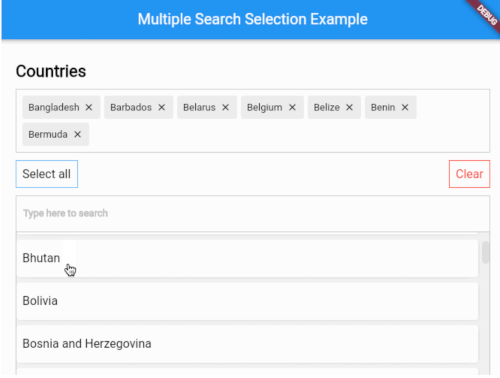
MultipleSearchSelection<Country>(
  // The TextField that is used to search items.
  //
  // You can use this to customize the search field.
  // The `onChanged` of the `searchField` is used internally to search items,
  // so you can use the `onSearchChanged` callback to get the search query.
  searchField: TextField(
    decoration: InputDecoration(
      hintText: 'Search countries',
      border: OutlineInputBorder(
        borderRadius: BorderRadius.circular(6),
        ),
      ),
    ),
  onSearchChanged: (text) {
    print('Text is $text');
  },
  items: countries, // List<Country>
  fieldToCheck: (c) {
    return c.name; // String
  },
  itemBuilder: (country,index,isPicked) {
    return Padding(
      padding: const EdgeInsets.all(6.0),
      child: Container(
        decoration: BoxDecoration(
          borderRadius: BorderRadius.circular(6),
          color: Colors.white,
        ),
        child: Padding(
          padding: const EdgeInsets.symmetric(
            vertical: 20.0,
            horizontal: 12,
          ),
          child: Text(country.name),
        ),
      ),
    );
  },
  pickedItemBuilder: (country) {
    return Container(
      decoration: BoxDecoration(
        color: Colors.white,
        border: Border.all(color: Colors.grey[400]!),
      ),
      child: Padding(
        padding: const EdgeInsets.all(8),
        child: Text(country.name),
      ),
    );
  },
  onTapShowedItem: () {},
  onPickedChange: (items) {},
  onItemAdded: (item) {},
  onItemRemoved: (item) {},
  sortShowedItems: true,
  sortPickedItems: true,
  fuzzySearch: FuzzySearch.jaro,
  itemsVisibility: ShowedItemsVisibility.alwaysOn,
  title: Text(
    'Countries',
    style: kStyleDefault.copyWith(
      fontSize: 22,
      fontWeight: FontWeight.bold,
    ),
  ),
  showSelectAllButton: true,
  maximumShowItemsHeight: 200,
)
MultipleSearchSelection<T>.creatable constructor can now create new item when search result does not return any results. It takes a new required parameter, createOptions e.g :
// [T] here is [Country]
createOptions: CreateOptions<Country>(
    // You need to create and return the item you want to add since [T] is not always [String].
    create: (text) {
        return Country(name: text, iso: text);
    },
    // A callback when the item is succesfully created.
    onCreated: (c) => print('Country ${c.name} created'),
    // Create item Widget that appears instead of no results.
    createBuilder: (text) => Align(
        alignment: Alignment.centerLeft,
            child: Padding(
                padding: const EdgeInsets.all(8.0),
                child: Text('Create "$text"'),
            ),
        ),
    // Whether you want to pick the newly created item or just add it to your list. Defaults to false.
    pickCreated: true,
),

itemsVisibility behaviour for the default & creatable constructors
| ShowedItemsVisibility.alwaysOn | ShowedItemsVisibility.onType | ShowedItemsVisibility.toggle |
|---|---|---|
 |
 |
 |
Found a bug or want a new feature? Open an issue in the Github repository of the project.
의존성 목록 4 개
{"sdk":"flutter"}^5.0.0{"sdk":"flutter"}^2.0.1사용 목적에 따라 검색하고 개발 활동을 비교한 뒤 원본 저장소에서 요구 사항을 확인하세요.
“A repository is the most basic element of GitHub.”
GitHub Docs — About repositories ↗