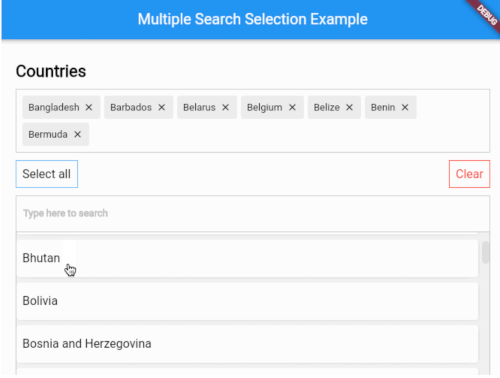
대규모 데이터셋에서 사용자가 효율적으로 여러 항목을 선택할 수 있도록 해주는 고도로 사용자 정의 가능한 다중 선택 위젯입니다. 퍼지 검색 기능을 포함하여 지능적인 매칭과 실시간 필터링을 지원하며, 양식, 태그 또는 필터와 같이 여러 옵션을 선택해야 하는 경우에 이상적입니다. 다양한 플랫폼에서 원활한 성능을 제공하도록 설계되었으며, 스타일 및 동작에 대한 광범위한 사용자 정의 기능을 제공합니다. Flutter로 구축되어 Android, iOS, Web, macOS, Windows, Linux를 대상으로 한 앱에 원활하게 통합될 수 있습니다.
사용 사례
다중 선택 옵션을 가진 폼 입력
태그 선택 인터페이스
동적 검색을 갖춘 필터링 시스템
사용자 선호도 선택
검색 기능이 있는 동적 드롭다운
관리 패널에서 다중 선택
주요 기능
유연한 매칭을 위한 퍼지 검색
사용자 정의 가능한 UI 및 스타일링
대규모 데이터셋 지원
크로스 플랫폼 호환성
실시간 검색 필터링
명확한 피드백을 제공하는 다중 선택
적합한 대상
복잡한 폼 컴포넌트를 구축하는 개발자
효율적인 다중 항목 선택이 필요한 앱
드롭다운에서 지능형 검색이 필요한 프로젝트
크로스 플랫폼 일관성을 우선시하는 팀
가볍지만 강력한 선택 위젯을 원하는 사용자
고려 사항
매우 큰 데이터 세트에 대해 조정이 필요할 수 있습니다
사용자 지정 옵션은 초기 설정의 복잡성을 증가시킬 수 있습니다
성능은 항목 렌더링 최적화에 따라 달라집니다
제한된 내장 검증 기능
단일 선택 사용 사례에 적합하지 않습니다
원본 README
연결된 소스 저장소의 README 원문 스냅샷입니다. 최신 내용은 저장소에서 확인하세요.
Show some love by dropping a ⭐ at GitHub
A highly customizable multiple selection widget with fuzzy search functionality
// Use this controller to adjust the behaviour of the widget// 1. getAllItems// 2. getPickedItems// 3. searchItems// 4. clearSearchField// 5. clearAllPickedItems// 6. selectAllItems// 7. minCharsToShowItems// 8. allowDuplicateSelection// 9. isSelectableMultipleSearchController controller = MultipleSearchController();
MultipleSearchSelection<Country>(
// The TextField that is used to search items.//// You can use this to customize the search field.// The `onChanged` of the `searchField` is used internally to search items,// so you can use the `onSearchChanged` callback to get the search query.
searchField: TextField(
decoration: InputDecoration(
hintText: 'Search countries',
border: OutlineInputBorder(
borderRadius: BorderRadius.circular(6),
),
),
),
onSearchChanged: (text) {
print('Text is $text');
},
items: countries, // List<Country>
fieldToCheck: (c) {
return c.name; // String
},
itemBuilder: (country,index,isPicked) {
returnPadding(
padding: constEdgeInsets.all(6.0),
child: Container(
decoration: BoxDecoration(
borderRadius: BorderRadius.circular(6),
color: Colors.white,
),
child: Padding(
padding: constEdgeInsets.symmetric(
vertical: 20.0,
horizontal: 12,
),
child: Text(country.name),
),
),
);
},
pickedItemBuilder: (country) {
returnContainer(
decoration: BoxDecoration(
color: Colors.white,
border: Border.all(color: Colors.grey[400]!),
),
child: Padding(
padding: constEdgeInsets.all(8),
child: Text(country.name),
),
);
},
onTapShowedItem: () {},
onPickedChange: (items) {},
onItemAdded: (item) {},
onItemRemoved: (item) {},
sortShowedItems: true,
sortPickedItems: true,
fuzzySearch: FuzzySearch.jaro,
itemsVisibility: ShowedItemsVisibility.alwaysOn,
title: Text(
'Countries',
style: kStyleDefault.copyWith(
fontSize: 22,
fontWeight: FontWeight.bold,
),
),
showSelectAllButton: true,
maximumShowItemsHeight: 200,
)
MultipleSearchSelection<T>.creatable
MultipleSearchSelection<T>.creatable constructor can now create new item when search result does not return any results. It takes a new required parameter, createOptions e.g :
// [T] here is [Country]
createOptions: CreateOptions<Country>(
// You need to create and return the item you want to add since [T] is not always [String].
create: (text) {
returnCountry(name: text, iso: text);
},
// A callback when the item is succesfully created.
onCreated: (c) => print('Country ${c.name} created'),
// Create item Widget that appears instead of no results.
createBuilder: (text) => Align(
alignment: Alignment.centerLeft,
child: Padding(
padding: constEdgeInsets.all(8.0),
child: Text('Create "$text"'),
),
),
// Whether you want to pick the newly created item or just add it to your list. Defaults to false.
pickCreated: true,
),
Showed items visibility
itemsVisibility behaviour for the default & creatable constructors
ShowedItemsVisibility.alwaysOn
ShowedItemsVisibility.onType
ShowedItemsVisibility.toggle
Issues / Features
Found a bug or want a new feature? Open an issue in the Github repository of the project.