
 v2.0.1
flutter_alice
앨리스는 HTTP 요청 디버깅을 돕는 HTTP 인스펙터 도구입니다. HTTP 요청과 응답을 캡처하고 저장하며, 간단한 UI를 통해 확인할 수 있습니다.
52좋아요 9.7천30일 다운로드125Pub 점수
AndroidiOSmacOSWindowsLinux
Flutter 애플리케이션용 HTTP 요청 인스펙터

의존성 목록 6 개
{"sdk":"flutter"}>=1.1.0>=5.1.1>=2.1.0>=9.0.0>=0.27.1아래는 영문 원문 스냅샷입니다. 최신 내용은 GitHub에서 확인하세요.
pub package pub package pub package
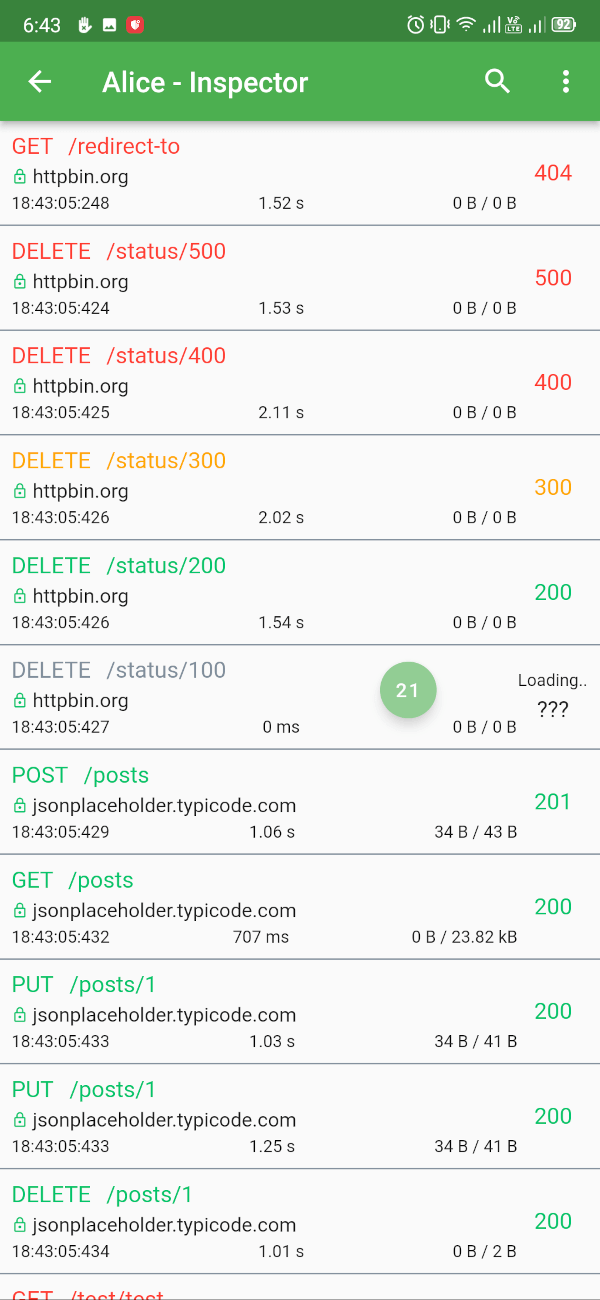
Alice is an HTTP Inspector tool for Flutter which helps debugging http requests. It catches and stores http requests and responses, which can be viewed via simple UI. It is inspired from Chuck (https://github.com/jgilfelt/chuck) and Chucker (https://github.com/ChuckerTeam/chucker).
Overlay bubble version of Alice: https://github.com/jhomlala/alice
| https://raw.githubusercontent.com/hautvfami/flutter-alice/main/media/1.png | https://raw.githubusercontent.com/hautvfami/flutter-alice/main/media/2.png | https://raw.githubusercontent.com/hautvfami/flutter-alice/main/media/3.png | https://raw.githubusercontent.com/hautvfami/flutter-alice/main/media/4.png | https://raw.githubusercontent.com/hautvfami/flutter-alice/main/media/5.png | https://raw.githubusercontent.com/hautvfami/flutter-alice/main/media/6.png |
| https://raw.githubusercontent.com/hautvfami/flutter-alice/main/media/7.png | https://raw.githubusercontent.com/hautvfami/flutter-alice/main/media/8.png | https://raw.githubusercontent.com/hautvfami/flutter-alice/main/media/9.png | https://raw.githubusercontent.com/hautvfami/flutter-alice/main/media/10.png | https://raw.githubusercontent.com/hautvfami/flutter-alice/main/media/11.png | https://raw.githubusercontent.com/hautvfami/flutter-alice/main/media/12.png |
Supported Dart http client plugins:
Features:
✔️ Detailed logs for each HTTP calls (HTTP Request, HTTP Response)
✔️ Inspector UI for viewing HTTP calls
✔️ Statistics
✔️ Support for top used HTTP clients in Dart
✔️ Error handling
✔️ HTTP calls search
✔️ Bubble overlay entry
dependencies:
  flutter_alice: ^1.0.1
$ flutter pub get
import 'package:flutter_alice/alice.dart';
// Define a navigator key
final navigatorKey = GlobalKey<NavigatorState>();

// Create Alice with the navigator key
final alice = Alice(navigatorKey: navigatorKey);
MaterialApp(
  navigatorKey: navigatorKey,
  home: YourHomeWidget(),
)
You need to add this navigator key in order to show inspector UI.
// Don't forget to import overlay_support package
import 'package:overlay_support/overlay_support.dart';

OverlaySupport(
  child: MaterialApp(
    navigatorKey: navigatorKey,
    home: YourHomeWidget(),
  ),
)
Add interceptor to your Dio instance:
final dio = Dio();
dio.interceptors.add(alice.getDioInterceptor());
You can use extension methods for cleaner code:
// Import extensions
import 'package:flutter_alice/core/alice_http_extensions.dart';

// Use extension methods
http
  .get(Uri.parse('https://jsonplaceholder.typicode.com/posts'))
  .interceptWithAlice(alice);

// For POST requests with body
http
  .post(Uri.parse('https://jsonplaceholder.typicode.com/posts'), body: body)
  .interceptWithAlice(alice, body: body);
Or use the standard approach:
http.get(Uri.parse('https://jsonplaceholder.typicode.com/posts')).then((response) {
  alice.onHttpResponse(response);
});

// For POST requests with body
http.post(Uri.parse('https://jsonplaceholder.typicode.com/posts'), body: body).then((response) {
  alice.onHttpResponse(response, body: body);
});
You can use extension methods:
// Import extensions
import 'package:flutter_alice/core/alice_http_client_extensions.dart';

// Use extension methods
httpClient
  .getUrl(Uri.parse("https://jsonplaceholder.typicode.com/posts"))
  .interceptWithAlice(alice);

// For POST requests with body
httpClient
  .postUrl(Uri.parse("https://jsonplaceholder.typicode.com/posts"))
  .interceptWithAlice(alice, body: body, headers: Map());
Or use the standard approach:
httpClient
  .getUrl(Uri.parse("https://jsonplaceholder.typicode.com/posts"))
  .then((request) async {
    alice.onHttpClientRequest(request);
    var httpResponse = await request.close();
    var responseBody = await utf8.decoder.bind(httpResponse).join();
    alice.onHttpClientResponse(httpResponse, request, body: responseBody);
  });
### Opening the Inspector
You can open the inspector UI in different ways:

```dart
// Open directly
ElevatedButton(
  child: Text("Open Inspector"),
  onPressed: alice.showInspector,
)

// Or call from anywhere in your code
alice.showInspector();