
 v3.0.0+1
slidable_button
간단하고 사용자 정의 가능한 Flutter 슬라이드 버튼 위젯입니다.
65좋아요 2530일 다운로드160Pub 점수
AndroidiOSWebmacOSWindowsLinux
husainazkas/slidable_button open-source repository details.

{"sdk":"flutter"}^2.0.1{"sdk":"flutter"}아래는 영문 원문 스냅샷입니다. 최신 내용은 GitHub에서 확인하세요.
A simple flutter plugin for Slidable Button.
Note : This plugin is cloned and remade from swipe_button.
dependencies:
  slidable_button: ^3.0.0+1
Import this library on your code.
import 'package:slidable_button/slidable_button.dart';
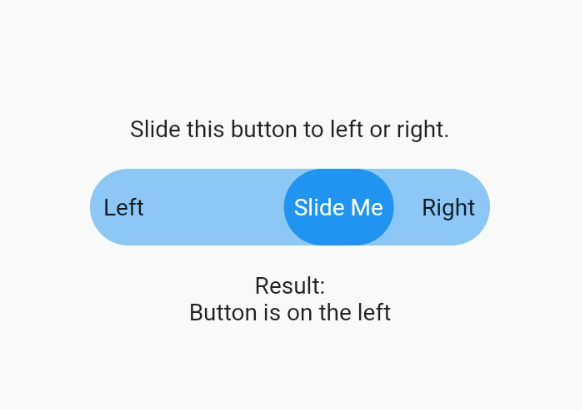
Now you can make your slidable button vertically or horizontally by using one of them widget. For horizontal usage example :
    HorizontalSlidableButton(
      width: MediaQuery.of(context).size.width / 3,
      buttonWidth: 60.0,
      color: Theme.of(context).accentColor.withOpacity(0.5),
      buttonColor: Theme.of(context).primaryColor,
      dismissible: false,
      label: Center(child: Text('Slide Me')),
      child: Padding(
        padding: const EdgeInsets.all(8.0),
        child: Row(
          mainAxisAlignment: MainAxisAlignment.spaceBetween,
          children: [
            Text('Left'),
            Text('Right'),
          ],
        ),
      ),
      onChanged: (position) {
        setState(() {
          if (position == SlidableButtonPosition.end) {
            result = 'Button is on the right';
          } else {
            result = 'Button is on the left';
          }
        });
      },
    ),
Vertical usage example :
    VerticalSlidableButton(
      height: MediaQuery.of(context).size.height / 3,
      buttonHeight: 60.0,
      color: Theme.of(context).accentColor.withOpacity(0.5),
      buttonColor: Theme.of(context).primaryColor,
      dismissible: false,
      label: Center(child: Text('Slide Me')),
      child: Padding(
        padding: const EdgeInsets.all(8.0),
        child: Column(
          mainAxisAlignment: MainAxisAlignment.spaceBetween,
          children: [
            Text('Top'),
            Text('Bottom'),
          ],
        ),
      ),
      onChanged: (position) {
        setState(() {
          if (position == SlidableButtonPosition.end) {
            result = 'Button is on the bottom';
          } else {
            result = 'Button is on the top';
          }
        });
      },
    ),
If you already use this package before v3.x.x you may need to migrate your code to HorizontalSlidableButton or VerticalSlidableButton for specific direction usage because SlidableButton class has been removed start from v3.0.0.