
 v0.0.1+3
snap_scroll_physics
사용자의 스크롤을 다른 오프셋에서 고정하는 스크롤 물리
76좋아요 530일 다운로드140Pub 점수
AndroidiOSWebmacOSWindowsLinux
Flutter | 스크롤뷰용 스냅 물리학

의존성 목록 2 개
{"sdk":"flutter"}{"sdk":"flutter"}아래는 영문 원문 스냅샷입니다. 최신 내용은 GitHub에서 확인하세요.
When building scrollable views, sometimes you would prefer that the scroll stopped at a given offset, or that it avoids to stop inside some area. This package allows you to implement this on any Flutter scroll view.
This kind of behaviour can be seen in any iOS app using the UIKit/SwiftUI Navigation bar, also with custom headers inside some popular apps like Twitter, Chrome, Gmail, Google Photos, Apple Music, Facebook and many more!
snap_scroll
physics: SnapScrollPhysics(
    snaps: [
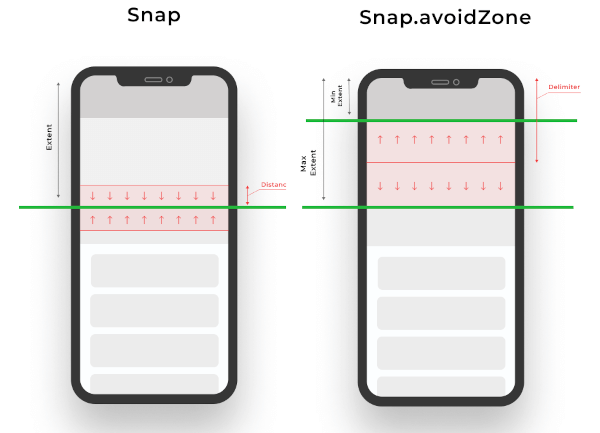
        Snap(200, distance: 50), // If the scroll offset is expected to stop between 150-250 the scroll will snap to 200,
        Snap(200, leadingDistance: 50), // If the scroll offset is expected to stop  between 150-200 the scroll will snap to 200,
        Snap(200, trailingDistance: 50), // If the scroll offset is expected to stop between 150-200 the scroll will snap to 200,
        Snap(200, trailingDistance: 50), // If the scroll offset is expected to stop between 150-200 the scroll will snap to 200,
        Snap.avoidZone(0, 200), // If the scroll offset is expected to stop between 0-200, the scroll will snap to 0 if the expected one is between 0-99, and to 200 if it is between 100-200,
        Snap.avoidZone(0, 200, delimiter: 50), // If the scroll offset is expected to stop between 0-200, the scroll will snap to 0 if the expected one is between 0-49, and to 200 if it is between 50-200
    ]
),
physics: SnapScrollPhysics.cupertinoAppBar, // Default values for the Cupertino appbar
https://user-images.githubusercontent.com/19904063/116775316-b67b8f80-aa62-11eb-9ae1-58da68a381e4.mp4
https://user-images.githubusercontent.com/19904063/116775452-56391d80-aa63-11eb-95ae-f8fd8154cbc9.mp4
IMPORTANT! Sadly ScrollPhysics are not reactivily updated, so if you change the values, they won't be automatically updated. See #80051.
This can be temporaly fixed by this, while is discouraged in production if no changes are needed at runtime:
List<Snap> getSnaps() {
    return [
       Snap(200), // Hot reload works
    ];
}
@override
  Widget build(BuildContext context) {
    return CustomScrollView(
      physics: SnapScrollPhysics.builder(getSnaps),
      slivers: [
       // ....
      ],
    );
  }