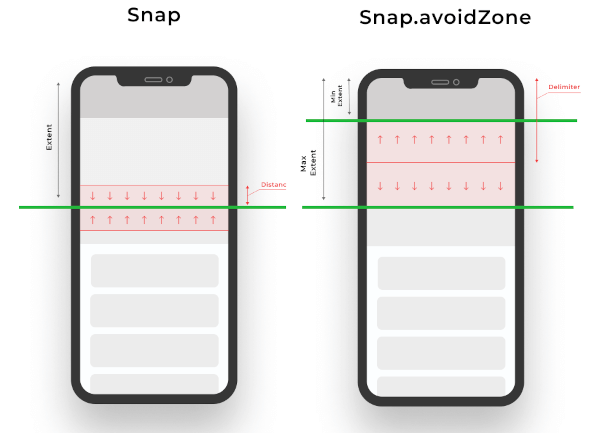
스크롤 위치를 특정 오프셋으로 스냅하는 스크롤 물리 효과를 제공하는 플러터 패키지로, 스크롤 가능한 위젯에서 사용자 경험을 향상시킵니다. 정밀한 스크롤 동작 제어가 가능하여 사전 정의된 위치에 정렬이 필요한 카루셀형 인터페이스나 그리드 레이아웃에 적합합니다. 이 패키지는 모든 주요 플랫폼을 지원하며 표준 ScrollView와 원활하게 통합됩니다. 플러터 내장 물리 시스템을 확장하여 사용자 지정 가능한 스냅 간격과 부드러운 전환을 제공합니다.
사용 사례
카루셀 슬라이더
그리드 레이아웃 및 정렬
폼 필드 탐색
제품 캐러셀
사용자 정의 스크롤 스냅
인터랙티브 튜토리얼
주요 기능
사전 정의된 오프셋으로 스냅
부드러운 전환 애니메이션
크로스 플랫폼 지원
기본 물리 효과 확장
사용자 정의 가능한 스냅 간격
ScrollView와의 간편한 통합
적합한 대상
인터랙티브 스크롤 인터페이스를 구축하는 개발자
정확한 스크롤 정렬이 필요한 디자이너
카루셀 또는 탭 기반 네비게이션을 가진 앱
사용자 정의 스크롤 동작이 필요한 프로젝트
다양한 플랫폼을 대상으로 하는 팀
고려 사항
최적의 UX를 위해 조정이 필요할 수 있습니다
관리되지 않으면 다른 물리 시스템과 충돌할 수 있습니다
지속적인 스크롤 콘텐츠에 적합하지 않습니다
많은 스냅 포인트와 함께 성능에 미치는 영향
스크롤 가능한 위젯만 가능
원본 README
연결된 소스 저장소의 README 원문 스냅샷입니다. 최신 내용은 저장소에서 확인하세요.
Snap Scroll Physics
When building scrollable views, sometimes you would prefer that the scroll stopped at a given offset, or that it avoids to stop inside some area. This package allows you to implement this on any Flutter scroll view.
This kind of behaviour can be seen in any iOS app using the UIKit/SwiftUI Navigation bar, also with custom headers inside some popular apps like Twitter, Chrome, Gmail, Google Photos, Apple Music, Facebook and many more!
physics: SnapScrollPhysics(
snaps: [
Snap(200, distance: 50), // If the scroll offset is expected to stop between 150-250 the scroll will snap to 200,Snap(200, leadingDistance: 50), // If the scroll offset is expected to stop between 150-200 the scroll will snap to 200,Snap(200, trailingDistance: 50), // If the scroll offset is expected to stop between 150-200 the scroll will snap to 200,Snap(200, trailingDistance: 50), // If the scroll offset is expected to stop between 150-200 the scroll will snap to 200,Snap.avoidZone(0, 200), // If the scroll offset is expected to stop between 0-200, the scroll will snap to 0 if the expected one is between 0-99, and to 200 if it is between 100-200,Snap.avoidZone(0, 200, delimiter: 50), // If the scroll offset is expected to stop between 0-200, the scroll will snap to 0 if the expected one is between 0-49, and to 200 if it is between 50-200
]
),
physics: SnapScrollPhysics.cupertinoAppBar, // Default values for the Cupertino appbar