
 v3.2.2
multi_dropdown
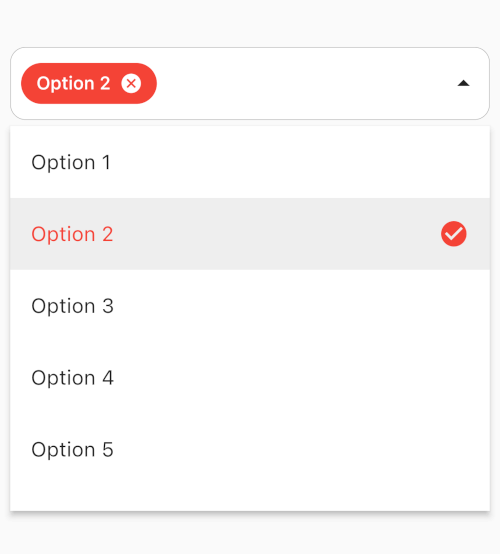
다양한 다중 선택을 위한 고도로 맞춤화 가능한 스트리밍된 Flutter 위젯.
384좋아요 4.3만30일 다운로드140Pub 점수
AndroidiOSmacOSWindowsLinux
Harmony Forge는 Flask과 Flutter를 결합한 음악 생성 플랫폼입니다. Flask은 음악 생성, 사용자 인증 및 모델 감시와 같은 백엔드 작업을 관리하며, Flutter 기반의 Android 앱은 사용자 친화적인 인터페이스를 제공합니다. 둘은 함께 머신러닝 모델과 현대적인 디자인 원칙을 통해 사용자가 매끄럽게 음악을 만들 수 있도록 지원합니다.
 v3.2.2
다양한 다중 선택을 위한 고도로 맞춤화 가능한 스트리밍된 Flutter 위젯.
HTML를 언 escaping하는 작은 라이브러리입니다. 모든 이름 있는 문자 참조, 십진수 문자 참조 및 16진수 문자 참조를 지원합니다.
JSON 웹 토큰을 디코딩하고 만료일을 확인 및 제공하는 간단한 Dart 패키지
Android 및 iOS에서 다양한 설정 화면을 열기 위한 가장 완전한 Flutter 플러그인 패키지
아래는 영문 원문 스냅샷입니다. 최신 내용은 GitHub에서 확인하세요.
Harmony Forge Logo
Harmony Forge is a music generation platform that combines the power of a Flask server for backend processing, a Flutter app for the Android client interface, and allows users to generate music seamlessly.
The Flask server acts as the backend for the Harmony Forge project. It handles music generation requests, manages user authentication and accounts, provides an admin panel for model management, and ensures a secure environment. Additionally, Harmony Forge leverages LSTM networks for MIDI generation, enabling users to create diverse musical compositions.
Music Generation with LSTM: Utilizes LSTM (Long Short-Term Memory) networks trained on MIDI datasets to generate music based on user preferences and inputs. The LSTM model can capture complex musical patterns and nuances, resulting in diverse and expressive MIDI outputs.
Multiple Instrument Support: Harmony Forge supports multiple instruments for MIDI generation, allowing users to specify instrument tracks and arrangements to create rich and varied musical compositions.
Custom Model Creation: Users have the flexibility to create custom LSTM models tailored to their musical style and preferences. By training the LSTM network on specific MIDI datasets, users can fine-tune the model to generate music that aligns with their artistic vision.
Clone the repository:
git clone https://github.com/jztchl/Harmony-Forge.git
Navigate to the Flask server directory:
cd Harmony-Forge/server
Install dependencies:
pip install -r needs.txt
Set up Configuration variables: Configure the following in the config.py after adding it:
import os
from datetime import timedelta
class Config:
    SECRET_KEY = 'your_secret_key_here'
    SQLALCHEMY_DATABASE_URI = 'sqlite:///users.db'
    JWT_ACCESS_TOKEN_EXPIRES = timedelta(hours=3)
    JWT_REFRESH_TOKEN_EXPIRES = timedelta(days=30)
    MAIL_SERVER = 'smtp.example.com'
    MAIL_PORT = 587
    MAIL_USE_TLS = True
    MAIL_DEFAULT_SENDER = your_email@example.com
    MAIL_USERNAME = your_email@example.com
    MAIL_PASSWORD = your_email_password
Run the Flask server:
python flask_app.py
The Flask server will run on http://localhost:5000.
Or you could run the project in the command line:
python control.py
By integrating LSTM networks for MIDI generation, Harmony Forge offers users the ability to create sophisticated and personalized musical pieces with rich instrumentation and customized model training.
The Harmony Forge project includes an Android Flutter app that serves as the client-side interface for users. Here are some key points about the Flutter app:
Install Flutter SDK and set up your development environment: Flutter Installation Guide
Clone the repository:
git clone https://github.com/jztchl/Harmony-Forge.git
Navigate to the Flutter app directory:
cd Harmony-Forge/flutter_app
Install dependencies:
flutter pub get
Configure the urls in api lib/api_endpoints.dart:
const String BASE_URL = 'server url';
note:be in same network running locally
Run the Flutter app:
flutter run
The Flutter app will build and run on your connected Android device or emulator.
Feel free to explore the full potential of Harmony Forge by setting up both the Flask server and Flutter app and experimenting with music generation and user interactions!