
 v0.1.7
flutter_storyboard
모든 위젯의 스토리보드를 보여주는 Flutter 패키지입니다.
133좋아요 9830일 다운로드40Pub 점수
플랫폼 정보 없음
Flutter 스토리보드

{"sdk":"flutter"}^0.4.0{"sdk":"flutter"}아래는 영문 원문 스냅샷입니다. 최신 내용은 GitHub에서 확인하세요.
Buy Me A Coffee Donate github pages GitHub stars flutter_storyboard
A Flutter Debug tool to see and test all your screens at once.
Online Demo: https://rodydavis.github.io/storyboard/
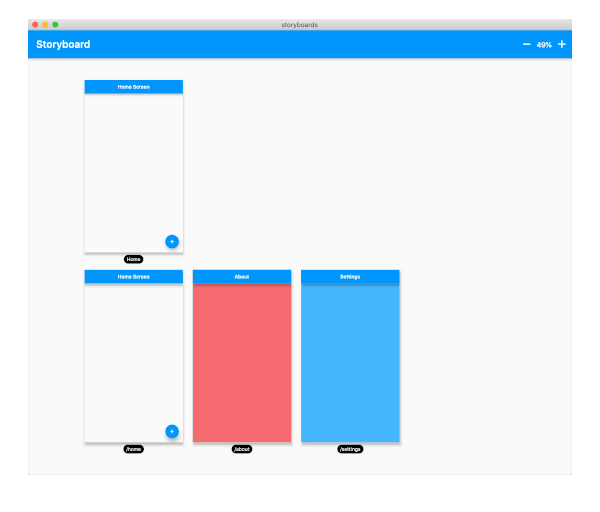
screenshot
Wrap your MaterialApp with Storyboard.
return StoryBoard.material(
      child: MaterialApp(
        debugShowCheckedModeBanner: false,
        title: 'Flutter Storyboard Example',
        theme: ThemeData.light().copyWith(
          visualDensity: VisualDensity.adaptivePlatformDensity,
        ),
        darkTheme: ThemeData.dark().copyWith(
          visualDensity: VisualDensity.adaptivePlatformDensity,
        ),
        themeMode: ThemeMode.light,
        home: HomeScreen(),
        routes: {
          '/home': (_) => HomeScreen(),
          '/about': (_) => AboutScreen(),
          '/settings': (_) => SettingsScreen(),
        },
      ),
    );
Wrap your WidgetsApp with Storyboard.widgets(). Wrap your CupertinoApp with Storyboard.cupertino().
You can add any number of custom widgets to the canvas, including custom routes. You can add dummy data to the constructors here as it will render all default values.
customScreens: [
  SettingsScreen(),
  AboutScreen(),
  CustomWidget(title: 'Dummy Data'),
],
customRoutes: [
  RouteSettings(name: '/about'),
],
Now you can test all your screens with a hot reload! You can also disable the widget at any time by setting enabled to false. You will need to do a hot restart after you change this value.