
 v0.0.3
flutter_hot_toast
애니메이션이 있는 매우 멋지고 간단한 토스트입니다. React Hot Toast에서 많은 영감을 받았습니다.
33좋아요 10730일 다운로드120Pub 점수
AndroidiOSWebmacOSWindowsLinux
samtuga1/flutter_hot_toast open-source repository details.

{"sdk":"flutter"}^2.1.0^3.0.0^2.2.0{"sdk":"flutter"}^2.0.0아래는 영문 원문 스냅샷입니다. 최신 내용은 GitHub에서 확인하세요.
A very cool and simple flutter toast that is highly inspired by React Hot Toast
Video preview
First wrap your Material App with GlobalLoaderOverlay
Widget build(BuildContext context) {
    return GlobalLoaderOverlay(
      child: MaterialApp(
        title: 'Flutter Demo',
        theme: ThemeData(
          primarySwatch: Colors.blue,
        ),
        home: const Home(),
      ),
    );
  }
Now you can call the toast to show in any part of your widget that is being encapsulated in the MaterialApp widget by:
context.loaderOverlay.show(
            widget: FlutterHotToast.loading(
              height: 70,
              width: 280,
              label: const Text(
                'loading...😬',
                style: TextStyle(
                  fontSize: 30,
                ),
              ),
            ),
          );
FloatingActionButton(
        child: const Icon(Icons.add),
        onPressed: () {
          context.loaderOverlay.show(
            widget: FlutterHotToast.loading(
              height: 70,
              width: 280,
              label: const Text(
                'loading...😬',
                style: TextStyle(
                  fontSize: 30,
                ),
              ),
            ),
          );
          Future.delayed(const Duration(seconds: 2), () {
            context.loaderOverlay.show(
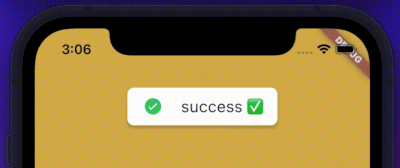
              widget: FlutterHotToast.success(
                context,
                height: 70,
                width: 280,
                label: const Text(
                  'success ✅',
                  style: TextStyle(
                    fontSize: 30,
                  ),
                ),
              ),
            );
          });
        },
      ),
This package uses lottie, loader_overlay and flutter_animate under the hood.
You can find the repository link at github to contribute to this project.
If you like this project, please follow me on github