
 v1.0.0
languagetool_textfield
LanguageTool TextField 패키지는 Flutter 앱을 위한 맞춤법 검사기입니다. 메시지, 노트, 이메일과 같이 텍스트 입력이 필요한 앱에 유용합니다.
94좋아요 2.5천30일 다운로드160Pub 점수
iOSWeb
🌐 LanguageTool 맞춤법 검사 기능을 구현한 Flutter 텍스트 필드.

^2.11.0^1.17.1{"sdk":"flutter"}^1.0.0^1.11.0^0.10.1^2.0.1{"sdk":"flutter"}1.0.0아래는 영문 원문 스냅샷입니다. 최신 내용은 GitHub에서 확인하세요.
Providing powerful spell-checking and grammar correction capabilities.
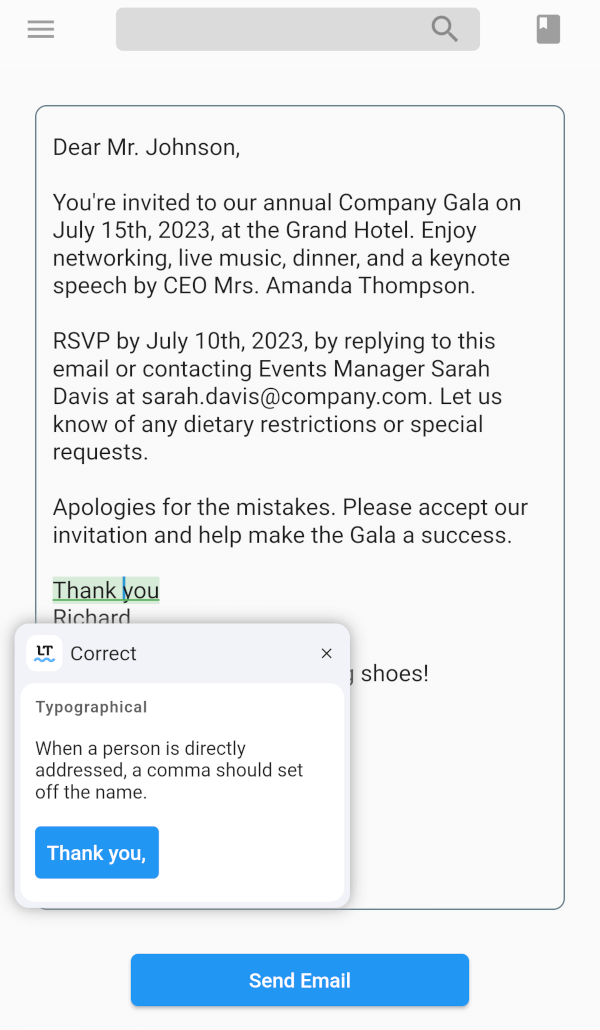
The LanguageTool TextField package is a spell-checker designed for Flutter apps. It integrates with the LanguageTool API to offer real-time spell-checking capabilities. This package will enhance text input accuracy by automatically detecting and highlighting spelling errors as users type.
It's particularly useful for apps that require precise text input, like chat or note-taking apps. By using the LanguageTool TextField package, developers can improve the user experience by providing an intuitive and reliable spell-checking feature.
flutter pub add languagetool_textfield
import 'package:languagetool_textfield/languagetool_textfield.dart';
To start using the plugin, copy this code or follow the example project in 'languagetool_textfield/example'
// Create a text controller for the Widget
final _controller = LanguageToolController();

// Use the text field widget in your layout
child: LanguageToolTextField(
  controller: _controller,

  // A language code like en-US, de-DE, fr, or auto to guess
  // the language automatically.
  // language = 'auto' by default.
  language: 'en-US',
);

// Don't forget to dispose the controller
_controller.dispose();
To incorporate the debounce or throttle functionality into the LanguageTool TextField, follow these:
Create a LanguageToolController and provide the desired debounce/throttle delay duration and delay type:
final _controller = LanguageToolController(
  // If the delay value is [Duration.zero], no delay is applied.
  delay: Duration(milliseconds: 500), // Set the debounce/throttle delay duration here
  delayType: DelayType.debouncing, // Choose either DelayType.debouncing or DelayType.throttling
);
DelayType.debouncing - Calls a function when a user hasn't carried out the event in a specific amount of time.
DelayType.throttling - Calls a function at intervals of a specified amount of time while the user is carrying out the event.
This is an unofficial plugin. We are not affiliated with LanguageTool. All logos are of their respected owners.
Current issues list is here.
Found a bug? Open the issue.