
 v1.2.0
dropdown_textfield
드롭다운 텍스트필드는 마테리얼 디자인 텍스트필드입니다. 드롭다운 버튼은 값 집합에서 하나의 고유한 값 또는 다수의 값을 선택하는 데 사용할 수 있는 위젯입니다.
181좋아요 3.8천30일 다운로드150Pub 점수
AndroidiOSWebmacOSWindowsLinux
사용자 지정 드롭다운

{"sdk":"flutter"}^1.18.0^2.0.5{"sdk":"flutter"}^4.0.0아래는 영문 원문 스냅샷입니다. 최신 내용은 GitHub에서 확인하세요.
A DropdownTextfield is a Material Design TextField. The DropDownButton is a widget that can be used to select one unique value or multiple values from a set of options.
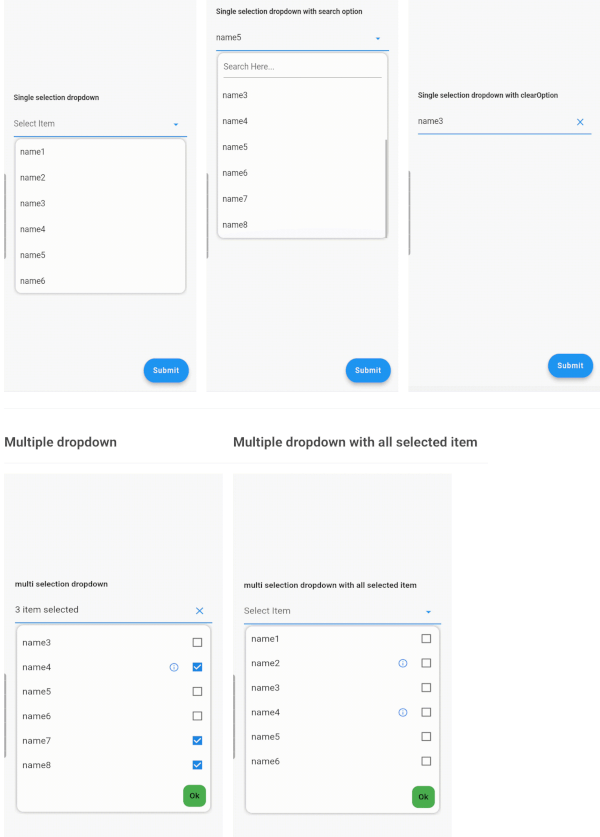
StatelessWidget| Single Dropdown | Single Dropdown with Search Option | Single Dropdown with Clear Option |
|---|---|---|
| Single Dropdown | Single Dropdown with Search Option | Single Dropdown with Clear Option |
| Multiple Dropdown | Multiple Dropdown with All Selected Items |
|---|---|
| Multiple Dropdown | Multiple Dropdown with All Selected Items |
You need to use SingleValueDropDownController for single dropdown and MultiValueDropDownController for multiple dropdown.
dropDownList, it will not display any value.<DropDownValueModel>.DropDownValueModel object for single selection dropdown, and a list of DropDownValueModel objects for multi-selection dropdown.false to disable the text field. Default value is true.true to enable the search option in the dropdown. Currently available only for single selection dropdown.true to display the complete list of selected items in the text field. Otherwise, it will display as "number_of_items selected".enableSearch=true.true to autofocus the search text field. Applicable only if enableSearch=true. Default value is false.false to hide the cursor from the search text field. Applicable only if enableSearch=true.false to hide the clear suffix icon button from the text field.Seeking contributions to improve the DropdownTextfield! If you have ideas for new features, optimizations, or bug fixes, please feel free to open a pull request or issue on our GitHub repository. Your contributions are greatly appreciated and will help make this package even better.