
 v3.3.0
dotted_line
이 패키지는 플러터에서 점선을 그리는 데 사용할 수 있습니다. 아름다운 점선을 그릴 수 있습니다.
326좋아요 14.5만30일 다운로드160Pub 점수
AndroidiOSWebmacOSWindowsLinux
이 패키지는 Flutter로 점선을 그리는 데 사용할 수 있습니다.

{"sdk":"flutter"}{"sdk":"flutter"}^1.2.0아래는 영문 원문 스냅샷입니다. 최신 내용은 GitHub에서 확인하세요.
logo.png
This package allows you to draw dotted lines with Flutter.
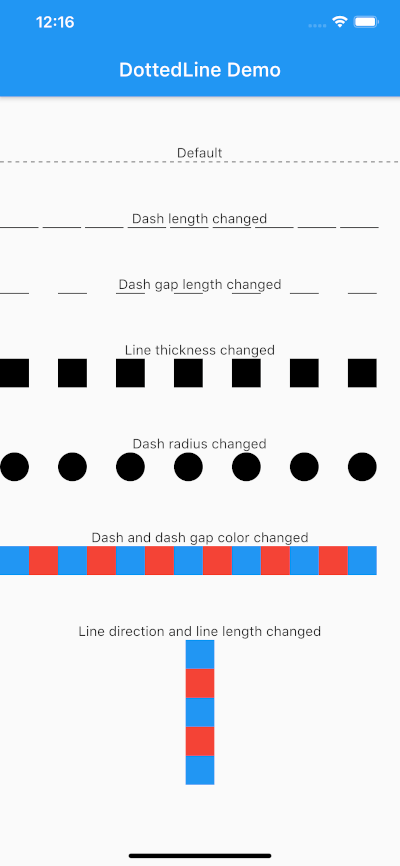
screenshot.png
| Parameter | Default | Description |
|---|---|---|
| direction | Axis.horizontal | The direction of the entire dotted line. |
| alignment | WrapAlignment.center | The alignment of the entire dotted line. |
| lineLength | double.infinity | The length of the entire dotted line. |
| lineThickness | 1.0 | The thickness of the entire dotted line. |
| dashLength | 4.0 | The length of the dash. |
| dashColor | Colors.black | The color of the dash. |
| dashGradient | null | The gradient colors of the dash. |
| dashRadius | 0.0 | The radius of the dash. |
| dashGapLength | 4.0 | The length of the dash gap. |
| dashGapColor | Colors.transparent | The color of the dash gap. |
| dashGapGradient | null | The gradient colors of the dash gap. |
| dashGapRadius | 0.0 | The radius of the dash gap. |
| addRepaintBoundary | false | Whether to wrap the dotted line with a RepaintBoundary. |
This can be used without parameters.
import 'package:dotted_line/dotted_line.dart';

DottedLine()
You can also customize by specifying parameters.
import 'package:dotted_line/dotted_line.dart';

DottedLine(
  direction: Axis.horizontal,
  alignment: WrapAlignment.center,
  lineLength: double.infinity,
  lineThickness: 1.0,
  dashLength: 4.0,
  dashColor: Colors.black,
  dashGradient: [Colors.red, Colors.blue],
  dashRadius: 0.0,
  dashGapLength: 4.0,
  dashGapColor: Colors.transparent,
  dashGapGradient: [Colors.red, Colors.blue],
  dashGapRadius: 0.0,
  addRepaintBoundary: true,
)
If your DottedLine is placed inside a widget that rebuilds frequently, you might experience performance issues (dropped frames) because the dashes and gaps are constantly repainted.
In such cases, setting addRepaintBoundary: true can improve performance by wrapping the DottedLine in a RepaintBoundary, isolating its paint step.
Note: The default is false to prevent unexpected memory overhead. Keep it false if you are displaying hundreds of dotted lines (e.g., in a large list) to avoid excessive memory usage.
The sample code can be found under the example package.
You can try changing all parameters.