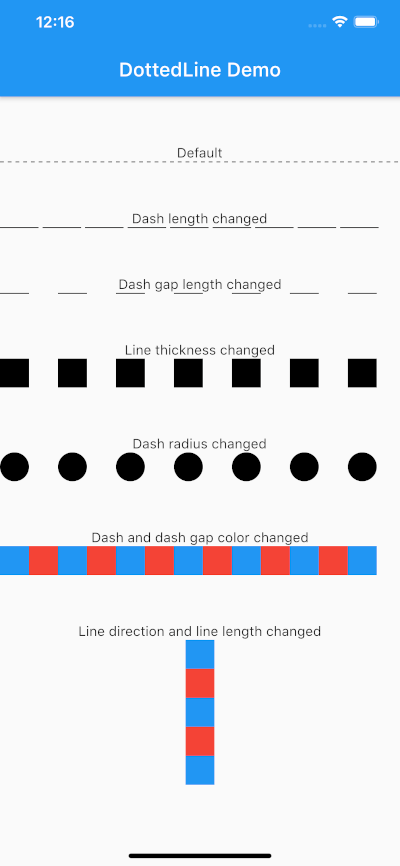
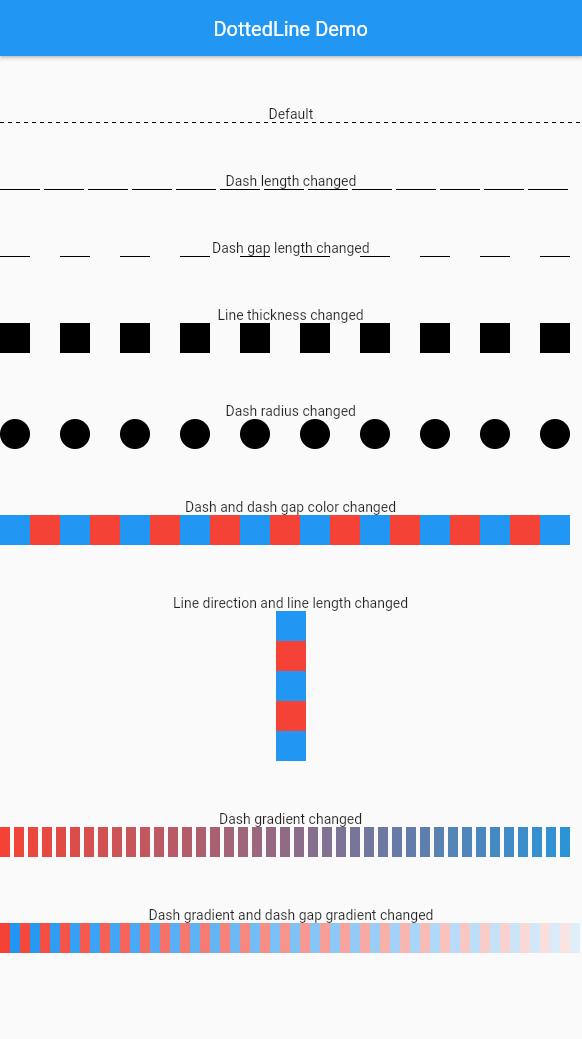
dotted_line 패키지는 Flutter 애플리케이션에서 시각적으로 매력적인 점선을 쉽게 만들 수 있도록 도와줍니다. 다양한 UI 요소에 점선 또는 파선을 그리는 간단하고 사용자 정의 가능한 방법을 제공하여 최소한의 코드로 인터페이스 디자인을 향상시킵니다. 이 패키지는 Android, iOS, Web, macOS, Windows, Linux 등 여러 플랫폼을 지원하며 크로스플랫폼 개발에 유용합니다. 직관적인 구성 옵션 덕분에 현대적인 앱 디자인에서 구분선, 분할선 또는 장식 요소를 추가하는 데 이상적입니다.
사용 사례
목록에서 시각적 구분 기호 만들기
양식 내 사용자 정의 구분선 설계
장식적인 선 요소로 UI 향상하기
점선 테두리를 사용하여 반응형 레이아웃 만들기
카드 컴포넌트에 스타일리스틱 악센트 추가하기
주요 기능
Flutter 위젯과의 간편한 통합
사용자 정의 가능한 점 크기 및 간격
수평 및 수직선 지원
크로스 플랫폼 호환성
경량이고 성능이 뛰어남
사용자 정의 가능한 테두리 색상 및 두께
적합한 대상
장식 요소를 찾는 UI 디자이너
깔끔하고 현대적인 인터페이스를 구축하는 개발자
일관된 시각적 스타일이 필요한 프로젝트
미묘한 그래픽 악센트가 필요한 앱
크로스플랫폼 플러터 애플리케이션
고려 사항
줄 기반 장식에만 제한됨
애니메이션 점 지원 없음
복잡한 레이아웃에서 정렬을 수동으로 처리해야 합니다
고성능 그림 작업 환경에는 적합하지 않습니다
부드러운 표시를 위해 Flutter의 렌더링 파이프라인에 의존합니다
원본 README
연결된 소스 저장소의 README 원문 스냅샷입니다. 최신 내용은 저장소에서 확인하세요.
About
This package allows you to draw dotted lines with Flutter.
Usage
Parameter
Default
Description
direction
Axis.horizontal
The direction of the entire dotted line.
alignment
WrapAlignment.center
The alignment of the entire dotted line.
lineLength
double.infinity
The length of the entire dotted line.
lineThickness
1.0
The thickness of the entire dotted line.
dashLength
4.0
The length of the dash.
dashColor
Colors.black
The color of the dash.
dashGradient
null
The gradient colors of the dash.
dashRadius
0.0
The radius of the dash.
dashGapLength
4.0
The length of the dash gap.
dashGapColor
Colors.transparent
The color of the dash gap.
dashGapGradient
null
The gradient colors of the dash gap.
dashGapRadius
0.0
The radius of the dash gap.
addRepaintBoundary
false
Whether to wrap the dotted line with a RepaintBoundary.
If your DottedLine is placed inside a widget that rebuilds frequently, you might experience performance issues (dropped frames) because the dashes and gaps are constantly repainted.
In such cases, setting addRepaintBoundary: true can improve performance by wrapping the DottedLine in a RepaintBoundary, isolating its paint step.
Note: The default is false to prevent unexpected memory overhead. Keep it false if you are displaying hundreds of dotted lines (e.g., in a large list) to avoid excessive memory usage.
Example
The sample code can be found under the example package.
You can try changing all parameters.