
 v2.0.0
flutter_font_picker
사용자가 사용자 지정 드롭다운/화면에서 Google 폰트를 선택할 수 있는 Flutter 위젯입니다.
40좋아요 18630일 다운로드130Pub 점수
AndroidiOSWebmacOSWindowsLinux
사용자가 사용자 정의 드롭다운에서 Google 글꼴을 선택할 수 있는 사용자 지정 Flutter 위젯입니다.

{"sdk":"flutter"}^6.3.2^2.5.3^6.0.0^4.15.2{"sdk":"flutter"}^2.4.0아래는 영문 원문 스냅샷입니다. 최신 내용은 GitHub에서 확인하세요.
https://user-images.githubusercontent.com/9117427/129091647-549ab203-501b-4654-9d1c-da74f494cb07.gif
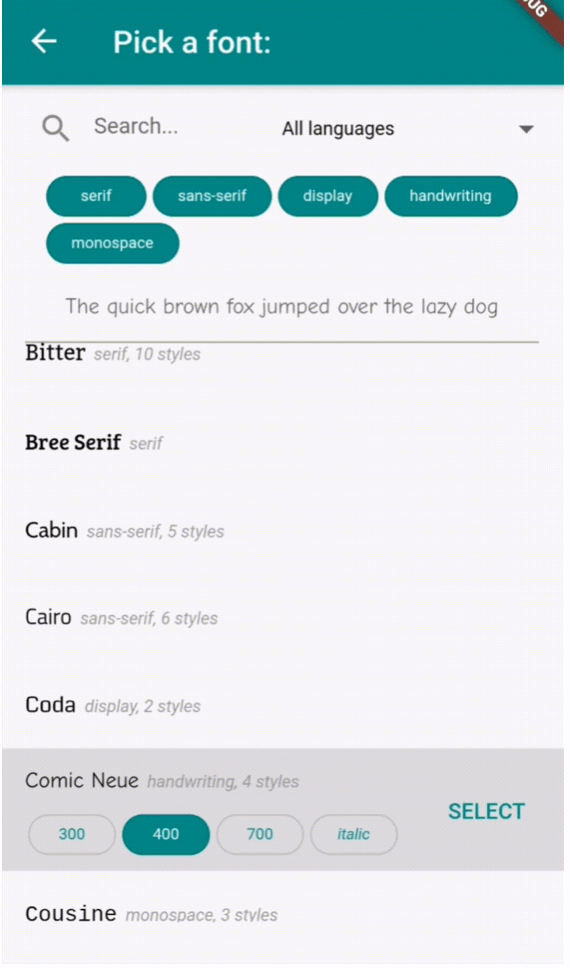
Provides a FontPicker widget that can be used in a route or dialog as a UI for choosing a font from Google Fonts.
Depends on the google_fonts package for loading and displaying the fonts.
Localizations available for 🇪🇸🇩🇪🇮🇹🇵🇹🇫🇷🇵🇱🇳🇱🇯🇵.
Inside your build method, use a button that when pressed, will navigate to the font picker screen:
PickerFont? _selectedFont;

ElevatedButton(
  child: Text('Pick a font'),
  onPressed: () {
    Navigator.push(
      context,
      MaterialPageRoute(
          builder: (context) => FontPicker(
              onFontChanged: (PickerFont font) {
                _selectedFont = font;
                print("${font.fontFamily} with font weight ${font.fontWeight} and font style ${font.fontStyle}.}");
              },
          ),
      ),
    );
  }),
The onFontChanged function retrieves the font that the user selects with an object containing details like the font's name, weight, style, etc.
You can then use its toTextStyle() method to style any text with the selected font:
Text('This will be styled with the font: $_selectedFont.fontFamily',
      style: selectedFont.toTextStyle()),
Check the example project for more usages.
https://user-images.githubusercontent.com/9117427/129081030-19a7df71-77d3-403e-89e9-8ad139b74540.jpg https://user-images.githubusercontent.com/9117427/129081023-67b0eb01-4bb1-47a2-b252-3a31536f8bb2.jpg
onFontChanged: (required) the callback that returns a PickerFont object with all the details and methods for the user's selected font.googleFonts: A list of Google fonts to use in the font picker. By default it contains all 975 fonts included in constants.dart. You should only use a limited number of them for performance and data saving, as each font is downloaded and stored to the app's storage when it comes into view. Using up to 100-200 fonts should work fine.initialFontFamily: The font family to use initially in the font picker. Defaults to 'Roboto'.showFontInfo: Whether to show font details (category, number of variants) next to each font tile in the list.showFontVariants: Whether to show font variants (weights and styles) in the font picker. If set to false, user will only be able to select the default variant of each font.showInDialog: Set this to true if you want to use the font picker inside an AlertDialog (check examples).recentsCount: Fonts that the user selected before are saved to be shown at the start of the list. Sets how many you want saved as recents.lang: The language in which to show the UI. Defaults to English ('en'). Other options are 🇪🇸🇩🇪🇮🇹🇵🇹🇫🇷🇵🇱🇳🇱🇯🇵 ('es', 'de', 'it', 'pt', 'fr', 'pl', 'nl', 'ja'). If you need a translation in another language: take a look at the dictionary variable in translations.dart, and send me (or fix) the translations for your language .The user can:
Inspired by the FontPicker jQuery plugin.