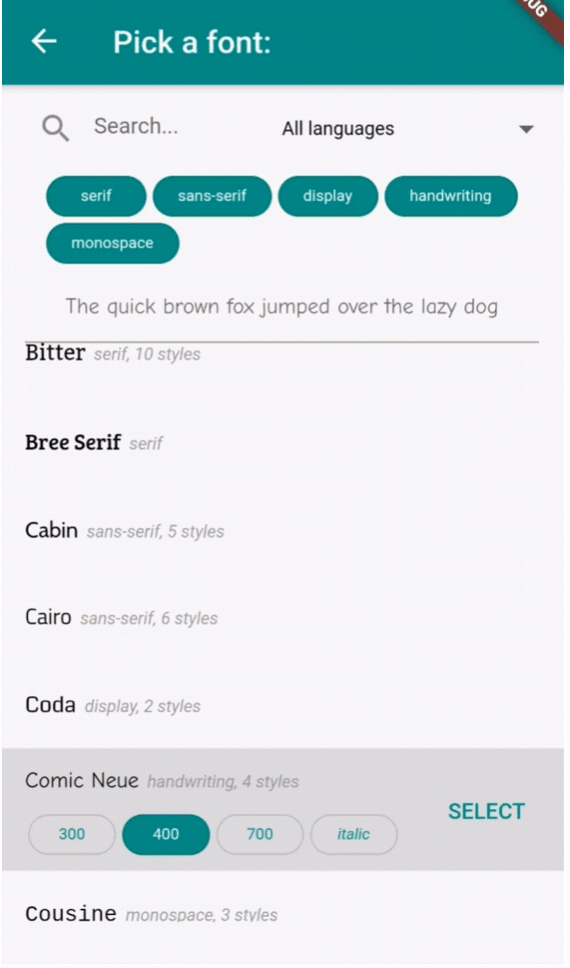
드롭다운 또는 전용 화면에서 Google 폰트를 선택할 수 있는 사용자 정의 가능한 위젯을 제공하는 플러터 패키지입니다. 여러 플랫폼에서 플러터 앱과 원활하게 통합되어 앱 인터페이스 내에서 직접 글꼴을 탐색하고 적용할 수 있도록 합니다. Google Fonts의 방대한 라이브러리를 활용하여 글꼴 통합을 간소화하며, 깔끔하고 직관적인 선택 경험을 제공합니다. 디자인 툴, 텍스트 에디터 또는 창작 애플리케이션과 같은 동적 타이포그래피 커스터마이징이 필요한 앱에 적합합니다.
사용 사례
동적 텍스트 스타일이 있는 앱
디자인 및 타이포그래피 도구
글꼴 선택 기능이 있는 텍스트 편집기
사용자 정의 가능한 UI 테마
시각 콘텐츠를 갖춘 교육 앱
창의적 콘텐츠 생성 앱
주요 기능
Google Fonts 통합
사용자 정의 가능한 드롭다운 또는 전체 화면 피커
크로스 플랫폼 지원
간편한 폰트 적용
경량이고 빠름
글꼴 미리보기 지원
적합한 대상
텍스트 중심 앱을 개발하는 개발자
디자인 중심의 플러터 애플리케이션
사용자 글꼴 사용자 정의가 필요한 앱
교육 및 창의적 소프트웨어
Flutter 사용자 UI/UX 디자이너
고려 사항
글꼴 로딩을 위해 인터넷 액세스가 필요합니다
앱 크기가 약간 증가할 수 있습니다
Google 폰트만 사용 가능
오래된 기기에서는 글꼴 렌더링 성능이 다릅니다
오프라인 폰트 지원 없음
대규모 폰트 목록의 초기 로드 시간
원본 README
연결된 소스 저장소의 README 원문 스냅샷입니다. 최신 내용은 저장소에서 확인하세요.
flutter_font_picker
A Flutter widget that lets the user select and apply a Google Font from a custom dropdown.
Provides a FontPicker widget that can be used in a route or dialog as a UI for choosing a font from Google Fonts.
Depends on the google_fonts package for loading and displaying the fonts.
Localizations available for 🇪🇸🇩🇪🇮🇹🇵🇹🇫🇷🇵🇱🇳🇱🇯🇵.
Simple Example
Inside your build method, use a button that when pressed, will navigate to the font picker screen:
PickerFont? _selectedFont;

ElevatedButton(
  child: Text('Pick a font'),
  onPressed: () {
    Navigator.push(
      context,
      MaterialPageRoute(
          builder: (context) => FontPicker(
              onFontChanged: (PickerFont font) {
                _selectedFont = font;
                print("${font.fontFamily} with font weight ${font.fontWeight} and font style ${font.fontStyle}.}");
              },
          ),
      ),
    );
  }),
The onFontChanged function retrieves the font that the user selects with an object containing details like the font's name, weight, style, etc.
You can then use its toTextStyle() method to style any text with the selected font:
Text('This will be styled with the font: $_selectedFont.fontFamily',
      style: selectedFont.toTextStyle()),
Check the example project for more usages.
FontPicker settings
onFontChanged: (required) the callback that returns a PickerFont object with all the details and methods for the user's selected font.
googleFonts: A list of Google fonts to use in the font picker. By default it contains all 975 fonts included in constants.dart. You should only use a limited number of them for performance and data saving, as each font is downloaded and stored to the app's storage when it comes into view. Using up to 100-200 fonts should work fine.
initialFontFamily: The font family to use initially in the font picker. Defaults to 'Roboto'.
showFontInfo: Whether to show font details (category, number of variants) next to each font tile in the list.
showFontVariants: Whether to show font variants (weights and styles) in the font picker. If set to false, user will only be able to select the default variant of each font.
showInDialog: Set this to true if you want to use the font picker inside an AlertDialog (check examples).
recentsCount: Fonts that the user selected before are saved to be shown at the start of the list. Sets how many you want saved as recents.
lang: The language in which to show the UI. Defaults to English ('en'). Other options are 🇪🇸🇩🇪🇮🇹🇵🇹🇫🇷🇵🇱🇳🇱🇯🇵 ('es', 'de', 'it', 'pt', 'fr', 'pl', 'nl', 'ja'). If you need a translation in another language: take a look at the dictionary variable in translations.dart, and send me (or fix) the translations for your language .
FontPicker features
The user can:
Browse a list of any Google fonts you want.
Select a variant (font weight and/or style) for each font.
Filter the fonts by category (serif, sans-serif, handwriting, etc.) or available font glyphs (Latin, Greek, Cyrillic, etc.).
Search the fonts by name.
See the most recently used fonts at the top of the list.