패키지, 저장소 및 앱 카테고리 검색

flutter_dropdown_alert 표지
패키지 상세v1.0.7

flutter_dropdown_alert

Flutter용 드롭다운 알림 패키지로, API 호출이 성공하거나 실패하거나 경고가 발생했을 때 사용자에게 푸시 알림처럼 알림을 전달하는 데 도움을 줍니다.

AndroidiOSWebmacOSWindowsLinux
30일 다운로드
4.6천
좋아요
99
Pub 점수
140

패키지 설치

flutter pub add flutter_dropdown_alert

패키지 개요

공개 정보를 바탕으로 생성한 선택 가이드입니다.

API 호출 후 성공, 실패 또는 경고 메시지를 표시할 수 있는 푸시 알림과 유사한 알림 시스템을 제공하는 플러터 패키지입니다. 시각적으로 매력적이고 방해가 되지 않는 방식으로 사용자 피드백을 향상시킵니다. 알림은 화면 상단에서 아래로 슬라이드되며, 다양한 스타일과 동작으로 맞춤 설정할 수 있습니다. 크로스플랫폼용으로 설계되어 안드로이드, iOS, 웹, macOS, Windows, 리눅스를 지원합니다.

사용 사례

  • API 호출 결과 표시
  • 사용자 경고 표시
  • 성공 또는 오류 상태 알림
  • 양식 내 사용자 피드백 향상
  • 실시간 상태 업데이트 제공

주요 기능

  • 슬라이드 다운 알림 애니메이션
  • 사용자 정의 가능한 알림 유형
  • 크로스 플랫폼 호환성
  • 간단한 API 통합
  • 사용자 정의 가능한 지속 시간 및 위치

적합한 대상

  • 시각적 피드백이 필요한 모바일 및 웹 앱
  • 경량 토스트 대안을 찾는 개발자
  • 즉시 사용자 알림이 필요한 앱
  • 자주 API 상호작용이 있는 프로젝트
  • 사용자 경험 중심 애플리케이션

고려 사항

  • 완전한 토스트 라이브러리에 비해 사용자 정의 옵션이 제한됨
  • 복잡한 디자인을 위해 추가 스타일링이 필요할 수 있습니다
  • 지속적인 알림에 적합하지 않음
  • 임시 알림에만 적합
  • 타이밍을 위해 적절한 상태 관리에 의존

원본 README

연결된 소스 저장소의 README 원문 스냅샷입니다. 최신 내용은 저장소에서 확인하세요.

pub package

flutter_dropdown_alert

A dropdown alert package for flutter

Dropdown alert will help to notify to user when you call api success, error or something like that, such as in app notification. It's will similar with push notification but you can custom more than that. You can show alert at anywhere without widget.

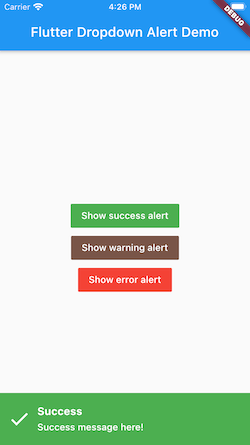
Demo

Top:

Bottom:

How to use it.

# pubspec.yaml

dependencies:
  flutter:
    sdk: flutter
  flutter_dropdown_alert: <last-version>

Just create a Stack widget and add DropdownAlert() inside MaterialApp which should be in main.dart like this:

import 'package:flutter_dropdown_alert/dropdown_alert.dart';
 MaterialApp(
       title: 'Dropdown Alert Demo',
       theme: ThemeData(
         visualDensity: VisualDensity.adaptivePlatformDensity,
       ),
       builder: (context, child) => Stack(
         children: [
            child!,
            DropdownAlert()
         ],
       ),
       home: MyHomePage(title: 'Flutter Dropdown Alert Demo'),
     );

Full example source code:

https://github.com/vantuan88291/flutter_bloc_modular

Show alert anywhere, even inside bloc without widget:

Next, import 'alert_controller.dart' into your dart code

import 'package:flutter_dropdown_alert/alert_controller.dart';
   AlertController.show("Title", "message here!", TypeAlert.success, payload);

The payload param is Map<String, dynamic>, this param is optional, should use to give data into the alert and get it when click on alert.

Hide alert:

The alert will automatically hide, but if you use delayDismiss: 0, it will freeze and not auto hide, you have to hide the alert by this code:

   AlertController.hide();

Listener when click on alert:

There are 2 ways to do that:

  • Using listener of controller, put this code inside initState() of widget:
   AlertController.onTabListener((Map<String, dynamic>? payload, TypeAlert type) {
         print("$payload - $type");
       });
  • Using param onTap:
   DropdownAlert(onTap: (Map<String, dynamic> payload?, TypeAlert type) {
                print("$payload - $type");
             },)

TypeAlert

Type description
TypeAlert.success Type when action success, the background of alert will green
TypeAlert.warning Type when action warning, the background of alert will brown
TypeAlert.error Type when action error, the background of alert will red

parameters

parameter description default
onTap Callback when tab to alert, will give: Function(Map<String, dynamic>, TypeAlert) null
successImage Image.asset() of success alert, uri of assets image Icon widget
warningImage Image.asset() of warning alert, uri of assets image Icon widget
errorImage Image.asset() of error alert, uri of assets image Icon widget
closeImage Image.asset() of close image, when showCloseButton is true Icon widget
errorBackground Color of background when error Colors.red
successBackground Colors.green
warningBackground 0xFFCE863D
titleStyle TextStyle of title
contentStyle TextStyle of content
maxLinesTitle null
maxLinesContent null
duration duration of animation 300
delayDismiss delay time when alert auto dismiss, set to 0 if you want to freeze alert 3000
position show the position of alert, include: AlertPosition.TOP, AlertPosition.BOTTOM AlertPosition.TOP
showCloseButton When close button is present, only can click on button close to hide the alert false
avoidBottomInset Add optional variable for inset overlap false

The ideal from react-native-dropdownalert

카테고리

소스 저장소

이 패키지를 사용하는 프로젝트