
 v2.0.0
card_game
Um pacote declarativo do Flutter para criar jogos de cartas com arrastar e soltar, animações e layouts flexíveis. Exemplos incluem Solitário e Guerra.
38Curtidas 274Downloads em 30 dias140Pontos Pub
AndroidiOSWebmacOSWindowsLinux
JLogical-Apps/card_game open-source repository details.

Lista de dependências 7 itens
{"sdk":"flutter"}^1.19.0^2.0.7^2.0.17^6.1.2{"sdk":"flutter"}^5.0.0Texto original em inglês. Visite o GitHub para a versão atual.
A declarative Flutter package for building card games with beautiful animations. Create card games with minimal code by defining the rules and letting the package handle the rest!
Each example demonstrates different features of the card_game package. Check out the example project for the complete source code.
| Game | Preview | Description | Key Concepts |
|---|---|---|---|
| Tower of Hanoi | Tower of Hanoi | A puzzle game where you move a stack of numbered disks between three columns, following the rule that larger numbers can't be placed on smaller ones. | • Custom numeric cards with CardGame<int, int>• Basic drag-and-drop with validation • maxGrabStackSize to limit moves to one card• Simple state management |
| War | War | A two-player card game where each player draws from their deck, and the highest card wins both cards. | • SuitedCard with deckCardStyle()• Flipped cards with CardDeck.flipped• Card value comparison with SuitedCardValueMapper• Automatic card flip animations |
| Memory Match | Memory Match | Find matching pairs of cards by flipping them over two at a time. Cards with matching ranks are removed from play. | • Grid layout with multiple CardDecks• Card flipping on press • Disabled card dragging |
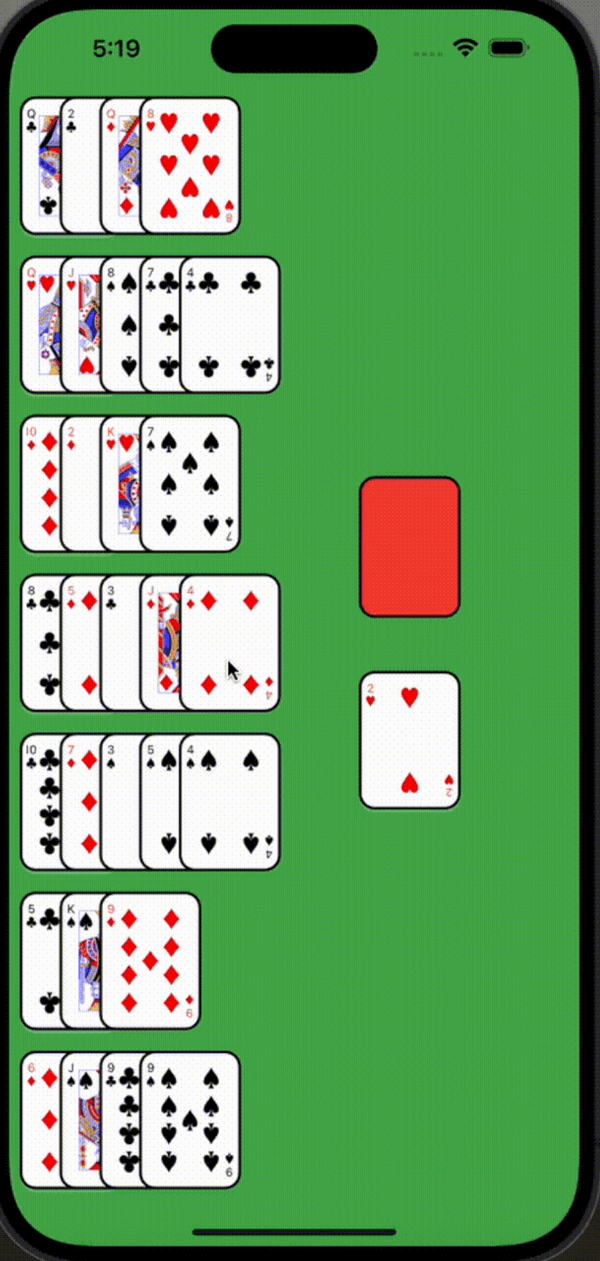
| Golf Solitaire | Golf Solitaire | Remove cards that are one rank away from the top card of the waste pile. Kings and Aces are considered one apart. | • Complex card comparison with SuitedCardDistanceMapper |
| Solitaire | Solitaire | The classic solitaire game. Build foundation piles by suit from Ace to King, and move cards between columns following standard rules. | • Advanced card movement rules • Multiple card dragging • Complex state management • Card stacking with flipped and unflipped cards |
Cards is a full-featured card game collection built with the card_game package that demonstrates its capabilities in a production environment.
Features:
The Cards project showcases advanced implementations including sophisticated game logic, multi-game support, persistent storage, and polished UI/UX. Check out the source code for inspiration on building your own complex card games.
🌐 Play Now • 📦 View Source Code
Let's walk through implementing the Tower of Hanoi example, as it's the simplest game that demonstrates the core concepts:
class TowerOfHanoi extends HookWidget {
  // Number of disks to include in the game
  final int amount;

  const TowerOfHanoi({super.key, this.amount = 4});

  // Initialize the game state with all disks in the first column
  // Each disk is represented by a number, where larger numbers represent larger disks
  List<List<int>> get initialCards => [
    // First column contains all disks, largest (amount) to smallest (1)
    List.generate(amount, (i) => amount - i),
    // Second and third columns start empty
    <int>[],
    <int>[],
  ];

  @override
  Widget build(BuildContext context) {
    // Use Flutter Hooks to manage the state of our columns
    // Each column is a list of integers representing the disks
    final cardsState = useState(initialCards);

    return CardGame<int, int>(
      // Use the built-in numeric card style to render our disks as numbers
      style: numericCardStyle(),
      children: [
        SafeArea(
          child: Column(
            children: [
              Row(
                mainAxisAlignment: MainAxisAlignment.spaceEvenly,
                children: cardsState.value
                    .mapIndexed((i, states) => CardColumn<int, int>(
                  // Each column needs a unique identifier
                  value: i,
                  // The cards (disks) currently in this column
                  values: states,
                  // Only allow moving one disk at a time
                  maxGrabStackSize: 1,
                  // Define the rules for when a disk can be placed here
                  canMoveCardHere: (move) {
                    final movingCard = move.cardValues.last;
                    final movingOnto = states.lastOrNull;
                    // Allow moves if:
                    // 1. Column is empty (movingOnto == null)
                    // 2. Moving disk is smaller than the top disk
                    return movingOnto == null || movingCard < movingOnto;
                  },
                  // Handle the actual movement of cards between columns
                  onCardMovedHere: (move) {
                    // Create a copy of the current state
                    final newCards = [...cardsState.value];
                    // Remove the moving card from its original column
                    // Since maxGrabStackSize is 1, we know we're only removing one card
                    newCards[move.fromGroupValue].removeLast();
                    // Add the moved card to its new column
                    // We use move.cardValues.first because maxGrabStackSize: 1 ensures
                    // there's exactly one card being moved at a time
                    newCards[i].add(move.cardValues.first);
                    // Update the state, triggering a rebuild
                    cardsState.value = newCards;
                  },
                ))
                    .toList(),
              ),
              Spacer(),
              // Reset button to start the game over
              ElevatedButton(
                onPressed: () => cardsState.value = initialCards,
                style: ButtonStyle(
                    shape: WidgetStatePropertyAll(CircleBorder())),
                child: Icon(Icons.restart_alt),
              ),
            ],
          ),
        ),
      ],
    );
  }
}
This implementation shows:
numericCardStyle()CardColumncanMoveCardHereFor more complex examples, check out the implementations of the other games in the example folder.
To try out the examples:
flutter pub getflutter run and select the example you want to tryAdd the package to your pubspec.yaml:
dependencies:
  card_game: ^1.0.0
The package uses two generic types:
T: The type of your cards (e.g., SuitedCard for playing cards or int for numeric cards)G: The type for group identifiers (can be any type, often dynamic, String, or int)Three types of card groups are available:
CardDeck: Shows only the top card, useful for draw pilesCardRow: Displays cards horizontally with customizable spacingCardColumn: Displays cards vertically with customizable spacingBuilt-in styles:
deckCardStyle(): Renders standard playing cards with a red backnumericCardStyle(): Renders numeric cardsCustom styles can be created by implementing CardGameStyle<T>.
Control card movement with the following parameters:
CardColumn<T, G>(
  // ... other params
  canCardBeGrabbed: (index, card) => true, // Control which cards can be grabbed
  maxGrabStackSize: 1, // Limit how many cards can be grabbed at once
  canMoveCardHere: (moveDetails) => true, // Define rules for accepting cards
  onCardMovedHere: (moveDetails) {}, // Handle successful moves
)
Control card interaction and visual state:
CardColumn<T, G>(
  // ... other params
  onCardPressed: (card) {
    // Handle card press events
    // Useful for flipping cards, selecting cards, or triggering game actions
  },
  isCardFlipped: (index, card) {
    // Control whether specific cards are shown face-down
    // Return true to show the card's back, false to show its face
    return shouldCardBeFlipped(index, card);
  },
)
Common use cases:
onCardPressed to flip cards when clickedisCardFlipped to hide cards in the tableauisCardFlipped with CardDeck.flipped for face-down draw pilesCreate your own card style:
CardGameStyle<MyCard>(
  cardSize: Size(64, 89),
  cardBuilder: (card, isFlipped, state) => MyCustomCard(
    card: card,
    isFlipped: isFlipped,
    state: state,
  ),
  emptyGroupBuilder: (state) => MyCustomEmptySpace(state: state),
)
T) must be unique within the gameG) must be unique within the gameCardGame<SuitedCard, String>, your groups should be CardColumn<SuitedCard, String>, CardRow<SuitedCard, String>, or CardDeck<SuitedCard, String>. This helps prevent type errors and makes the code more maintainable