
 v3.0.0
multiple_search_selection
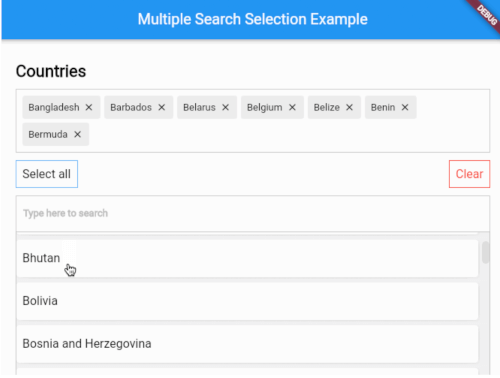
Um widget de seleção múltipla altamente personalizável com funcionalidade de pesquisa difusa.
73Curtidas 1,4 milDownloads em 30 dias150Pontos Pub
AndroidiOSWebmacOSWindowsLinux
Um widget de seleção múltipla altamente personalizável com funcionalidade de pesquisa difusa.

Lista de dependências 4 itens
{"sdk":"flutter"}^5.0.0{"sdk":"flutter"}^2.0.1Texto original em inglês. Visite o GitHub para a versão atual.
https://i.imgur.com/3dHOaoF.gif
Version Version
Show some love by dropping a ⭐ at GitHub
HTML tutorial
// Use this controller to adjust the behaviour of the widget
// 1. getAllItems
// 2. getPickedItems
// 3. searchItems
// 4. clearSearchField
// 5. clearAllPickedItems
// 6. selectAllItems
// 7. minCharsToShowItems
// 8. allowDuplicateSelection
// 9. isSelectable
MultipleSearchController controller = MultipleSearchController();
MultipleSearchSelection<Country>(
  // The TextField that is used to search items.
  //
  // You can use this to customize the search field.
  // The `onChanged` of the `searchField` is used internally to search items,
  // so you can use the `onSearchChanged` callback to get the search query.
  searchField: TextField(
    decoration: InputDecoration(
      hintText: 'Search countries',
      border: OutlineInputBorder(
        borderRadius: BorderRadius.circular(6),
        ),
      ),
    ),
  onSearchChanged: (text) {
    print('Text is $text');
  },
  items: countries, // List<Country>
  fieldToCheck: (c) {
    return c.name; // String
  },
  itemBuilder: (country,index,isPicked) {
    return Padding(
      padding: const EdgeInsets.all(6.0),
      child: Container(
        decoration: BoxDecoration(
          borderRadius: BorderRadius.circular(6),
          color: Colors.white,
        ),
        child: Padding(
          padding: const EdgeInsets.symmetric(
            vertical: 20.0,
            horizontal: 12,
          ),
          child: Text(country.name),
        ),
      ),
    );
  },
  pickedItemBuilder: (country) {
    return Container(
      decoration: BoxDecoration(
        color: Colors.white,
        border: Border.all(color: Colors.grey[400]!),
      ),
      child: Padding(
        padding: const EdgeInsets.all(8),
        child: Text(country.name),
      ),
    );
  },
  onTapShowedItem: () {},
  onPickedChange: (items) {},
  onItemAdded: (item) {},
  onItemRemoved: (item) {},
  sortShowedItems: true,
  sortPickedItems: true,
  fuzzySearch: FuzzySearch.jaro,
  itemsVisibility: ShowedItemsVisibility.alwaysOn,
  title: Text(
    'Countries',
    style: kStyleDefault.copyWith(
      fontSize: 22,
      fontWeight: FontWeight.bold,
    ),
  ),
  showSelectAllButton: true,
  maximumShowItemsHeight: 200,
)
MultipleSearchSelection<T>.creatable constructor can now create new item when search result does not return any results. It takes a new required parameter, createOptions e.g :
// [T] here is [Country]
createOptions: CreateOptions<Country>(
    // You need to create and return the item you want to add since [T] is not always [String].
    create: (text) {
        return Country(name: text, iso: text);
    },
    // A callback when the item is succesfully created.
    onCreated: (c) => print('Country ${c.name} created'),
    // Create item Widget that appears instead of no results.
    createBuilder: (text) => Align(
        alignment: Alignment.centerLeft,
            child: Padding(
                padding: const EdgeInsets.all(8.0),
                child: Text('Create "$text"'),
            ),
        ),
    // Whether you want to pick the newly created item or just add it to your list. Defaults to false.
    pickCreated: true,
),
itemsVisibility behaviour for the default & creatable constructors
| ShowedItemsVisibility.alwaysOn | ShowedItemsVisibility.onType | ShowedItemsVisibility.toggle |
|---|---|---|
| Always On | On type | Toggle |
Found a bug or want a new feature? Open an issue in the Github repository of the project.