


 v0.1.0+3
dashed_line
Desenhe linhas tracejadas com qualquer forma e estilo que quiser. Assim mesmo.
77Curtidas 4Downloads em 30 dias160Pontos Pub
AndroidiOSWebmacOSWindowsLinux
Desenhe linhas tracejadas com qualquer forma e estilo que quiser. Assim mesmo.

Texto original em inglês. Visite o GitHub para a versão atual.


Draw dashed lines with any shape and style you want. Just like that.
Add the dependency to your pubspec.yaml (you can see the newest version in the pub badge):
dependencies:
  dashed_line: ^0.1.0
Use the widget:
import 'package:dashed_line/dashed_line.dart';

// ...

DashedLine(
  path: Path()..cubicTo(-40, 53, 14, 86, 61, 102),
  color: Colors.red,
)
...you can also use the SVG path commands instead of a Path:
DashedLine.svgPath(
  'C -40 53 14 86 61 102',
  color: Colors.red,
)
There are many ways.
You can construct the path yourself using the Path methods like lineTo or cubicTo.
You can also use the path commands used in the d attribute of SVG files. You can do this manually or via export from one of the vector graphics software, like Inkscape or Figma. We found SvgPathEditor quite useful too.
| First step | Second step |
|---|---|
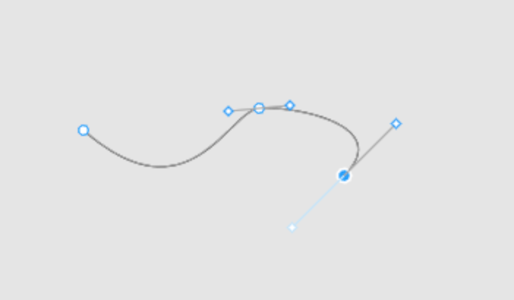 |
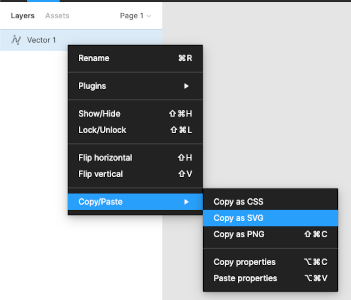 |
And now we have an SVG in the clipboard:
<svg width="190" height="48" viewBox="0 0 190 48" fill="none" xmlns="http://www.w3.org/2000/svg">
  <path d="M1 16C73 79 100 3 121 0.999997C142 -1 214.5 11.5 179 47" stroke="black"/>
</svg>
From here we can just copy the value of the path's d attribute and use for the DashedLine.svgPath constructor's first argument.
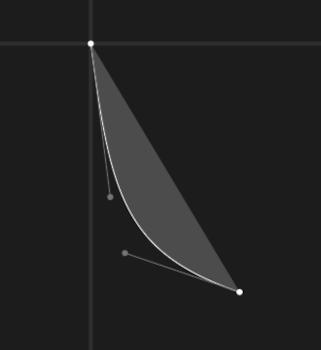
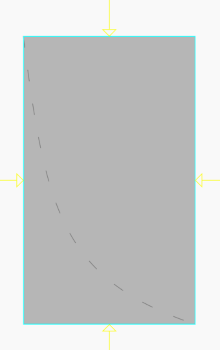
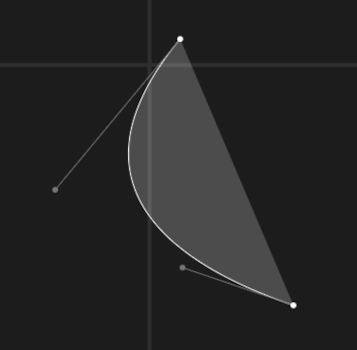
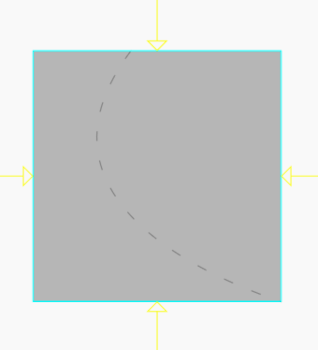
Due to how Paths work in Flutter and Skia, the DashedLine widget takes NOT as much space as the dashed line needs, but as much it needs to contain all the control points. Table below should help understand the problem.
| Path commands | Path | Result line |
|---|---|---|
C 8 63 14 86 61 102 |
 |
 |
C -40 53 14 86 61 102 |
 |
 |
See LICENSE.
Lista de dependências 4 itens
{"sdk":"flutter"}^1.0.0{"sdk":"flutter"}^1.5.3Filtre pelo caso de uso, compare a atividade e confira o projeto original antes de adotá-lo.
“A repository is the most basic element of GitHub.”
GitHub Docs — About repositories ↗