
clubTivi
開源跨平台 IPTV 播放器,具備智慧型 EPG 對應、多供應商串流故障轉移與遠端控制支援。以 Flutter 建構。

- 星標
- 107
- 分支
- 29
- 最近推送(UTC)
- 2026年10月25日
- 專案狀態
- 未封存
原始 README
以下為英文專案原文快照,最新內容請造訪 GitHub。
⚡ clubTivi
The open-source IPTV player that never buffers. Combine all your sources — free TV, paid services, debrids — into one unified interface with Smart Channels, intelligent EPG matching, and automatic stream failover.
Built with Flutter for Android, macOS, Linux, and Windows.
Why clubTivi?
Most IPTV players let you watch one provider at a time. When a stream buffers, you're stuck. And your free channels, paid services, and debrids are all in separate apps. clubTivi changes that — it brings everything into one interface and automatically switches streams when problems are detected. No more buffering. No more app-hopping. No more manually hunting for a working channel.
✨ Features
⚡ Smart Channels
The headline feature that sets clubTivi apart. Group the same channel from multiple sources — free TV, paid services, debrids — into a single Smart Channel:
- One-click creation — multi-select matching channels, hit "New Smart Channel"
- Automatic failover — when buffering is detected, instantly switches to the next healthy stream
- Mix any source — combine free, paid, and debrid streams for the same channel in one group
- Priority ordering — arrange streams in your preferred order; the best source plays first
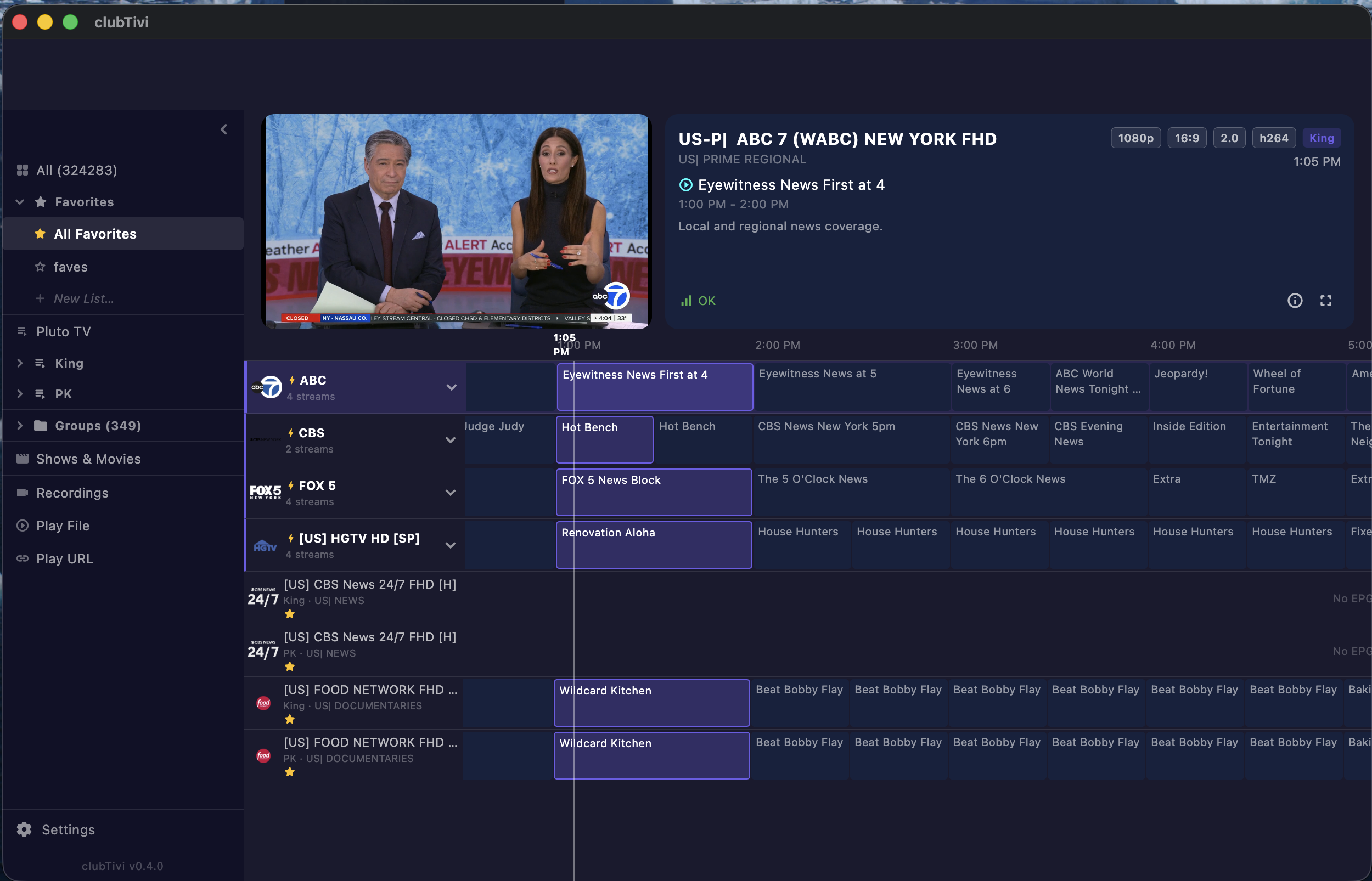
- Full EPG integration — Smart Channels show the same guide data as regular channels
- Visual indicators — amber ⚡ bolt icon, playing-stream highlight, expand to see all members
- Right-click management — rename, delete, remove members, add channels to existing groups
📺 EPG (Electronic Program Guide)
- 4-tier intelligent auto-matching — explicit mapping → tvgId lookup → normalized name match → call-sign extraction (WABC, WCBS, etc.)
- Full timeline guide view — horizontally scrollable multi-day programme grid with now-playing highlight
- EPG for Smart Channels — guide data pulls from the best-matched member automatically
- XMLTV support — load EPG from any URL or local file
- Compatible with EPG providers like epg.best and others
- Now-playing text on every channel row — see what's on without opening the guide
🔄 Multi-Provider Management
- Unlimited providers — add free TV (Pluto TV, etc.), paid IPTV services, debrids, and more
- One unified interface — all sources merge into one searchable, filterable channel list
- Provider badges — see which provider each stream comes from at a glance
- 324K+ channels tested — handles massive playlists with instant startup via phased loading
⭐ Favorites & Organization
- Multiple favorite lists — create custom lists (Sports, News, Movies, etc.)
- Sidebar navigation — browse by provider group, favorite list, or "All Channels"
- Smart search — real-time filtering with debounced search across all channels
- Vanity names — rename any channel without affecting the underlying data
- Channel history — backspace to toggle between current and previous channel
🎮 Keyboard & Remote Control
- Full keyboard navigation — arrow keys, Enter for fullscreen, number keys for direct channel entry
- Volume control — left/right arrow keys adjust volume with visual overlay
- D-pad optimized — Android TV remote and gamepad support with focus-based navigation
- Multi-select — Shift+click or Cmd+click to select multiple channels for batch operations
- Debug dialog — press
Dto see stream details, EPG mapping, provider info, and failover alternatives
🖥️ Player & Playback
- media_kit powered — libmpv/FFmpeg backend for broad codec support
- Fullscreen mode — double-click or press Enter to toggle
- Preview row — see a live preview of the selected channel before committing
- Info overlay — channel name, EPG now-playing, and provider shown on channel switch
- Multi-audio track support — handles streams with multiple audio tracks (EAC-3, AAC, etc.)
🚀 Performance
- Instant startup — favorites and providers load first (Phase 0), everything else loads in background
- Phased loading — splash screen → favorites → sidebar groups → EPG → full channel list
- Lazy EPG loading — guide data fetched only for visible/favorite channels first
- Efficient logo caching — channel logos load once and persist across sessions
- Session persistence — remembers your last channel, scroll position, and sidebar state
🌐 Cross-Platform
| Platform | Status |
|---|---|
| macOS | ✅ Full support |
| Android (Phone/Tablet/TV) | ✅ Full support |
| Linux | ✅ Full support |
| Windows | ✅ Full support |
🚀 Getting Started
Prerequisites
- Flutter SDK (3.29+)
- For Android: Android Studio + Android SDK
- For macOS: Xcode 15+
- For Linux:
clang,cmake,ninja-build,pkg-config,libgtk-3-dev,libmpv-dev - For Windows: Visual Studio 2022 with C++ desktop development workload
Build & Run
git clone https://github.com/clubanderson/clubTivi.git
cd clubTivi
flutter pub get
flutter run -d macos       # or linux, windows, <android-id>
First Launch
- Go to Settings (gear icon) and add your IPTV provider (M3U URL or Xtream Codes credentials)
- Add an EPG source URL for programme guide data
- Channels load automatically — star your favorites ⭐
- Multi-select channels → create Smart Channels ⚡ for automatic failover
🛠️ Tech Stack
| Layer | Technology |
|---|---|
| UI Framework | Flutter 3.29+ / Dart 3.11+ |
| State Management | Riverpod |
| Video Playback | media_kit (libmpv/FFmpeg) |
| Local Database | Drift (SQLite) |
| EPG Parsing | Custom XMLTV parser |
| Playlist Parsing | Custom M3U/M3U+ & Xtream Codes parser |
🏗️ Architecture
lib/
├── main.dart                      # App entry point
├── data/
│   ├── datasources/local/         # Drift database, queries, migrations
│   ├── models/                    # Channel, EPG, Provider models
│   └── services/                  # Stream alternatives, failover engine
├── features/
│   ├── channels/                  # Channel list, guide view, Smart Channels, sidebar
│   ├── player/                    # Video player, failover, playback controls
│   ├── providers/                 # Provider management (add/edit/delete)
│   ├── settings/                  # App settings, EPG config
│   └── shows/                     # VOD / series browser
└── platform/                      # Platform-specific adaptations
Key design decisions:
- Single-screen architecture — channels, guide, search, and Smart Channels all live in
channels_screen.dartfor instant navigation - Phased startup — favorites render in <1s, full channel list loads incrementally in background
- Smart Channel groups stored in SQLite (
failover_groups+failover_group_channelstables) with in-memory index for O(1) lookups - EPG matching runs 4 tiers of heuristics so channels match guide data without manual configuration
📋 Roadmap
✅ Shipped
- [x] Multi-platform Flutter app (macOS, Android, Linux, Windows)
- [x] M3U / M3U Plus / Xtream Codes parser
- [x] Video player with media_kit
- [x] Channel list with favorites, search, groups
- [x] XMLTV EPG parser with 4-tier auto-matching
- [x] Full timeline guide view
- [x] Multi-provider management
- [x] Smart Channels with automatic failover
- [x] Keyboard, gamepad, and remote control navigation
- [x] Instant startup with phased loading
- [x] Session persistence
🔜 Coming Next
- [ ] Warm failover (background stream health monitoring)
- [ ] Catch-up / timeshift (provider-dependent)
- [ ] Recording (local DVR)
- [ ] Theming and customization
- [ ] Backup/restore settings and Smart Channel configs
- [ ] Multi-language support
- [ ] Web companion remote control
🤝 Contributing
Contributions are welcome! Please see CONTRIBUTING.md for guidelines.
- Fork the repo
- Create a feature branch (
git checkout -b feat/amazing-feature) - Commit with DCO sign-off (
git commit -s -m 'feat: add amazing feature') - Push and open a PR
📄 License
This project is licensed under the Apache License 2.0 — see the LICENSE file for details.
⚠️ Disclaimer
clubTivi is a media player application. It does not provide any content, streams, or IPTV subscriptions. Users are responsible for ensuring they have the legal right to access any content they configure in the application.

Andy Anderson ↗
使用的依賴
依賴清單 49 項
- flutter
{"sdk":"flutter"} - flutter_riverpod
^2.6.1 - riverpod_annotation
^2.6.1 - media_kit
^1.1.11 - media_kit_video
^1.2.5 - media_kit_libs_video
^1.0.5 - dio
^5.7.0 - http
^1.2.2 - drift
^2.22.1 - sqlite3_flutter_libs
^0.5.28 - go_router
^14.8.1 - freezed_annotation
^2.4.4 - json_annotation
^4.9.0 - collection
^1.19.1 - path_provider
^2.1.5 - path
^1.9.0 - shared_preferences
^2.5.4 - logger
^2.5.0 - intl
^0.19.0 - equatable
^2.0.7 - uuid
^4.5.1 - xml
^6.5.0 - archive
^4.0.4 - string_similarity
^2.0.0 - fuzzywuzzy
^1.1.6 - shelf
^1.4.2 - shelf_web_socket
^2.0.1 - web_socket_channel
^3.0.3 - multicast_dns
^0.3.2+8 - connectivity_plus
^6.1.2 - wakelock_plus
^1.2.10 - url_launcher
^6.3.1 - cupertino_icons
^1.0.8 - cached_network_image
^3.4.1 - shimmer
^3.0.0 - flutter_staggered_grid_view
^0.7.0 - dlna_dart
^0.1.0 - file_picker
^10.3.10 - share_plus
^12.0.1 - palette_generator
^0.3.3+7 - flutter_test開發依賴
{"sdk":"flutter"} - flutter_lints開發依賴
^6.0.0 - riverpod_generator開發依賴
^2.6.3 - build_runner開發依賴
^2.4.14 - freezed開發依賴
^2.5.7 - json_serializable開發依賴
^6.9.4 - drift_dev開發依賴
^2.22.1 - mockito開發依賴
^5.4.5 - flutter_launcher_icons開發依賴
^0.14.4
所在榜單
如何選擇適合專案的儲存庫?
先依使用情境篩選,再比較專案活躍情況,最後到原始儲存庫確認使用要求。
- 透過儲存庫名稱、作者或描述搜尋,再依技術分類縮小範圍。
- 綜合星標、分支與最近推送比較專案;星標反映社群關注,不保證品質。
- 使用前在 GitHub 確認 README、授權條款與 Issues。
來源與維護
“A repository is the most basic element of GitHub.”
GitHub Docs — About repositories ↗