
v10.0.0
bloc_test
一個用來輕鬆測試 bloc 的測試程式庫。專為與 bloc 狀態管理套件一起使用而設計。
668喜歡 122萬近 30 天下載160Pub 分數
AndroidiOSWebmacOSWindowsLinux
簡單而強大,開源的SpaceX發射追蹤器。

一個用來輕鬆測試 bloc 的測試程式庫。專為與 bloc 狀態管理套件一起使用而設計。
Flutter 小部件,可輕鬆實作 BLoC(業務邏輯元件)設計模式。專為與 bloc 狀態管理套件搭配使用而打造。
一個擴展 bloc 狀態管理庫的外掛程式,可自動持久化和還原 bloc 狀態。
 v1.1.1
用於在主螢幕上建立捷徑的 Flutter 外掛程式,也稱為 iOS 上的快速動作和 Android 上的應用程式捷徑。
一個受到 Mockito 啟發的模擬框架,提供用於 Fake、Mock、行為驗證和 Stubbing 的 API。
 v2.0.12
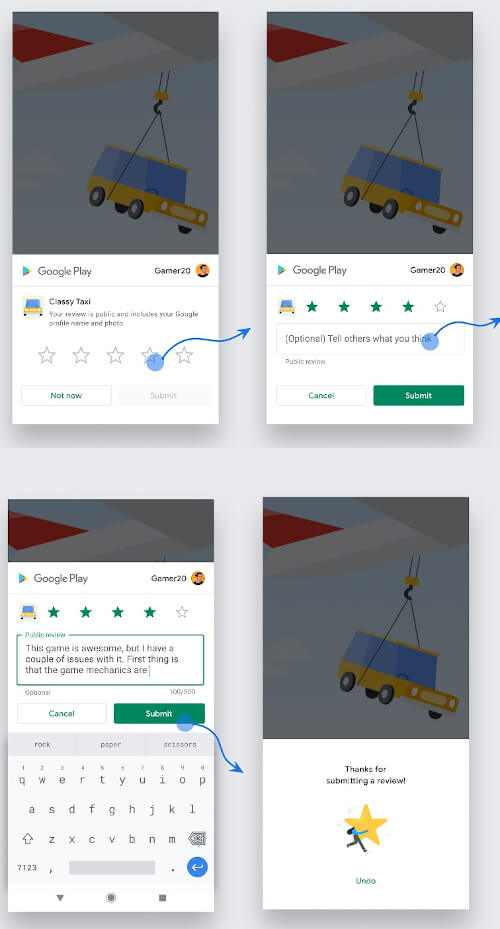
Flutter 插件,可在 Android、iOS 和 MacOS 上顯示應用內評分/系統評分彈窗。讓使用者輕鬆為您的應用程式評分。
一個具意見性、由社群驅動的 Dart 與 Flutter 項目 lint 规則集。類似於 pedantic,但更嚴格
Flutter 的國際化變得輕鬆。使用 flutter_i18n,您只需一個簡單的 .json、.xml、.yaml 或 .toml 檔案,即可讓您的應用程式實現國際化!
一個非常簡單的 Flutter 插件,用於將事件新增至各平台的預設日曆。
一個 Flutter 插件專案,用於使用 Chrome 自訂標籤頁與 SFSafariViewController 開啟網頁。
在您的應用中快速輕鬆地建立自訂搜尋體驗
 v0.10.1
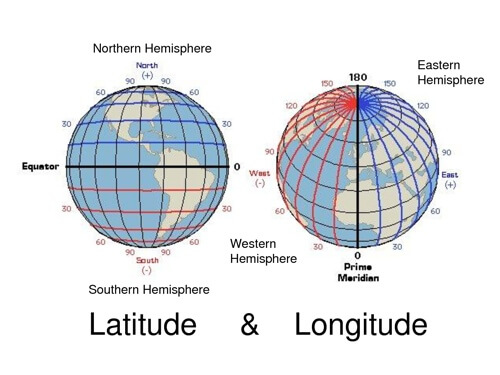
用於常見緯度和經度計算的輕量級程式庫
{"sdk":"flutter"}^2.1.0^2.0.0^3.1.0^0.3.1^1.2.1^4.0.0^2.1.0^2.0.3^7.0.1^0.30.0^8.2.0^0.6.2^0.2.0^0.22.0^1.1.6^0.15.0^2.1.0^7.0.1^2.0.2^0.8.0^1.6.0^1.0.3^0.6.0+6^0.2.5^2.0.1^2.0.0^2.1.4^1.0.0^0.1.3{"sdk":"flutter"}^8.0.2^0.9.0^1.2.0^5.0.10以下為英文專案原文快照,最新內容請造訪 GitHub。
https://raw.githubusercontent.com/jesusrp98/spacex-go/master/screenshots/icon.png
https://img.shields.io/github/license/jesusrp98/spacex-go.svg?style=for-the-badge https://img.shields.io/github/stars/jesusrp98/spacex-go.svg?style=for-the-badge https://img.shields.io/badge/Donate-PayPal-blue.svg?style=for-the-badge https://img.shields.io/badge/Support-Patreon-orange.svg?style=for-the-badge https://img.shields.io/badge/Google-PlayStore-green.svg?style=for-the-badge
The purpose of this project is to develop the ultimate SpaceX experience in a variety of platforms. A single experience, from a single codebase.
From the start, SpaceX GO! has been developed to be light-weight, fast and easy to use. It takes all the data from the open-source r/SpaceX REST API, which can be found here.
This project has been built using the Flutter framework, which allows to build an app for mobile, desktop & web, from a single codebase.
https://raw.githubusercontent.com/jesusrp98/spacex-go/master/screenshots/0.jpg https://raw.githubusercontent.com/jesusrp98/spacex-go/master/screenshots/1.jpg https://raw.githubusercontent.com/jesusrp98/spacex-go/master/screenshots/2.jpg
First, clone the repository with the 'clone' command, or just download the zip.
$ git clone git@github.com:jesusrp98/spacex-go.git
Then, download either Android Studio or Visual Studio Code, with their respective Flutter editor plugins. For more information about Flutter installation procedure, check the official install guide.
Install dependencies from pubspec.yaml by running flutter packages get from the project root (see using packages documentation for details and how to do this in the editor).
There you go, you can now open & edit the project. Enjoy!
If you want to take the time to make this project better, please read the contributing guides first. Then, you can open an new issue, of a pull request.
This project is licensed under the GNU GPL v3 License - see the LICENSE.md file for details.